Order Management Software

Stop splitting orders by hand.

SkuNexus sends every order line to your warehouse or the right dropship vendor, and puts every tracking number back on the order.

What changed for three order teams

Carewell: every dropship order automated

Orders import from BigCommerce, each item goes to the right vendor and the purchase order is created automatically. Nobody types a PO.

Read Carewell's story →

Graeter's Ice Cream: every order automated

Every order now runs from intake to shipping label with no manual touches. Pint shipments grew from 270,000 a year to more than 550,000 without adding order-processing staff.

Read Graeter's story →

New Look Vision: 477 locations live in 9 months

Canada's largest eyewear retailer automated pick, pack and ship without disrupting a single day of business.

Read New Look Vision's story →

Read all customer stories →

Three order problems our customers had, in their own words.

And what we built for each one.

"Currently parts are being delivered and then we are emailing some tracking numbers weeks later and the customer is then contacting us asking why we are re-shipping their order..."Customer Service Lead, Diesel Parts Retailer
What we built: tracking from every vendor shipment posts back to the order on its own, so customers see each package.
"one or two orders is not a problem but it is time-consuming to manually process them when we have a handful"Customer Operations Lead, Carewell
What we built: routing that decides every order on its own, weighing each vendor's cost and location. Their team tunes it from a spreadsheet.
"we'd send a dropship with a part number of either 'BDD1032004' or '1032004' neither of which is correct"Owner, Diesel Parts Retailer
What we built: when a part number changes, the old one is cleared across all 323 vendors' catalogs before the next PO goes out.
323
dropship vendors routed through one system for a diesel parts retailer
2.5 million
orders run through SkuNexus for Carewell
7 days
for Carewell, from first store connection to the first order shipped and tracked

Every line goes to the right place.

Your warehouse ships what's on the shelf. Vendors get a dropship PO for the rest. Your rules decide the moment the order lands.

  • Split by line or by quantity
  • Dropship POs sent to vendors automatically
  • Rules by location, channel, vendor or item
"Order 267 was a win! This multi-vendor order correctly routed to just two vendors... saving us unnecessary shipping costs by consolidating items with the two vendors already fulfilling exclusive items."Operations Team, Carewell
Read Carewell's story →
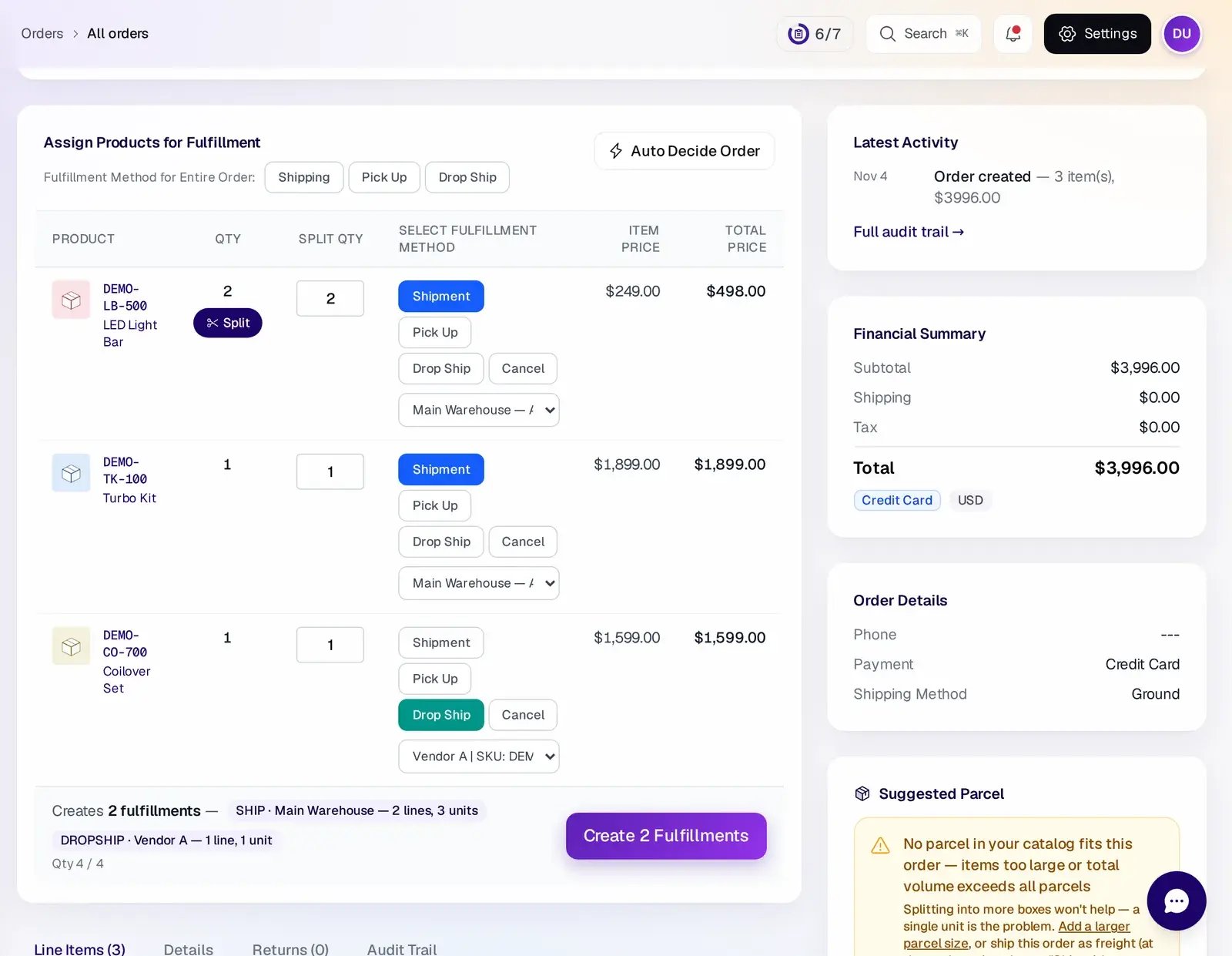
Order screen with Auto Decide Order and a fulfillment choice on each line: two lines ship from the main warehouse and one drop ships from a vendor

Only promise what's on the shelf.

Orders only route to a warehouse or vendor that has the stock. When it isn't there, the line waits as a backorder and releases when stock arrives.

  • Stock checked at every location before routing
  • Backorders released oldest first
  • Orders edited after sale stay in sync
A diesel parts retailer's store shows a "ships today" badge that's driven by live shelf stock, so it's always true.
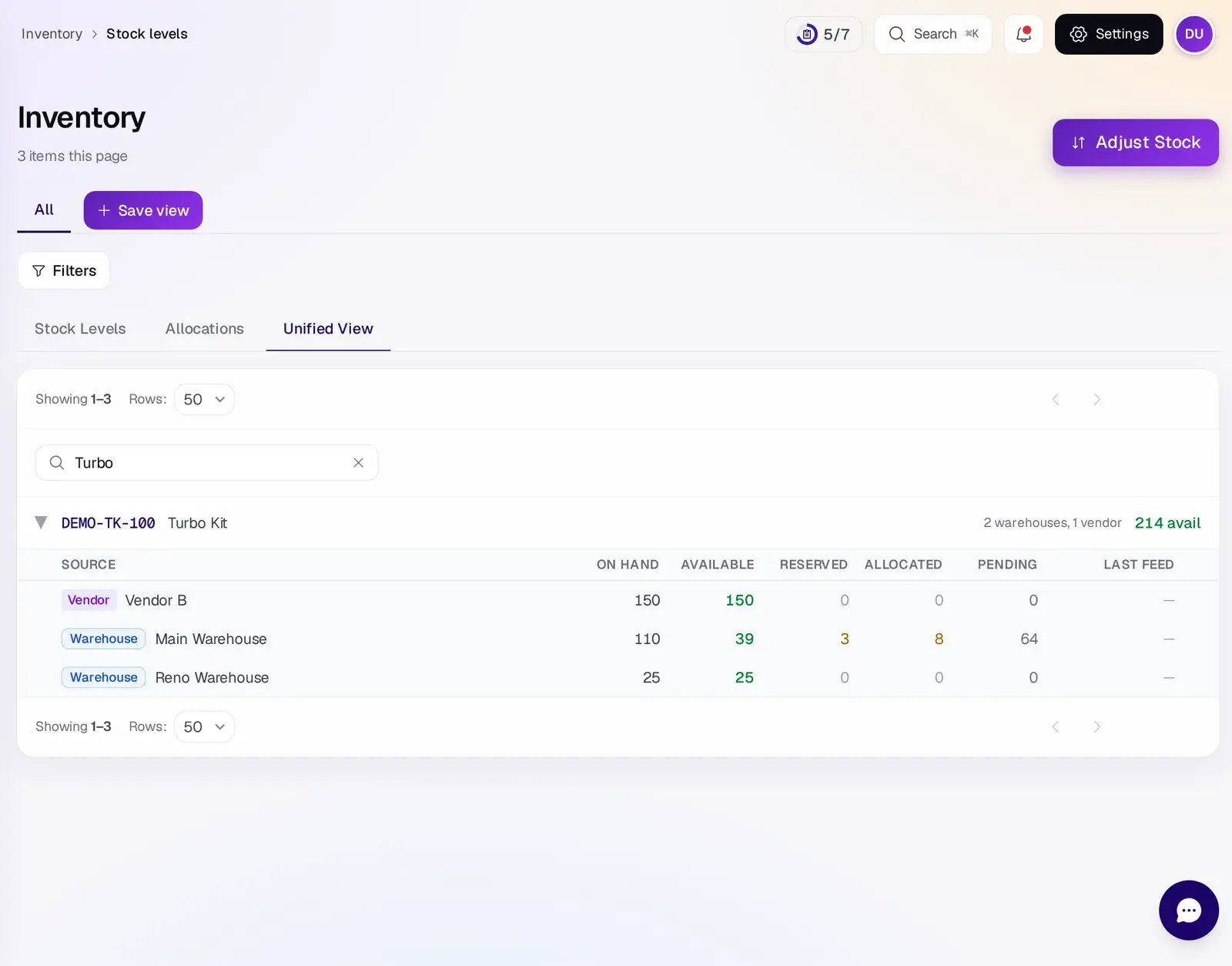
Stock for one product across two warehouses and a vendor, with on-hand, available, reserved and allocated counts for each

Every tracking number, back on the order.

Each shipment's tracking posts back to your store, including vendor dropships, so customers see every package.

  • Several tracking numbers on one order
  • Vendor tracking picked up automatically
  • Failed updates retry on their own until they land
In one week, more than 8,300 of Carewell's vendor POs updated with tracking on their own, from one distributor alone.
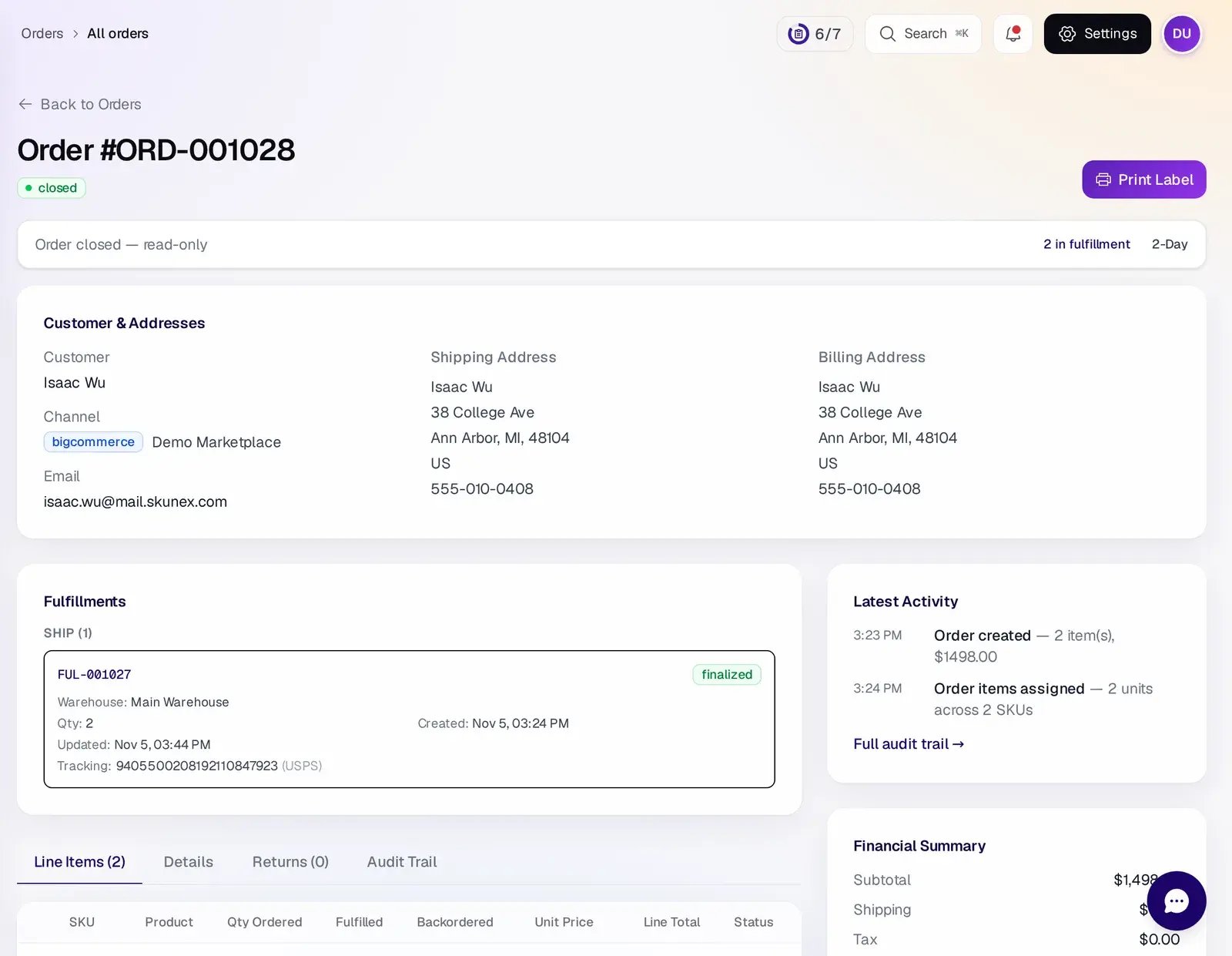
Closed order with its shipped fulfillment and USPS tracking number on the order

An order management system that holds the risky orders.

Hold any order that shouldn't move yet, with a reason your team already knows. Unhold it and the order picks up where it stopped.

  • Hold reasons such as awaiting payment, address check, customer request or fraud review
  • Automation rules that hold every order over a set total and tag it for review
  • Hold or cancel a whole selection at once from the order list
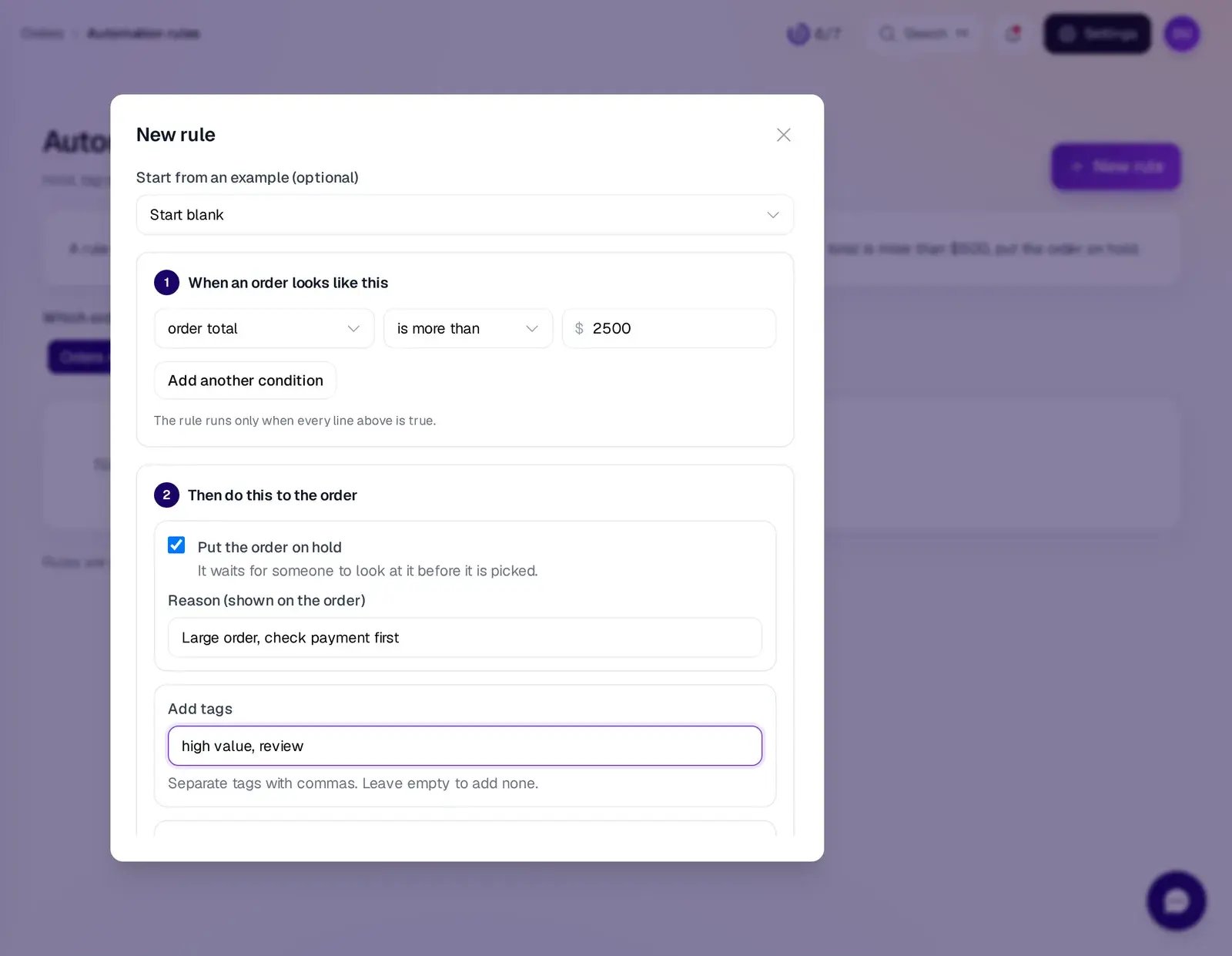
New automation rule: when the order total is more than 2,500, put the order on hold with a reason and add the tags high value and review

Dropship lines go to the vendor without anyone writing a PO.

When a rule sends a line to a vendor, SkuNexus creates that vendor's purchase order from the order, and the vendor's tracking comes back to the customer's order.

  • Purchase orders created from the order
  • Vendor SKU, cost and lead time per product
  • Vendor tracking posted back to the order
A diesel parts retailer routes orders across one warehouse and 323 dropship vendors, with about 39,000 vendor products in one system.
See vendor and purchase orders →
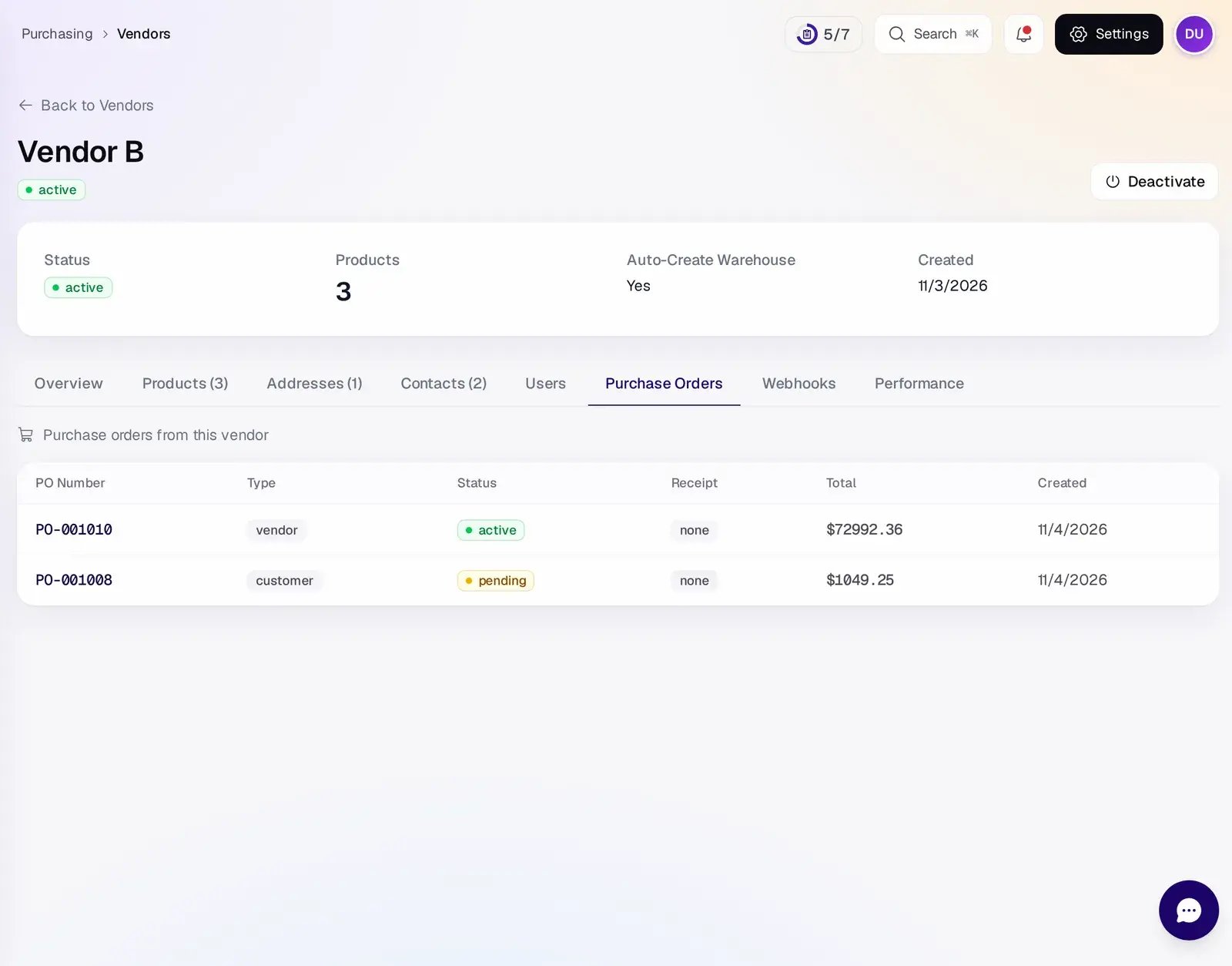
Vendor page on the Purchase Orders tab, listing each purchase order with its type, status and receipt status
Customer story · Diesel Parts Retailer

One warehouse, 300+ dropship vendors, one system.

They ran on paper pick lists, a legacy order system and manual change orders. SkuNexus replaced all of it with one platform that routes each order line to the warehouse or the right dropship vendor automatically.

What changed
  • Every order line routed to the warehouse or the right vendor
  • Multi-box shipping for oversized parts, built in seven weeks and live on day one
  • 323 vendors and about 39,000 vendor products in one system

Works with what you already use.

All of these run live at SkuNexus customers today. Using something else? Ask on the call and we'll tell you what it takes.

STORES

Shopify · Shopify POS · BigCommerce · Adobe Commerce · Shopware

MARKETPLACES & ERP

Amazon and eBay orders by feed · ERPs · B2B order feeds

CARRIERS

UPS · FedEx · USPS

Built for merchants who sell on more than one channel or ship from more than one place, at 50 to 20,000 orders a day. Not built for 3PLs, or manufacturers who need MRP.

How fast you go live.

  1. Week 1
    A real order, end to end

    Carewell had its first order in, shipped and tracked seven days after connecting its store.

  2. Next weeks
    Your rules, vendors and stock

    We set up your routing rules with you and bring over products, vendors, bins and open orders.

  3. Go-live
    About 9 weeks to 6 months

    Recent launches took from about 9 weeks to about 6 months from kickoff, depending on how much was built. Cutover is planned with you for one window.

Questions buyers ask us

Can one order ship in several boxes, with every tracking number on the order?

Yes. Each shipment gets its own tracking number, and all of them post back to the original order in your store, including vendor dropships.

What if no warehouse or vendor has the stock?

That line waits as a backorder. When stock arrives, backorders are filled oldest first.

Can we see it with our own orders first?

Tell us how an order moves through your warehouse today, or send a short screen recording. We'll run the demo with your workflow already set up.

What happens to our ERP or accounting system?

It stays. SkuNexus runs orders, stock and the warehouse, and passes orders, stock and receipts back to it.

What if our process doesn’t fit?

Most quirks are handled by rules you can change yourself. For anything rules can't do, we scope the work with you before work starts.

Which stores and carriers does it connect to?

Shopify, Shopify POS, BigCommerce, Adobe Commerce and Shopware for stores, Amazon and eBay for marketplaces, and UPS, FedEx and USPS for labels. Systems without a ready connector are built against the open API. See the full list of integrations.

How is SkuNexus priced?

Pricing is scoped on the call, based on your order volume, channels and warehouses. See pricing for how scoping works.

Bring your messiest order.

Tell us how it ships today. We'll show it running in SkuNexus on a 30-minute call.