Warehouse terminology is the shared shorthand that lets a picker, a buyer, a carrier and a software configuration describe the same physical work the same way. When the words drift, every handoff needs a translation, and the damage shows up as a mispick, a duplicate label or a stock number nobody trusts.
This is a working glossary of warehouse terms and definitions, grouped by where the work happens. Every entry stands on its own, so you can jump straight to a term and read only that. Use the abbreviations table for fast lookup, or the index below to reach a letter or a group.
Jump to a letter
# A B C D E F G H I J K L M N O P Q R S T U V W X Y Z
Jump to a group
Product and inventory terms · Inbound terms · Order terms · Outbound terms · Returns terms · Systems and partners · Warehouse slang and floor language · Abbreviations table · FAQ
Quick reference: abbreviations you will actually hear
Sorted alphabetically for lookup. Floor terms that are not abbreviations are listed here too.
| Term or abbreviation | Full term | What it means |
|---|---|---|
| 3PL | Third-Party Logistics | An outside provider that warehouses and ships on your behalf. |
| 4PL | Fourth-Party Logistics | A provider that manages your whole logistics network, coordinating other providers, including 3PLs. |
| ASN | Advanced Shipping Notice | An electronic notice from a supplier describing an inbound shipment before it lands. |
| ASRS | Automated Storage and Retrieval System | Automated equipment that stores and retrieves goods with minimal manual handling; the backbone of warehouse automation. |
| ATP | Available to Promise | Stock not yet committed to existing orders, which can be promised to new ones. |
| B2B | Business to Business | Selling to businesses, usually on POs and freight; wholesaling runs on the same terms. |
| B2C | Business to Consumer | Selling directly to consumers, usually as parcels. |
| Backhaul | Floor term | A return trip that carries freight instead of running empty. |
| Bin | Floor term | The smallest addressed storage location in the building. |
| BOL | Bill of Lading | The document between shipper and carrier listing goods, quantities and destination on a freight shipment. |
| Cage | Floor term | A secured, usually locked area for high-value stock. |
| DC | Distribution Center | A warehouse built for fast throughput of outbound orders rather than long-term storage. |
| DIM | Dimensional Weight | Billable parcel weight computed from the parcel's dimensions rather than scale weight; carriers charge the greater of the two. |
| Dock-to-stock | Floor term | The elapsed time from truck arrival to the goods being sellable. |
| EAN | European Article Number | The international counterpart of the UPC on retail barcodes. |
| EDI | Electronic Data Interchange | A standardized format for exchanging documents such as POs, ASNs and invoices between trading partners' systems. |
| EOQ | Economic Order Quantity | The order size that minimizes combined ordering and holding cost. |
| ERP | Enterprise Resource Planning | The central business system tying finance, purchasing and inventory together. |
| Exempt | Floor term | Salaried staff not eligible for overtime, as opposed to hourly floor associates. |
| FEFO | First Expired, First Out | Rotation rule where stock with the earliest expiration date ships first. |
| FIFO | First In, First Out | Rotation rule where the oldest stock ships first. |
| FTL | Full Truckload | Freight that uses the entire truck for a single load. |
| GRN | Goods Received Note | The internal record of what was actually received against a purchase order. |
| IMS | Inventory Management System | Software focused on stock levels and locations, without the full pick-pack-ship workflow of a WMS. |
| JIT | Just In Time | An inventory strategy where stock arrives as close as possible to the moment it is needed. |
| KPI | Key Performance Indicator | Any metric used to judge performance, such as units picked per hour. |
| LIFO | Last In, First Out | Rotation rule where the most recently received stock ships first. |
| LTL | Less Than Truckload | Freight that shares trailer space with other shipments. |
| MOQ | Minimum Order Quantity | The smallest order a supplier will accept. |
| OMS | Order Management System | Software that captures orders from sales channels and routes them through to fulfillment. |
| PO | Purchase Order | The buyer's authorization to purchase from a supplier at agreed quantities. |
| POD | Proof of Delivery | Signed or scanned confirmation that a shipment reached the recipient. |
| POS | Point of Sale | The register system where in-person sales happen; its orders draw on inventory like any other channel. |
| QC | Quality Control | Inspection checks that verify goods meet standards, at receiving, packing or returns. |
| RFID | Radio Frequency Identification | Tags read by radio signal, without line of sight. |
| RGA | Returned Goods Authorization | An alternative name for the same return approval and tracking reference. |
| RMA | Return Merchandise Authorization | The approval that lets a customer send an item back, and the reference used to track it. |
| SCM | Supply Chain Management | The coordination of sourcing, inventory and delivery across the whole chain. |
| SKU | Stock Keeping Unit | The unique identifier for a distinct product or variant, internal to one seller. |
| SLA | Service Level Agreement | A documented commitment to a performance standard, such as a ship-by cutoff. |
| SO | Sales Order | The confirmed customer order that triggers fulfillment. |
| TMS | Transportation Management System | Software that plans and tracks freight: carrier selection, rate comparison and shipment tracking. |
| UOM | Unit of Measure | The unit a product is counted or sold in: each, case, pallet. |
| UPC | Universal Product Code | The standardized retail barcode identifying a product across sellers, unlike a SKU. |
| Wave | Floor term | A group of orders released to the floor together, usually built around a carrier cutoff. |
| WMS | Warehouse Management System | Software that controls day-to-day warehouse work: receiving, putaway, picking, packing and shipping. |
Product and inventory terms
SKU
A SKU, or stock keeping unit, is the unique identifier assigned to one distinct product or variant so it can be counted, located, picked and shipped. Every other inventory record hangs on it, so a blank or renamed SKU in the storefront catalog breaks receiving and fulfillment downstream.
Unit
A unit is the smallest individual item or package a warehouse can handle, store or sell. It is the base measure that storage, picking and stock control are organized around, and it ranges from a single screw to a large appliance depending on how the product is sold.
Unit of measure (UOM)
Unit of measure defines what you are counting: an each, a case or a pallet. Every quantity in a warehouse system is meaningless without it, and most inventory disputes between a buyer and a warehouse are unit of measure disputes, one side counting cases and the other eaches.
Pallet
A pallet is the flat wood or plastic platform goods are stacked on so a forklift or pallet jack can move them as one load. It is the largest handling unit in most buildings, and it sets the storage math: rack depth, bay height and truck capacity are counted in pallets.
Case
A case is the carton holding multiple eaches of the same product, the middle level of the standard unit load hierarchy. Cases stack onto pallets and break down into eaches. A recorded count of forty means nothing until the record says whether those forty are cases or eaches.
Each
An each is one single sellable unit, the smallest quantity a customer can buy. Direct to consumer orders are picked in eaches, wholesale orders are usually picked in cases or pallets, and the pick unit decides the equipment, the slotting and the labor math for the whole building.
Inventory pool
An inventory pool is the set of physical stock a given sales channel is allowed to sell from. Running two channels off one undivided pool is the classic mid-market failure, because a busy retail register quietly drains the quantity the web store still believes it has.
Sellable inventory
Sellable inventory is what remains on hand after allocations to open orders are subtracted, so it is the number a channel can safely promise. It is always smaller than on-hand quantity, and it is the figure that should feed a storefront. Publishing on-hand instead is how oversells start.
Allocation
Allocation is reserving specific stock for a specific order so nothing else can sell it. Once allocated, units stay physically in place but drop out of sellable inventory. Allocation rules decide who wins when demand exceeds supply, which is why they matter most in the hours before a restock lands.
Inventory sync
Inventory sync is the push of stock levels from the system of record out to every selling channel. Merchants that merchandise off live availability, ordering collections or badging shipping speed by stock, feel a broken feed as a public problem. Multi-channel inventory sync is where those signals are governed.
Replenishment
Replenishment is moving inventory from bulk or backstock locations into primary picking locations so pick faces stay stocked. Done well it is invisible. Done badly a picker stands at an empty face while the stock sits forty feet away in bulk. The trigger timing is the whole discipline.
Cycle count
A cycle count is a partial count of selected locations or SKUs on a rolling schedule, instead of shutting the building for a full count. Counting continuously finds record drift while it is still small enough to explain, and it spreads the labor across the year.
Inventory accuracy
Inventory accuracy is the share of stock records that match what is physically on the shelf, usually measured by location and by SKU. Every other warehouse number depends on it, because a picking or replenishment decision made against a wrong quantity fails however good the logic is.
Perpetual inventory
A perpetual inventory system updates stock records with every transaction as it happens, so the record stays current between physical counts. It is the default in any barcode driven operation. Its accuracy depends entirely on scans being taken at the moment of the move rather than keyed in afterwards.
Physical inventory
A physical inventory is a wall to wall count of everything in the building, typically taken once a year to verify the books. Most operations now keep a perpetual record honest with cycle counts and reserve the full physical count for when finance or an auditor requires one.
FIFO
FIFO, first in first out, ships the oldest received stock first. It is the default rotation rule wherever product ages, and it keeps stock from quietly growing old at the back of a location. FIFO only holds if receiving records the date, because a picker cannot see age.
LIFO
LIFO, last in first out, ships the most recently received stock first. It appears more often as an accounting method than as a picking rule, and as a physical rotation it risks leaving old units buried at the back of a location indefinitely. Perishable operations never run it.
FEFO
FEFO, first expired first out, ships the earliest expiration date first regardless of when the stock arrived. Perishable, cosmetic and pharmaceutical operations run on it. FEFO only works if lot and expiry data is captured at receiving, which is why the rule usually breaks at the dock.
Lot number
A lot number identifies a batch of units produced or received together, so a recall or an expiry rule can find every unit from that batch at once. Lots answer which batch a unit came from, and capturing them at receiving is what makes expiry rotation possible.
Serial number
A serial number identifies one specific physical unit, so a single item can be traced, warrantied or authenticated on its own. Serials answer which exact unit, where lots answer which batch. Capturing serials at pick or pack ties a customer, an order and a device together permanently.
Lead time
Lead time covers everything between issuing a purchase order and having that stock on a pick face ready to promise: supplier processing, transit, receiving and putaway. A single average hides what actually causes stockouts, which is how much lead time swings by supplier and by season.
Reorder point
A reorder point is the stock level at which a new purchase order is placed, set to cover expected demand across the supplier lead time. It is also the level low stock alerts watch. Set it from real lead time variability, or it will fire late every peak.
Safety stock
Safety stock is the buffer held on top of the reorder point to absorb demand spikes and late deliveries. It is what keeps a pick face alive when a supplier slips. Sizing it is a judgment about which SKUs deserve protection, not one formula applied across a catalog.
EOQ
EOQ, economic order quantity, is the order size that balances the expense of ordering against the expense of holding stock. It assumes steady demand and a stable supplier, so treat it as a starting quantity to argue with rather than an answer, especially where minimum order quantities override it anyway.
MOQ
MOQ, minimum order quantity, is the floor a supplier imposes on any single order regardless of what your replenishment math says. Where the MOQ exceeds the calculated quantity, the supplier's floor wins and the excess becomes inventory you carry, which makes replenishment planning a negotiation.
Cycle stock
Cycle stock is the portion of inventory you expect to sell through under normal demand between replenishments. It is the working layer that moves, sitting above safety stock, which does not. Separating the two in reporting is what stops a healthy buffer from being read as slow moving inventory.
In-transit stock
In-transit stock is inventory you own but have not yet received, moving between a supplier and your building or between your own locations. It belongs on the books and it should be visible to buyers, because stock already on the water changes whether a low quantity needs another purchase order.
Quarantine stock
Quarantine stock is inventory physically in the building but blocked from sale, held pending inspection, quality review or a damage decision. It has to be excluded from sellable inventory and stored in a location the picking logic cannot reach, or it eventually ships to a customer by accident.
Dead stock
Dead stock is inventory that no longer sells at any meaningful rate and has stopped earning the space it occupies. It ties up racking and working capital that faster moving SKUs need. Identifying it early requires reporting on movement by SKU, not only on quantity on hand.
ABC analysis
ABC analysis classifies SKUs by value contribution: A items are the small group carrying most of the value, B items the middle band, C items the long tail of slow movers. The classes decide where attention goes first, from cycle count frequency to slotting A items nearest the pack bench.
Inventory turnover
Inventory turnover is cost of goods sold divided by average inventory over the same period: how many times you sold through your average stock. It is a lagging summary, so it describes last quarter rather than this morning. Read it by category, because a blended number hides extremes.
Stock-out
A stock-out is demand arriving for a SKU with no sellable units behind it. Measure it as a rate rather than an event, because the useful question is how often and on which SKUs. Stock-outs signal immediately that reorder points or lead time assumptions are wrong.
Backorder
A backorder is an order line accepted against stock you do not yet have, promising to ship when the replenishment arrives. It keeps the sale, but it splits the shipment and commits the next receipt before it lands. Backorders need their own aging report or they quietly become cancellations.
Inbound terms
Receiving
Receiving is the first stage of warehouse work: accepting goods as they arrive, unloading, inspecting for damage and counting against the purchase order before anything moves into storage. It is the point where stock becomes your custody, and every downstream number inherits whatever error is accepted at the dock.
Advanced shipping notification (ASN)
An advanced shipping notification, or ASN, is an electronic pre-alert a supplier sends before a shipment arrives, listing products, quantities, expected delivery, carrier and tracking. With one, receiving becomes a check against an expected list. Without one, a truck simply shows up and every mismatch becomes a dispute afterwards.
Blind receiving
Blind receiving is checking in a shipment without showing the receiver what the paperwork expects, so the recorded quantity is what was actually counted rather than a confirmed guess. It is the receiving side cousin of a blind count, and it is how you verify a doubtful supplier.
Goods received note (GRN)
A goods received note, or GRN, is the internal record of what was physically received, as distinct from what was ordered on the purchase order and what was announced on the ASN. It exists so the three can be compared. A GRN that always matches the PO means nobody is counting.
Putaway
Putaway is moving received goods from the dock to their storage location and recording where they went. Direct putaway sends stock to a fixed home location, random putaway to any open slot the system remembers. Both fail the same silent way, as a later pick against an empty bin.
Purchase order (PO)
A purchase order, or PO, is the document a buyer issues to a supplier specifying quantities and agreed terms, and it becomes binding once accepted. Receiving against the PO inside purchase order software makes short and over shipments visible at the dock, which is where vendor purchase order management starts.
Cross-docking
Cross-docking is receiving inbound freight and routing it directly to an outbound shipment with no putaway step. It skips storage entirely to cut handling time and dock congestion. It is used most on high velocity or pre-sold SKUs, and it depends on trusting the ASN before the truck arrives.
Order terms
Order
An order is a customer request for specific goods, carrying the products, quantities and delivery requirements that determine what ships from the warehouse. It is the unit of work the operation is organized around, and its status is the one thing a customer, a channel and a warehouse must agree on.
Order line
An order line is a single item within an order, with its own product, quantity and status of unfulfilled, picking, packed or shipped. Thinking in lines rather than whole orders is what lets you ship part of an order today and the rest on Thursday.
Manual order handling
Manual order handling is any order a person has to key, copy or babysit between systems. It scales badly in a specific way: one or two a day is an annoyance, and a handful arriving at once becomes the job. That threshold is lower than most teams expect.
Order routing
Order routing is the decision about which location, method and service should handle each order or each line. Rules carry priorities, and the highest priority rule that matches an order picks its warehouse, its fulfillment method and its shipping service. See order management and the guide to order management.
Decision engine
A decision engine is the rule set that executes routing automatically, producing a fulfillment plan that lays out who ships what, including any split across buildings. Plans move from draft through confirmed to executed. AI automation and AI inventory software extend the same engine with learned inputs.
Fulfillment
A fulfillment is the unit of work created when an order is routed: the items one operator picks, packs and ships from one location. A single order can produce several. In everyday speech the same word means the whole business of getting orders out the door, so it needs context.
Hold
A hold pauses an order without cancelling it, usually with a recorded reason such as payment review, fraud check or a bad address. The order keeps its allocation while held, so a long hold quietly removes sellable stock from every other channel. Holds need an owner and an expiry rule.
Cancel
Cancelling an order stops it permanently and releases any allocated stock back to sellable inventory. The timing matters: a cancellation after a label has been bought needs that label voided with the carrier as well, or the carrier still has a live shipment on record against your account.
Split
A split divides one order line into two so part of the quantity can ship now and the rest later, or from a different location. Splitting is what makes partial shipments possible without duplicating the order, which is the alternative most spreadsheet based operations end up living with.
Merge
A merge recombines lines that were previously split, or consolidates separate orders from the same customer into one shipment. It saves a parcel and a label when two orders land minutes apart, and it needs a rule about which shipping service and which address survive the combination.
Outbound terms
Pick list
A pick list is the document or screen telling a picker what to collect and from where, in the sequence they should walk it. A useful one identifies itself: customer name, order number, ship-to address and notes in the header, so a loose sheet on a bench is never anonymous.
Discrete picking
Discrete picking, also called single order picking, has one picker collect all items for one order before starting the next. It is the simplest method and the strongest for order integrity, and it walks the most miles per unit shipped. Most small operations start here and outgrow it at volume.
Batch picking
Batch picking has one worker collect items for several orders in a single pass, grouping orders with similar SKUs or nearby locations. It cuts trips around the building, trading walking time for a sortation step afterwards. The saving only appears if the sortation station is designed for it.
Zone picking
Zone picking, also called pick and pass, divides the building into zones and assigns each picker to one. An order spanning zones is passed along, each picker adding items from their area. It suits large buildings with wide SKU variety, and it needs a handoff that cannot lose totes.
Wave picking
Wave picking releases groups of orders to the floor together on a schedule, usually built around carrier cutoff times. The wave is the planning unit: labor, replenishment and packing capacity are sized against it. Waves make a building predictable and they punish any order that arrives late.
Case picking
Case picking is pulling full cartons without opening them, rather than picking individual eaches. It is standard for wholesale and store replenishment orders. The pick unit changes everything around it, so a building picking eaches, cases and pallets runs three picking operations at one address.
Pallet picking
Pallet picking is pulling entire pallets, usually for wholesale, transfer or store replenishment orders, with a forklift rather than a cart. It is the fastest unit of movement in the building and the least flexible, because it assumes the full quantity is wanted exactly as stored.
Sortation
Sortation is separating picked goods and routing each item to its correct order, lane or destination. It is the step batch picking creates: picking many orders in one pass is only faster because the sorting has been moved to a station built to do it quickly and accurately.
Kitting
Kitting is assembling component SKUs into one new sellable unit before orders arrive, so the kit picks as a single item. It trades assembly labor upfront for faster picking later, and the kit needs its own SKU. See kitting and bundle management and an introduction to kitting.
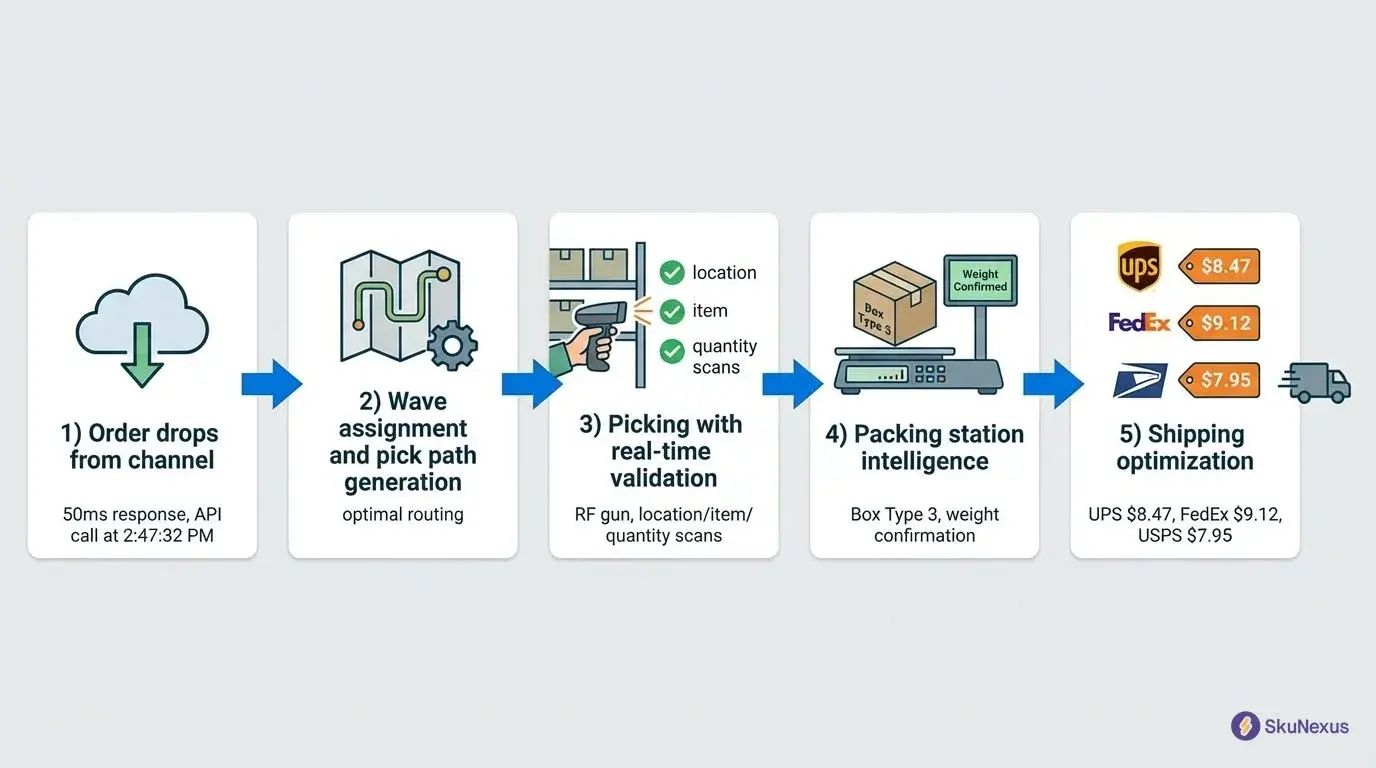
Pack station
A pack station is the bench and software station where picked items are verified into a parcel and the label is bought. A packing flow built for volume runs as stages, load then pack then ship, with each scanned item marked done and the station warning on an over pack.
Parcel
A parcel is the box, mailer or envelope an order ships in, and it is the unit carriers rate and track. Choosing the parcel at the start of packing rather than the end means the operator grabs the right box before handling any product.
Carrier
A carrier is the company that physically moves the parcel or the freight, from a national parcel network to a regional courier or an LTL trucking line. Each exposes its own services, cutoff times and tracking formats, so every carrier you add is another set of rules to maintain.
Service
A service is the specific speed and product bought from a carrier: ground, two day, overnight, or a freight class. The service determines the label, the transit expectation and the promise shown at checkout, which is why routing rules select a service and not only a carrier.
Rate shopping
Rate shopping is comparing live rates across your configured carriers at the moment of shipping instead of accepting a default. It runs after the parcel and weight are confirmed, so the comparison uses real dimensions. See shipping rate shopping for how that comparison gets configured.
Staging area
A staging area is the floor space where completed orders, built pallets or received goods wait for their next step, usually between packing and carrier pickup. Staging is deliberately temporary. Anything that lives in staging too long has stopped being staged and started being lost.
Bill of lading (BOL)
A bill of lading, or BOL, is the document a carrier issues to a shipper detailing a freight shipment. It plays three roles at once: a receipt confirming the carrier took the cargo as described, a contract for transporting it, and often a document of title that can transfer ownership.
Proof of delivery (POD)
A proof of delivery, or POD, is the signed or scanned confirmation that the consignee received a shipment, carrying the date, the time and often a signature image. It settles most delivery disputes, which is why it belongs on the order record rather than in a carrier portal.
LTL
LTL, less than truckload, freight shares trailer space with other shippers, so a pallet is handled at more terminals and transit varies more. The warehouse consequence is physical: LTL pallets are moved and restacked repeatedly, so they have to be built and wrapped to survive it.
FTL
FTL, full truckload, uses an entire trailer for one shipper's load, typically point to point with no terminal handling in between. It is chosen for volume, for fragile freight that cannot survive repeated handling, or when a delivery date matters more than filling every cubic foot.
Freight forwarder
A freight forwarder is the intermediary that books and coordinates shipments across carriers on a shipper's behalf, often without owning any trucks or vessels. Forwarders matter most on imports, where they arrange the ocean or air leg, customs clearance and the handoff to domestic transport.
Drayage
Drayage is the short haul truck move that connects one leg of a journey to the next, typically from a port or rail terminal to a warehouse. It is measured in miles but scheduled in hours, and a missed appointment can hold a container for days.
Last mile
Last mile delivery is the final leg from a local hub or facility to the customer's door. It is the most handled and most visible part of the journey, and it is where delivery exceptions, address failures and reattempts are generated, all of which land back on customer service.
Consignee
The consignee is the party a shipment is addressed to and the one who takes receipt of it, named on the bill of lading and the proof of delivery. On a parcel to a shopper that is the shopper. On a wholesale shipment it is the receiving store.
Returns terms
Reverse logistics
Reverse logistics is the flow of goods moving backwards through the chain: returns, exchanges, repairs, refurbishment, recycling and disposal. It differs from outbound work in one basic way, which is that units arrive in unknown condition, so inspection sits at the front of every reverse logistics flow.
RMA
An RMA, or return merchandise authorization, is the approval that lets a customer send something back, plus the reference used to track it from request to resolution. A structured RMA workflow carries the original order, a reason code and expected line items, so an arriving box is matched instantly.
Inspection
Inspection is the graded assessment of each returned unit on arrival, judging it new or like new, damaged, or refurbishable. It happens item by item rather than by box, because two units inside one return can end in different places. Nothing else about a return is decided before it.
Disposition
Disposition is the decision about what happens to a returned unit after inspection: back into sellable stock at a designated location, into quarantine pending review, or discarded. It is where returned value is recovered or lost. Until a unit has a disposition it is in your building and commercially invisible.
Reship
A reship is a replacement shipment for an order that was lost or arrived damaged, creating a new fulfillment for the same items through the full pick, pack and ship cycle. The trap is the original label, which is not cancelled automatically and needs its own void with the carrier.
Systems and partners
WMS
A WMS, or warehouse management system, directs day to day work inside the building: receiving, putaway, replenishment, picking, packing and cycle counting. The useful distinction is between a system of record, which tells you what you own, and a system of work, which tells someone what to do next.
OMS
An OMS, or order management system, sits above the warehouse. It captures orders from every sales channel, decides where each should be fulfilled, and pushes status back to the customer and the channel. Orders that never arrive and channels that disagree about stock are OMS problems.
ERP
An ERP is the central business system covering finance, purchasing and often inventory valuation. It is usually the system of record for money and the least suitable system for telling a picker what to do next. Deciding which system owns inventory truth belongs before an integration, not during one.
TMS
A TMS, or transportation management system, plans and tracks freight movement: carrier selection, rate comparison, tendering and tracking. It sits beside a warehouse system rather than inside it. The WMS decides what leaves the building and the TMS decides how it travels once it is on the dock.
EDI
EDI, electronic data interchange, is a standardized format for exchanging business documents between trading partners' systems: purchase orders, ASNs, invoices and ship notices. Large retail and distribution partners often require it before onboarding a supplier, so it arrives as an integration requirement rather than a choice.
Connector
A connector is the integration layer that translates between a storefront, a marketplace or an ERP and your fulfillment system. It carries more than orders: line splits, tracking pushes, cancellations and address edits all travel through the same layer, which is why the integration ecosystem deserves scrutiny early.
Replatforming
Replatforming is changing the storefront or ERP underneath your fulfillment operation while the warehouse keeps shipping. It succeeds or fails on whether the connector layer survives the move with the floor workflow intact, which is the argument for owning the source code of the layer between them.
3PL
3PL, third party logistics, means outsourcing warehousing, fulfillment or transportation to an outside provider that stores and ships on your behalf. The operational question is visibility: whether inventory and order status reach your own system through a direct integration, or whether someone reads them from a portal.
4PL
4PL, fourth party logistics, is a provider that manages your whole logistics network as a single point of contact, coordinating carriers and 3PLs on your behalf. You hand a 3PL your boxes and you hand a 4PL the outcome, which makes system to system data flow the dependency.
Dropship
Dropshipping means a supplier ships directly to your customer and the product never enters your building. It expands the catalog without expanding the warehouse, and it multiplies routing decisions, because every order line now has more than one possible origin and each vendor keeps its own cutoffs and tracking format.
Vendor-managed inventory (VMI)
Vendor-managed inventory, or VMI, is an arrangement where the supplier watches your stock levels and decides when to replenish instead of waiting for your purchase orders. It only works on shared data, which is why it sits next to vendor purchase order management rather than replacing it.
Barcode
A barcode is data in a machine readable visual form, usually parallel lines of varying width, encoding an identifier a scanner reads in one motion. Its entire operational value is that scanning replaces typing wherever a human would key an identifier. See barcode scanner inventory software for the tooling.
QR code
A QR code is a two dimensional barcode storing data in a grid of squares, readable in two directions, so it holds far more than a one dimensional barcode. Warehouses use them where a scan must carry more than an identifier, such as a location or a handling unit record.
RFID
RFID, radio frequency identification, uses tags read by radio waves rather than line of sight, so a reader captures many units at once inside a carton or as a pallet passes a portal. That makes bulk and pass through reading possible, in exchange for tagging every unit.
License plate number (LPN)
An LPN, or license plate number, is a barcode identifying a whole handling unit such as a pallet, tote or carton, so the unit moves as one scan. Receiving builds the LPN once and records its contents, and from then on one scan moves everything inside.
MHE
MHE, material handling equipment, is the umbrella term for everything that moves goods inside a building: forklifts, pallet jacks, conveyors, carts and lifts. The management question is not what equipment you own but whether each move it performs is recorded, because unrecorded moves become inventory variances later.
ASRS
An ASRS, or automated storage and retrieval system, stores and retrieves goods automatically from high density racking, presenting product to an operator instead of sending an operator to the product. It buys density and speed, and it makes the accuracy of the underlying stock record non negotiable.
AGV
An AGV, or automated guided vehicle, moves loads along fixed routes through a building, following wires, magnets or floor markings. It is predictable and it is inflexible: changing a route means changing the infrastructure, which is why AGVs suit stable high volume flows rather than frequently reslotted buildings.
AMR
An AMR, or autonomous mobile robot, navigates a building on its own, routing around people and obstacles without fixed guidance. It is reconfigurable in software rather than in floor tape, so it fits operations whose layout and volume change. Its value depends on reporting every move.
KPI
A KPI is a metric you manage the operation by: units picked per hour, order accuracy, on time ship rate, dock to stock time. Before adopting one, write down how it is measured, because dock to stock timed from truck arrival is a different number entirely.
SLA
An SLA is a documented commitment about a metric, made to a customer, a channel or a partner, such as a dispatch commitment on orders received before a cutoff. The difference from a KPI is accountability: a KPI can be argued with, and a signed SLA cannot.
Warehouse slang and floor language
Pick face
A pick face is the front, reachable position of a shelf or rack that pickers pull stock from, as opposed to the bulk or reserve location behind it. Keeping pick faces stocked is the whole job of replenishment, and their layout decides how far a picker walks.
Slot
A slot is a single addressed storage location: a shelf position, a rack bay or a floor position with its own code. Every location needs an address a picker can read and a system can store, because stock without a location is stock nobody can be directed to.
Slotting
Slotting is deciding which SKU lives in which location, and reslotting is changing those assignments as demand shifts. Good slotting puts fast movers close to packing and groups items that ship together. It is the least disruptive way to cut walking distance, and it goes stale.
Backstock
Backstock is reserve inventory held in bulk locations, waiting to replenish the pick faces in front of it. It is real, sellable stock that a picker cannot reach directly. Counting backstock as sellable without a replenishment trigger produces orders the floor cannot actually pick that day.
Shrink
Shrink is inventory lost to damage, error or theft: the gap between the record and the shelf that a count eventually reveals. It is measured as a rate against inventory value over a period. Cycle counting does not stop shrink, it finds it while the trail is still warm.
Yard
The yard is the outdoor area around a building where trailers wait, park and are staged for loading or unloading. Yard moves are warehouse moves that most systems never see, which is why a trailer full of received product can sit while the stock shows as not arrived.
Stockroom
A stockroom is a smaller storage room attached to a store or facility rather than a standalone warehouse, holding backstock for the sales floor. Retail runs the same vocabulary at smaller scale, and a stockroom count feeds the same inventory record once the two are connected.
Distribution center (DC)
A distribution center, or DC, is a building built to move stock onward to stores or other facilities at high throughput rather than to store it long term. Its layout favors full case and pallet movement, dock capacity and turnover, so storage density matters less than flow.
Fulfillment center (FC)
A fulfillment center, or FC, is a building that picks and ships individual orders to end customers rather than replenishing stores. It is organized around each picking, packing benches and parcel carriers. One site can act as both, which is why the words get used interchangeably.
Warehouse Terms FAQ
What are some common terms used in a warehouse?
The most common warehouse terms describe the flow of goods and the documents that track them: receiving, putaway, picking, packing, and shipping for the physical work; SKU, UOM, and safety stock for what you are counting; and ASN, PO, BOL, and RMA for the paperwork that moves with the goods. The abbreviations table above covers 40 of the ones you will hear most.
What are the 7 types of warehouses?
Warehouse types are commonly grouped into: distribution centers, fulfillment centers, public warehouses, private warehouses, contract or 3PL warehouses, bonded warehouses holding goods under customs control with duties deferred, and cold storage or climate-controlled facilities. Automated facilities built around ASRS equipment are often counted as a category of their own, which is why published lists disagree on the number.
What are the 5 KPIs for a warehouse?
There is no fixed set of five, but the warehouse KPIs most operations track first are inventory accuracy, order accuracy, on-time shipment rate, picks per labor hour, and dock-to-stock time. Choose the handful that map to your actual bottleneck, and write down how each is measured before comparing it to anything.
Vocabulary is the easy part. The argument is which system holds the real number.
If two teams use these words differently, the fix is configuration, not vocabulary. Bring the handoff that keeps breaking and we will map it against how your systems actually pass work.
Ready to Transform Your Operations?
See how SkuNexus gives you full control over inventory, orders, warehouse, and shipping.
Schedule a Free Demo →
Yitz Lieblich
CEO & Founder, SkuNexus
Yitz Lieblich is the Founder and CEO of SkuNexus. He has spent 19 years in eCommerce, starting in 2007 when he founded Web Solutions NYC, an eCommerce agency he still leads today. His approach to inventory, order, and warehouse management did not come from a whiteboard. It came from the floor. Across nearly two decades, Yitz has worked with merchants of every size, from mom-and-pop startups to Fortune 100 enterprises, across auto parts, food and beverage, apparel, B2B wholesale, and retail/D2C. He has walked through hundreds of warehouses, watching where operations lose time, money, and orders, with one goal: optimize the operation and make it easier for the merchant. That hands-on pattern is what led him to build SkuNexus in 2018 as a full operational platform. The idea was simple. Configurable infrastructure that bends to each merchant workflow, supporting businesses that ship anywhere from 50 to 20,000 orders a day. A custom development background runs through everything he builds. When SkuNexus writes about fulfillment, WMS, or multi-channel inventory, it comes from operations Yitz has seen and solved firsthand. First as an agency partner since 2007, and now as the architect of the platform.
Keep Reading
WooCommerce Warehouse and Inventory Management
September 16, 2026