Warehouse Automation Software

Let rules do the daily busywork.

Orders route themselves. Low shelves ask for restock. Pick waves build on a schedule. You write the rules and test them first. A chat assistant answers questions about your data.
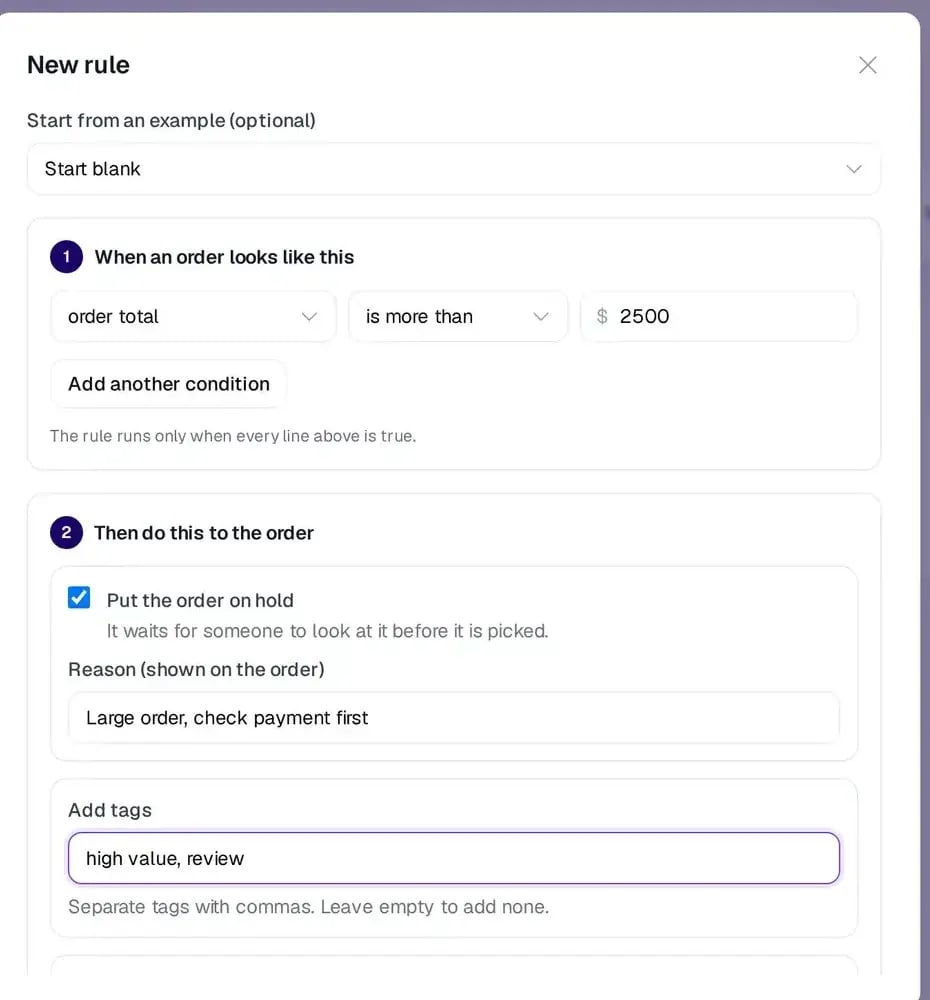
New automation rule: when the order total is more than 2,500, put the order on hold with a reason and add the tags high value and review

What changed for three merchants

Graeter's Ice Cream: every order automated

Every order now runs from intake to shipping label with no manual touches. Pint shipments grew from 270,000 a year to more than 550,000 without adding order-processing staff.

Read Graeter's story →

Carewell: every dropship order automated

Orders import from BigCommerce, each item goes to the right vendor and the purchase order is created automatically. Nobody types a PO.

Read Carewell's story →

New Look Vision: 477 locations live in 9 months

Canada's largest eyewear retailer automated pick, pack and ship without disrupting a single day of business.

Read New Look Vision's story →

Read all customer stories →

Three daily chores our customers got rid of, in their own words.

And what we built for each one.

"...someone in merch has to monitor sales and turn the product off for sale manually. This is been going on for 2 weeks and is not manageable much longer."Merchandising Team, Carewell
What we built: a daily limit on each vendor product. The count goes up with every PO sent and resets at midnight, so the product stops selling at the cap on its own.
"Cutoff time for [the 3PL] is 1pm... I'd want to have [the 3PL] removed from routing every weekday from 1-3... To then route orders to our vendors that CAN ship out by our cutoff promise."Carewell
What we built: a schedule on each vendor, with its own time zone. During its blocked hours, routing skips that vendor.
"We're having issues with [a distributor] not passing along tracking numbers... Ill be updating tracking manually. Thanks"Operations Team, Carewell
What we built: vendor files are read on a schedule, and tracking lands on the PO without anyone typing it in.
4 AM
when Graeter's whole day of orders is decided automatically, before the crew arrives
37,000
vendor files a month read by SkuNexus for one distributor alone
55
orders in one day of production pick waves at a kitchen equipment retailer, in its first week live

Orders that route themselves.

Write a rule: when an order matches these conditions, use this warehouse and this method, whether ship, pickup or drop ship. Rules run in the order you set, and the first match wins.

  • Conditions on order value, SKU, shipping method or customer type
  • Test a rule on sample orders, or dry-run it on a real one, before it goes live
  • Orders no rule matches wait in a review queue
"Order 267 was a win! This multi-vendor order correctly routed to just two vendors... saving us unnecessary shipping costs by consolidating items with the two vendors already fulfilling exclusive items."Operations Team, Carewell
Read Carewell's story →
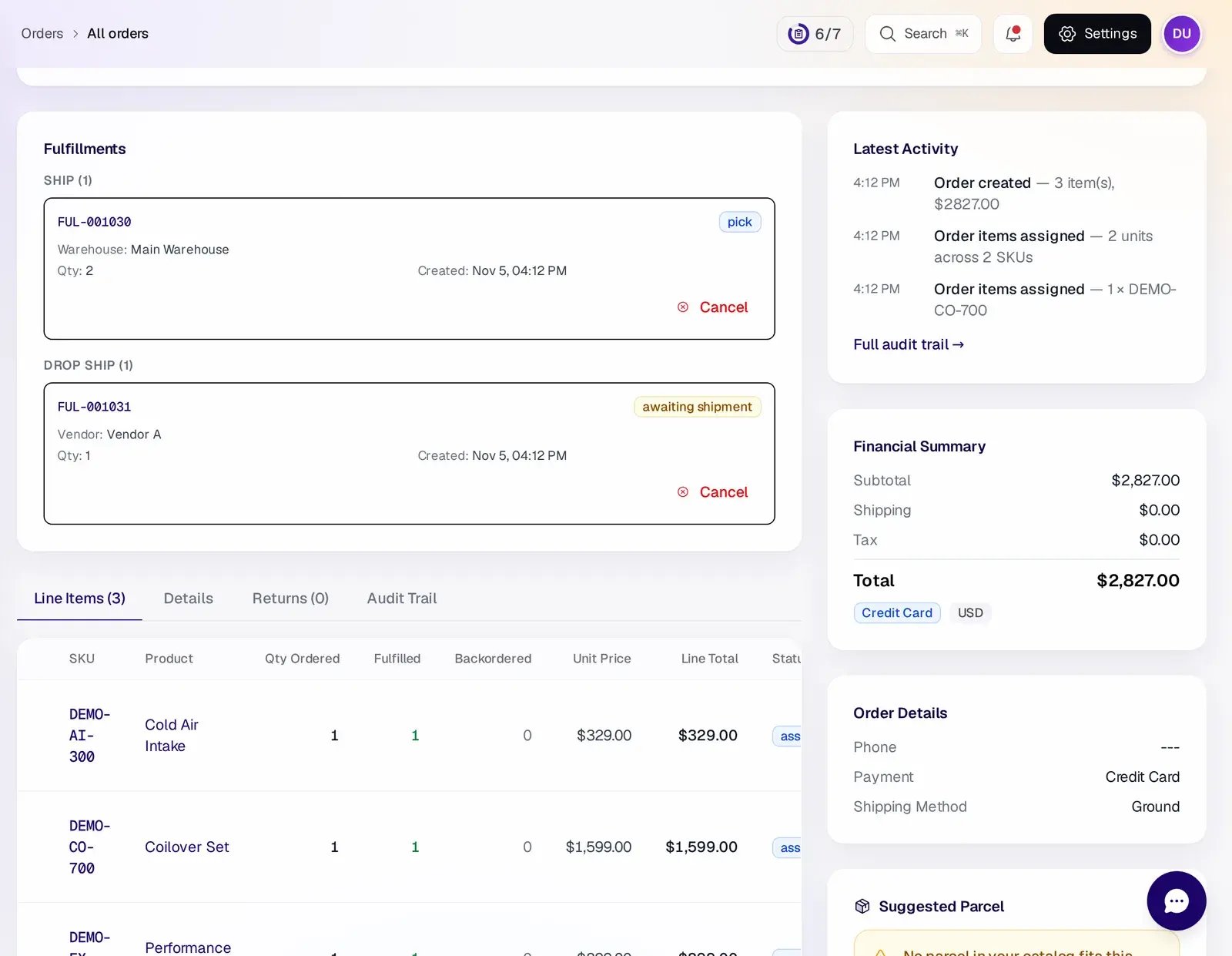
Order after Auto Decide Order ran: one fulfillment ships from the main warehouse and one drop ships from a vendor

Restocking and pick waves without the nudge.

Set a minimum and a maximum for each product and warehouse. When stock falls below the minimum, a restock job appears. Wave rules group orders for batch picking on a schedule you set.

  • Restock jobs move from pending to picking to put away to done
  • Wave limits by items, orders or weight, with carrier and SKU filters
  • Turn any restock rule off with one switch
A kitchen equipment retailer's marketplace orders are sorted into shipping-method waves automatically.
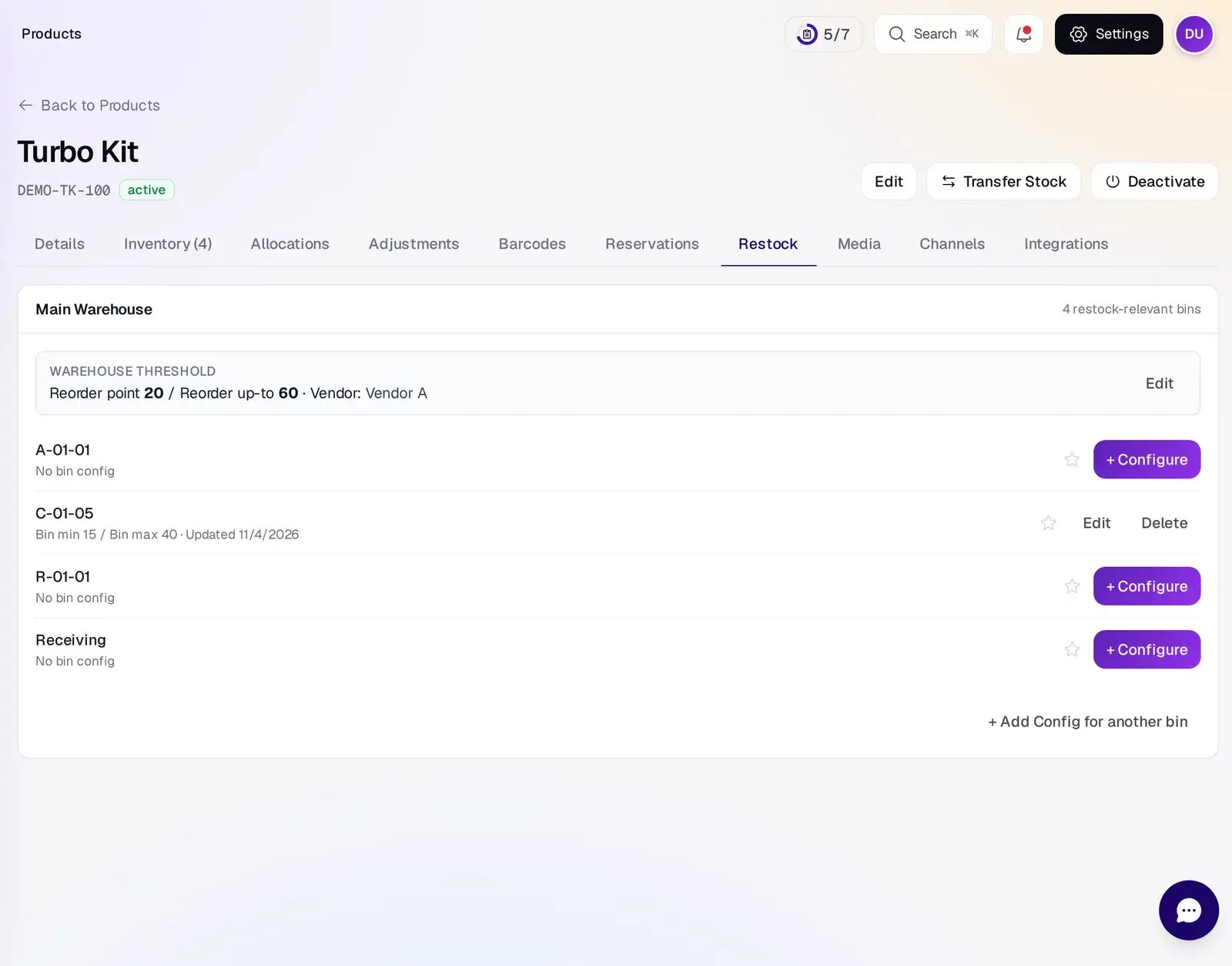
Restock settings for one product: a reorder point and reorder-up-to level for the warehouse with its vendor, and a minimum and maximum set for one bin

An assistant for questions and quick changes.

Open the chat bubble on any page and ask. It can look up orders, products, stock, customers and vendors. It can also create orders, adjust stock and update records, and it asks before it does.

  • Looking things up needs no confirmation
  • Creating or updating asks for a quick confirmation
  • Deleting or cancelling asks for an explicit one
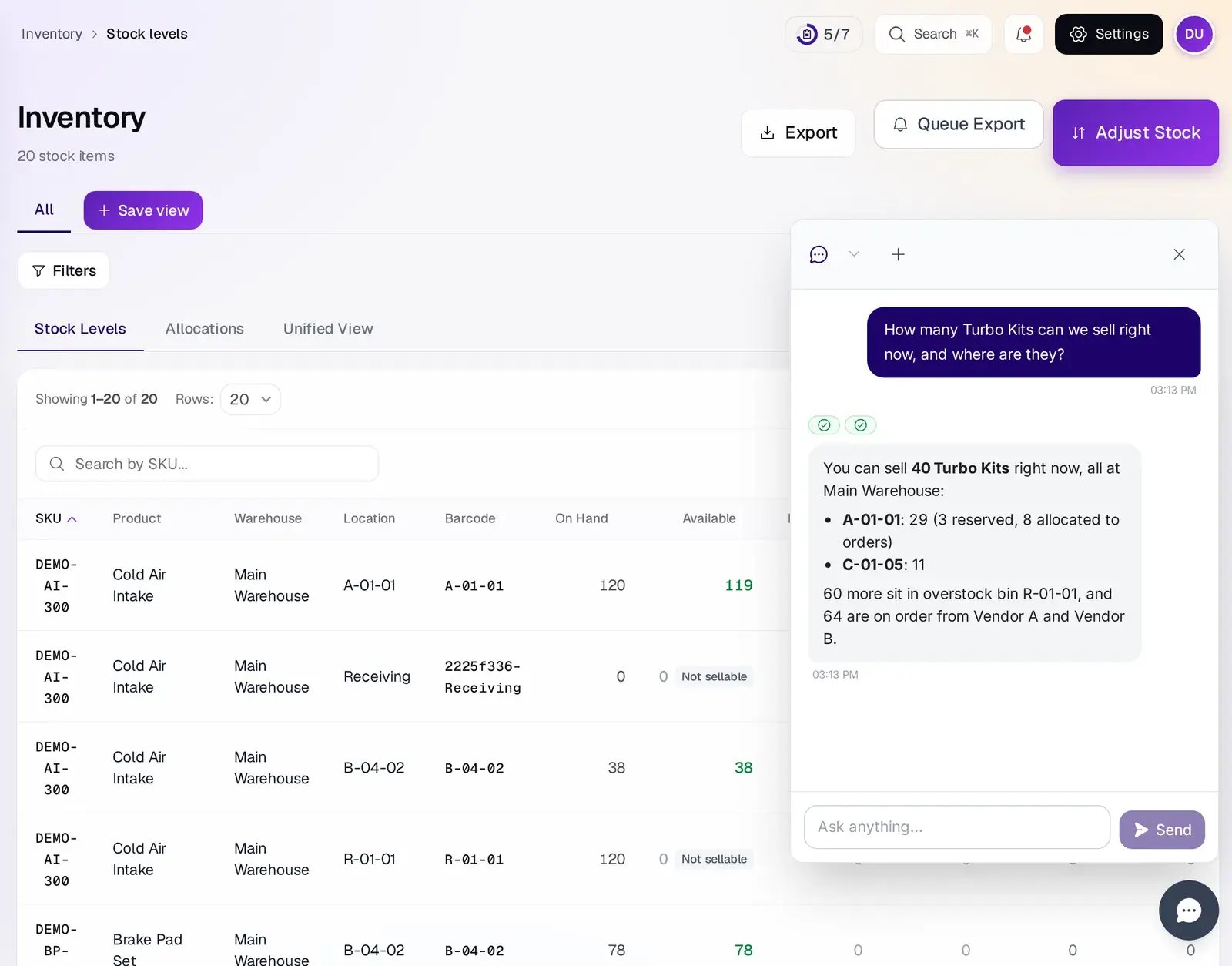
Stock levels list with the chat assistant open, answering how many units can be sold right now and which bins they are in

Ecommerce automation that sends tracking back on its own.

Labels bought at the pack station write the tracking number to the order and back to the store. For drop ship orders, vendor tracking files are read on a schedule.

  • Tracking written to the order and the store when the label is bought
  • Vendor tracking files read on a schedule
  • Drop ship tracking lands on the purchase order without anyone typing it
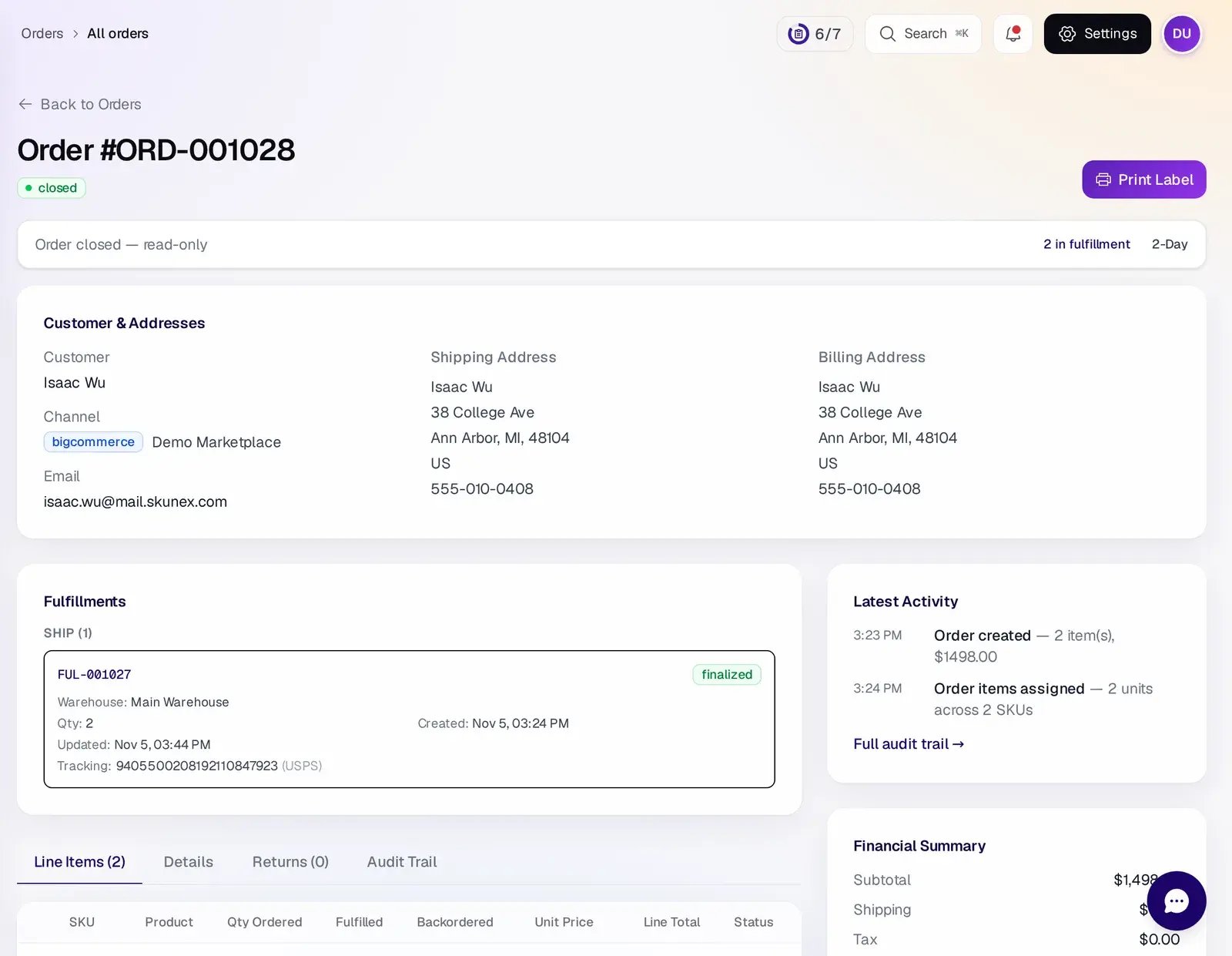
For Carewell, more than 8,300 purchase orders were updated with tracking from a single distributor in one week.
Closed order with its shipped fulfillment and USPS tracking number on the order

Drop ship orders that send their own purchase orders.

When a line routes to a vendor, SkuNexus creates the purchase order and sends it the way that vendor takes it: an API call, a file or an email.

  • Purchase orders created and sent per vendor
  • Vendor schedules with blocked hours
  • Daily limits that reset at midnight
When a distributor capped one product at 500 units a day, a daily limit that resets at midnight replaced the person switching it off by hand.
See vendor and purchase orders →
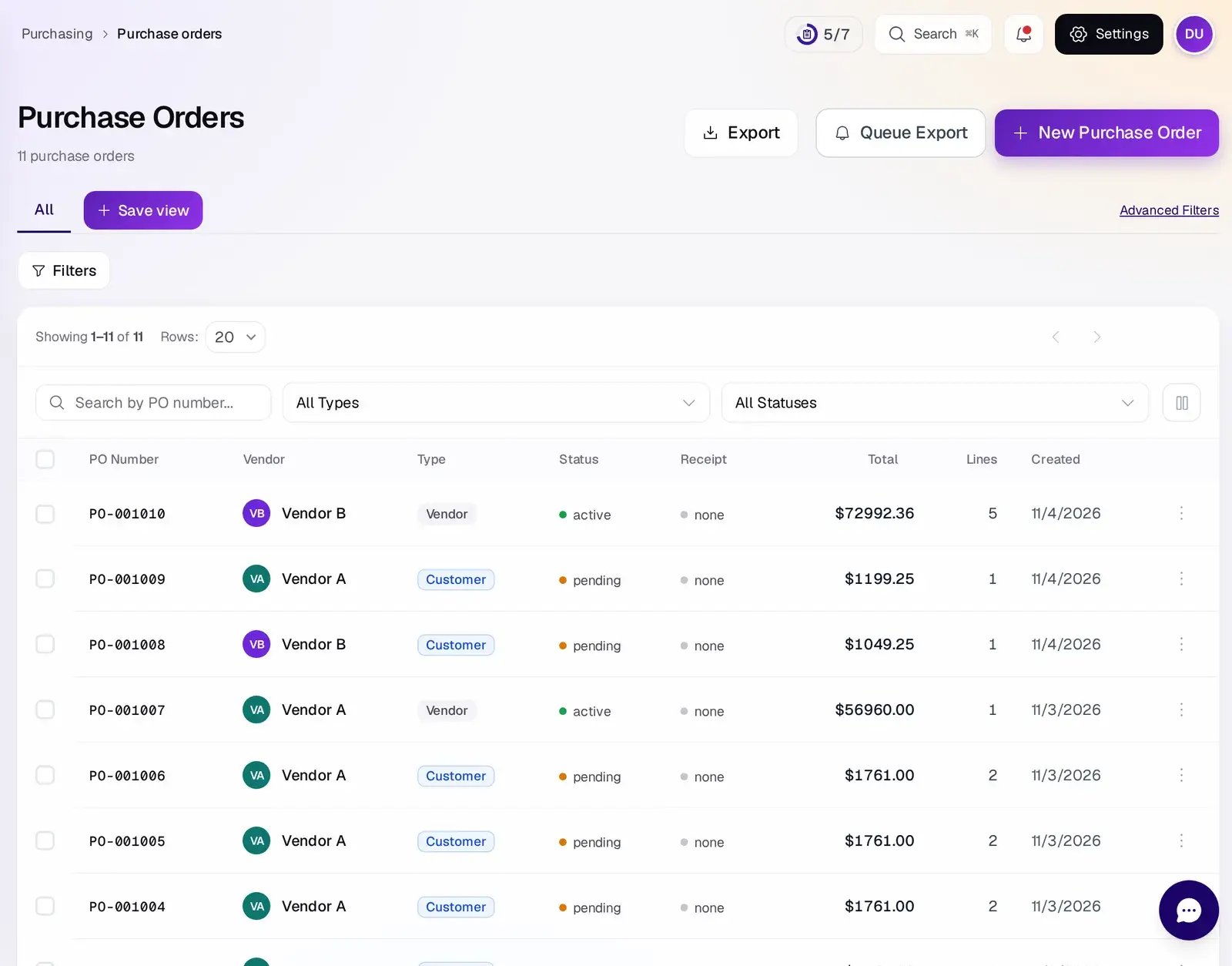
Purchase orders list showing each order with its vendor, type, status, receipt status and number of lines
Customer story · Graeter's Ice Cream

The day's orders are decided before the crew walks in.

Graeter's orders pull in from the storefront during the day. At 4 AM, SkuNexus decides the whole day's orders on its own. When the crew arrives, they batch, print, pick and ship. A mass Auto Decide button covers anything that needs a human push.

Read the full story →
What changed
  • The whole day's orders decided automatically at 4 AM
  • A mass Auto Decide action for the orders that need a push
  • The crew batches, prints, picks and ships the day's orders in the morning

Works with what you already use.

All of these run live at SkuNexus customers today. Using something else? Ask on the call and we'll tell you what it takes.

STORES

Shopify · Shopify POS · BigCommerce · Adobe Commerce · Shopware

MARKETPLACES & ERP

Amazon and eBay orders by feed · ERPs · B2B order feeds

CARRIERS

UPS · FedEx · USPS

Built for merchants who make the same order, stock and vendor decisions hundreds of times a day, at 50 to 20,000 orders a day. Not built for 3PLs, or manufacturers who need MRP. It is also not a demand forecasting tool.

How fast you go live.

  1. Week 1
    A real order, end to end

    Carewell had its first order in, shipped and tracked seven days after connecting its store.

  2. Next weeks
    Your rules, written with you

    We sit down with you to write routing rules, set restock levels and set wave limits, then test them on sample orders before they run.

  3. Go-live
    About 9 weeks to 6 months

    Recent launches took from about 9 weeks to about 6 months from kickoff, depending on how much was built. Cutover is planned with you for one window.

Questions buyers ask us

What does warehouse automation mean in SkuNexus?

The software makes the routine decisions using rules you wrote: which warehouse gets an order, when a shelf needs restocking, which orders to pick together. You can read every rule, test it first and see which one fired.

Does SkuNexus forecast demand?

Not as a feature we offer. Restocking runs on the minimum and maximum you set for each product and warehouse.

Can I test a routing rule before it goes live?

Yes. A rule simulator runs it against sample orders. On any real order, Dry-Run Routing shows which rule would match without changing the order.

What happens to orders no rule matches?

They stay unrouted and show up in the Review Queue, so a person decides.

Can routing wait until someone clicks?

Yes. Routing can run the moment an order arrives, or only when someone clicks Evaluate. To route many orders at once, select them and click Auto Decide.

Can the chat assistant change my data?

Yes, with limits. It looks things up freely. It asks you to confirm before it creates or updates a record, and asks again, more firmly, before it deletes or cancels.

Which stores and carriers does it connect to?

Shopify, Shopify POS, BigCommerce, Adobe Commerce and Shopware for stores, Amazon and eBay for marketplaces, and UPS, FedEx and USPS for labels. Systems without a ready connector are built against the open API. See the full list of integrations.

How is SkuNexus priced?

Pricing is scoped on the call, based on your order volume, channels and warehouses. See pricing for how scoping works.

Bring the jobs you repeat every day.

Tell us which decisions your team makes by hand each day. We'll show how rules handle them in SkuNexus on a 30-minute call.