The Real Cost of Bad Inventory Management (And Your Fix)
Stockouts and overstock quietly take a fixed share of revenue out of every store, every year. Here's how you stop bleeding money.
I've audited dozens of warehouses. The same five cost drains kill profits everywhere:
Carrying costs eat 25% of your inventory value. A quarter of everything sitting on your shelves is gone before you sell it. That's warehouse space, insurance, utilities, and capital tied up in products gathering dust.
Stockouts torch 4% of revenue. Miss a sale because you're out of stock? That customer buys from Amazon. We tracked one client losing sales every week from stockouts on their top 50 SKUs alone.
Shrinkage averages 1.62% across retail. Theft, damage, and admin errors. That is 1.62% of everything you buy, vanishing yearly. Most don't even know it's happening until annual counts.
Dead stock is the silent killer. 30% of inventory never sells at full price. Fashion retailers are worst - I've seen a full season's inventory marked down 70% because nobody tracked sell-through rates.
Manual counts waste 15 hours weekly. Your team spends nearly two full days counting instead of selling, which is 780 hours a year walking aisles with clipboards.

📷 Retail inventory cost breakdown chart
Add it up: poor retail inventory management is a recurring annual cost per store, and it multiplies by every store in the chain.
These five cost drains share one root cause: manual processes and disconnected systems. Here's the 12-step fix that eliminates them.
Your 12-Step Retail Inventory Management Process
Here's the exact process we use to manage 50,000 SKUs with 99.2% accuracy.
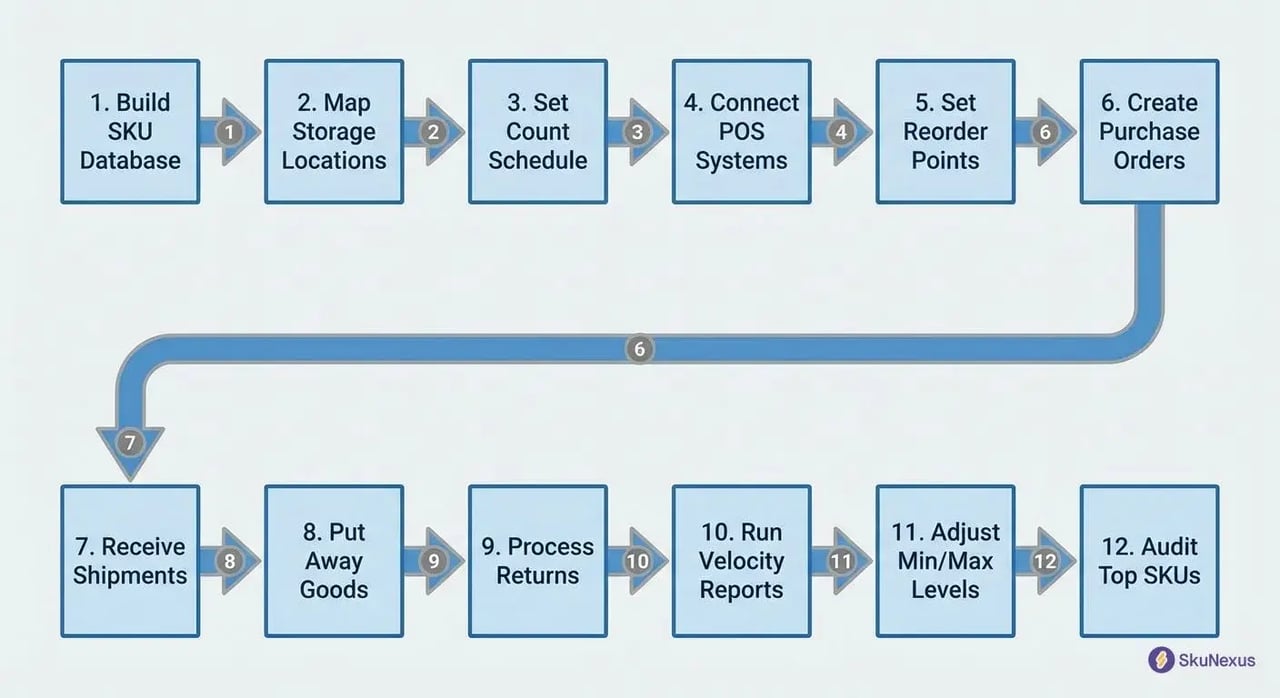
📷 12-step retail inventory management process diagram
Step 1: Build Your SKU Database (2 Days)
Create your master SKU list with these eight fields: SKU, description, category, supplier, cost, retail price, min/max levels, location assignments. Use this naming convention: CATEGORY-SUPPLIER-STYLE-SIZE.
Start by importing existing data from your POS. Then clean the mess. I guarantee you'll find 500+ duplicate SKUs in the first hour. One client had the same product listed 14 times with slight spelling variations.
Map every variant correctly. A medium blue t-shirt isn't the same SKU as a large blue t-shirt. Sounds obvious until you're reconciling 10,000 items.
Step 2: Map Every Storage Location
Assign location codes using this format: BUILDING-ZONE-AISLE-SHELF-BIN. Example: WH1-A-03-B-12 means Warehouse 1, Zone A, Aisle 3, Shelf B, Bin 12.
Include these six location types:
- Warehouse primary (fast-moving pick faces)
- Warehouse overstock (bulk storage up high)
- Store floor (customer-accessible displays)
- Store backroom (immediate replenishment stock)
- In-transit (between locations)
- Returns processing (quarantine area)
For omnichannel inventory, tag each location with fulfillment capabilities. Can this location ship-from-store? Handle BOPIS orders? Supply wholesale accounts? One location might serve all three. Your system needs to know.
Step 3: Set Your Count Schedule
ABC analysis determines frequency. Here's the breakdown:
A items (20% of SKUs, 80% of value): Count weekly. These are your money makers. Missing inventory here costs thousands.
B items (30% of SKUs, 15% of value): Count monthly. Important but not critical. Set calendar reminders.
C items (50% of SKUs, 5% of value): Count quarterly. Low-value items that rarely move. Don't waste time here.
Schedule counts for Tuesday or Wednesday mornings. Receiving is lowest then. Monday has weekend returns. Thursday-Friday have pre-weekend shipments.
Assign two-person teams. Rotate partners weekly to prevent collusion. Yes, employee theft happens. Plan for it.
Step 4: Connect POS to Inventory Systems
Real-time sync is non-negotiable. Your retail inventory software needs these four integration points:
- Sales deduct inventory immediately. Customer buys item at 2:47 PM? Inventory adjusts at 2:47 PM. Not end-of-day batch processing.
- Returns add back within 2 hours. Inspect first, then restock. Don't let returns sit in limbo inflating your out-of-stock list.
- Transfers update both locations. Ship 50 units from warehouse to store? Both locations update when the transfer is confirmed, not when it arrives.
- Damaged goods flag for review. Don't just delete them. Track damage patterns. Same SKU damaged repeatedly? You've got a handling problem.
Test with 10 transactions daily for the first week. Watch for these sync failures: network timeouts (happens during peak hours), duplicate transactions (double-deducts inventory), timezone mismatches (3 PM EST sale shows as 6 PM PST).
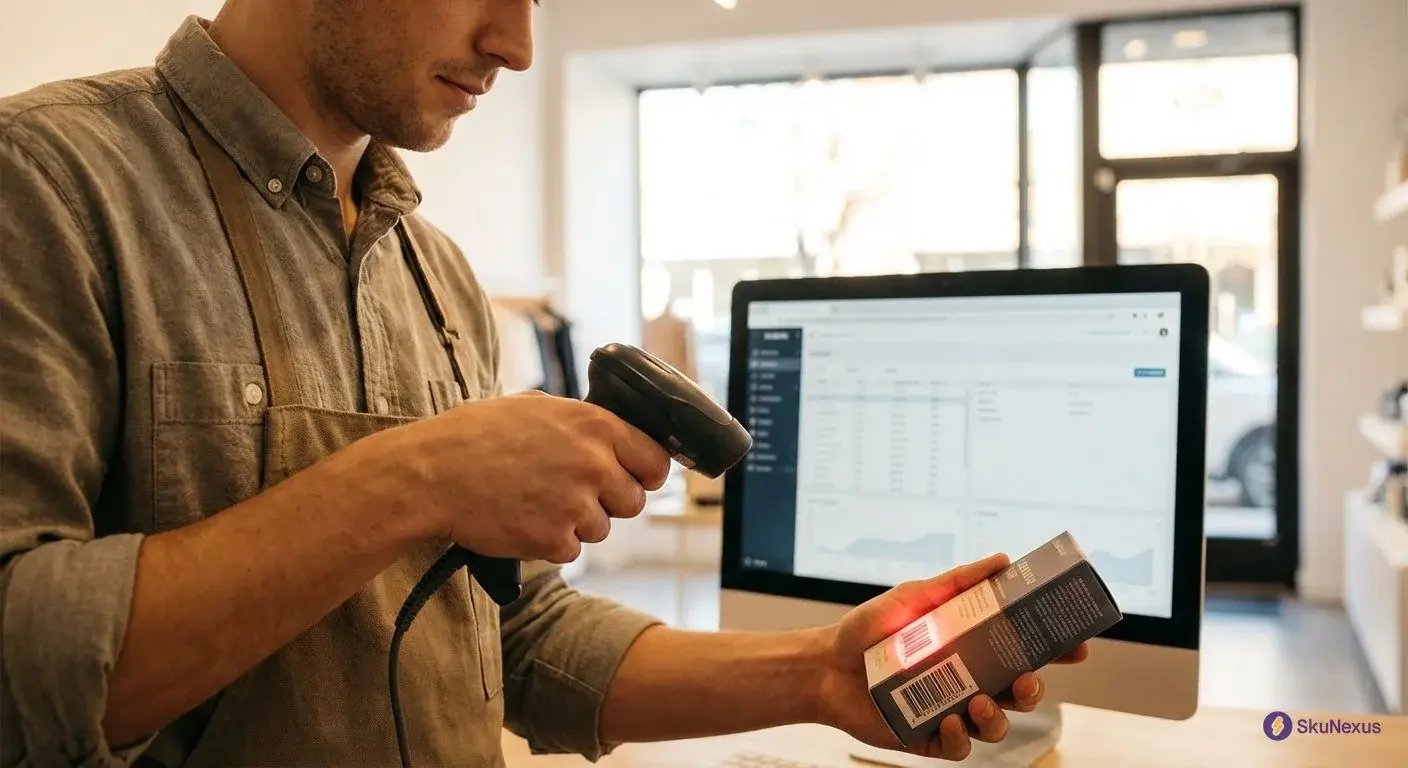
Steps 5-8: Purchasing Through Receiving
Step 5: Set reorder points at 2 weeks average sales plus 50% buffer. If you sell 100 units weekly, reorder at 300 units (2 weeks × 100 + 50% buffer).
Step 6: Create POs when inventory hits reorder point, not below. Waiting until you're out means stockouts. I've seen stores lose their December because they ordered too late.
Step 7: Receive shipments within 4 hours using mobile scanners. Paper receiving? You're asking for errors. Scan every item against the PO. Discrepancies happen in 1 of 3 shipments.
Step 8: Put away received goods immediately. Scan into final location. Products sitting in receiving aren't sellable inventory. One retailer had a pallet of "missing" stock that was actually sitting on the dock for a week.
Steps 9-12: Returns to Optimization
Step 9: Process returns within 24 hours. Inspect for damage. Restock sellable items immediately. Write off damaged goods with photo documentation. Returns piling up? You're showing false stockouts online while sellable inventory sits in quarantine.
Step 10: Run velocity reports monthly. Markdown items with less than 0.5 turns. If it hasn't sold in 6 months, it won't sell at full price. Take the markdown before it's worthless.
Step 11: Adjust min/max levels based on 13-week rolling average. Seasonality matters. Don't stock beach towels like it's July when it's October. Review these quarterly minimum.
Step 12: Audit your top 100 SKUs weekly for accuracy. Pick your highest-value items. Count physical inventory. Compare to system records. Below 95% accuracy? You've got a process problem. Fix it before expanding audits.
This retail inventory management system took us from 87% accuracy to 99.2% in 90 days. The difference? Following every step religiously. Skip steps 7 and 8 because you're busy? Watch your accuracy plummet.
Next: These methods multiply your inventory efficiency.
7 Inventory Methods That Actually Work
Now that your 12-step process is running, optimize it with these proven inventory methods. Each targets specific cost drains from Section 1.
Skip the theory. Here's what works in real warehouses.
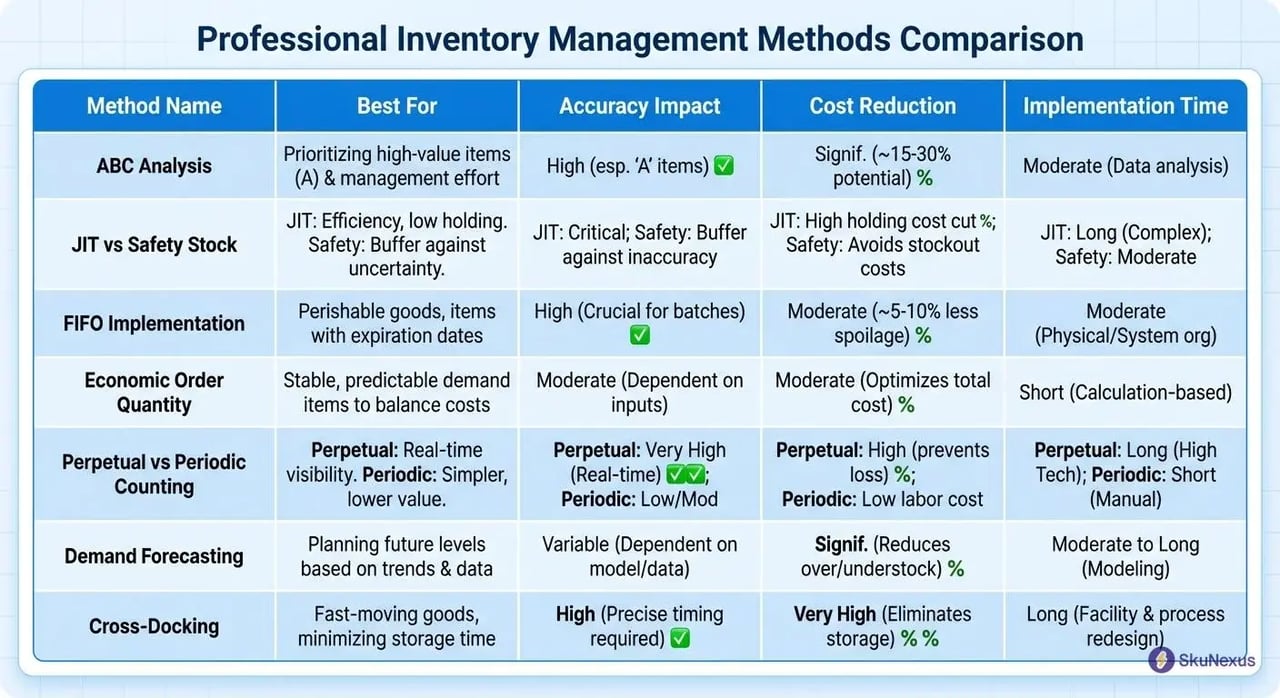
📷 Comparison of retail inventory management methods
ABC Analysis: Your 80/20 Weapon
Pull last year's sales data. Rank every SKU by total dollars generated.
Your top 20% are A items. Count weekly. Never let them stockout. Keep 3 weeks safety stock minimum. One retailer lost a whole weekend of sales because they ran out of their #1 SKU.
Middle 30% are B items. Count monthly. Stock 2 weeks safety. These matter but won't kill you if you're short for a day.
Bottom 50% are C items. Count quarterly. One week safety stock max. If a C item turns less than twice annually, kill it. That shelf space costs more than the margin you'll make.
Review classifications every 6 months. Products shift categories fast. Your seasonal decorations might jump from C to A in October, then back to C in December.
Track the money, not the units. A high-ticket item selling once monthly can outrank a cheap one selling twenty times. Revenue drives the rankings.
JIT vs Safety Stock: The Balance
JIT works for predictable sellers with local suppliers. Your bread-and-butter items with 7-day lead times or less. Order Monday, receive Friday, sell over the weekend.
JIT fails hard with imports. Add 30% buffer for anything crossing oceans. Ports back up. That 21-day lead time becomes 35 days fast.
Seasonal items need 50% buffer minimum. New products? Double your normal stock for the first 90 days. You have zero sales history.
Calculate safety stock: (Max daily usage × Max lead time) - (Average daily usage × Average lead time). If you sell 10-30 units daily with 5-10 day lead times, your safety stock is (30 × 10) - (20 × 7.5) = 150 units.
Weather kills JIT plans. Ice storms shut down highways. Plan for disruptions in your lead time calculations.
FIFO Implementation That Sticks
Physical setup determines success. Older stock sits in front. Newer stock loads from back.
Date every case with MM/YY labels. Big labels. Train your team: always pull from front, always load to back. Make it physically impossible to do wrong.
Your retail inventory software needs FIFO costing and lot tracking enabled. Most systems default to average costing. Switch it. The cost accuracy improves your margin calculations.
Audit weekly by checking dates on back stock. Find anything over 90 days old? Mark it down 25% immediately. At 120 days, go 40% off. At 180 days, donate it and take the tax write-off.
Set up your warehouse flow to support FIFO. If staff can easily grab from the back, they will. Block access or use gravity-feed shelving that forces front-to-back movement.
Track your markdown percentages by category. If you're marking down 15% of your electronics but only 2% of your clothing, your electronics buying needs work.
Retail Inventory Software: The 8 Features You Need
Stop buying based on demos. Here's what matters after implementation.
Plenty of teams buy retail inventory software that looked perfect in a demo and are back on spreadsheets six months later, because the system freezes when WiFi drops. Test these three features before you sign anything.
📷 Retail inventory software dashboard with multi-location view
Real-Time Tracking That Works Offline
Your scanners will lose WiFi. Software that freezes without internet is worthless.
Test this before buying: scan 50 items offline, reconnect, verify all 50 updated. Most systems fail this test. They'll show "pending sync" forever or drop transactions entirely. We lost 200 inventory moves when our first system crashed during a power outage.

You need local queue storage. Transactions save to the device, sync when connection returns. No manual re-entry. No missing data.
Get both barcode and RFID support built in. Not as a paid add-on module. RFID reads 1,000 items per minute versus 60 with barcodes. You'll upgrade eventually.
Mobile apps must run on both Android and iOS. Your team has different phones. The app needs batch scanning for cycle counts. Scanning 500 items individually kills productivity.
Location transfers should take 2 taps maximum. Select items, select destination, done. More steps mean more errors.
Omnichannel Sync Across All Channels
One inventory pool, multiple sales channels. Your retail inventory software must sync with Shopify, Amazon, and your POS in under 1 minute.
A customer buying your last unit online while another grabs it in-store? That's an oversell. Every one of them costs you shipping, a return, and an angry customer service call.
Channel-specific buffer stock settings save you from oversells. Set Amazon at 5 units buffer, website at 2, store at 0. When inventory hits 5 units, Amazon shows out of stock but your website still sells.
BOPIS order routing to nearest store is mandatory. Customer orders online at 2 PM for 4 PM pickup? Route to the store 2 miles away, not the one 20 miles away with more stock. Distance-based routing cuts pickup abandonment 40%.
Ship-from-store logic based on distance reduces shipping costs 25%. Order going to California? Ship from your California store, not the New Jersey warehouse.
Marketplace FBA integration keeps Amazon inventory separate but visible. We use SkuNexus to manage this across 8 channels - saves 20 hours weekly on manual updates.
Integration APIs That Don't Break
Check these integration points before buying. Get sandbox access. Test 1,000 transactions. Watch what breaks.
ERP connections (SAP, NetSuite, Dynamics) need two-way sync. Orders flow from ERP to inventory system. Inventory levels flow back. Most integrations are one-way. That's not enough.
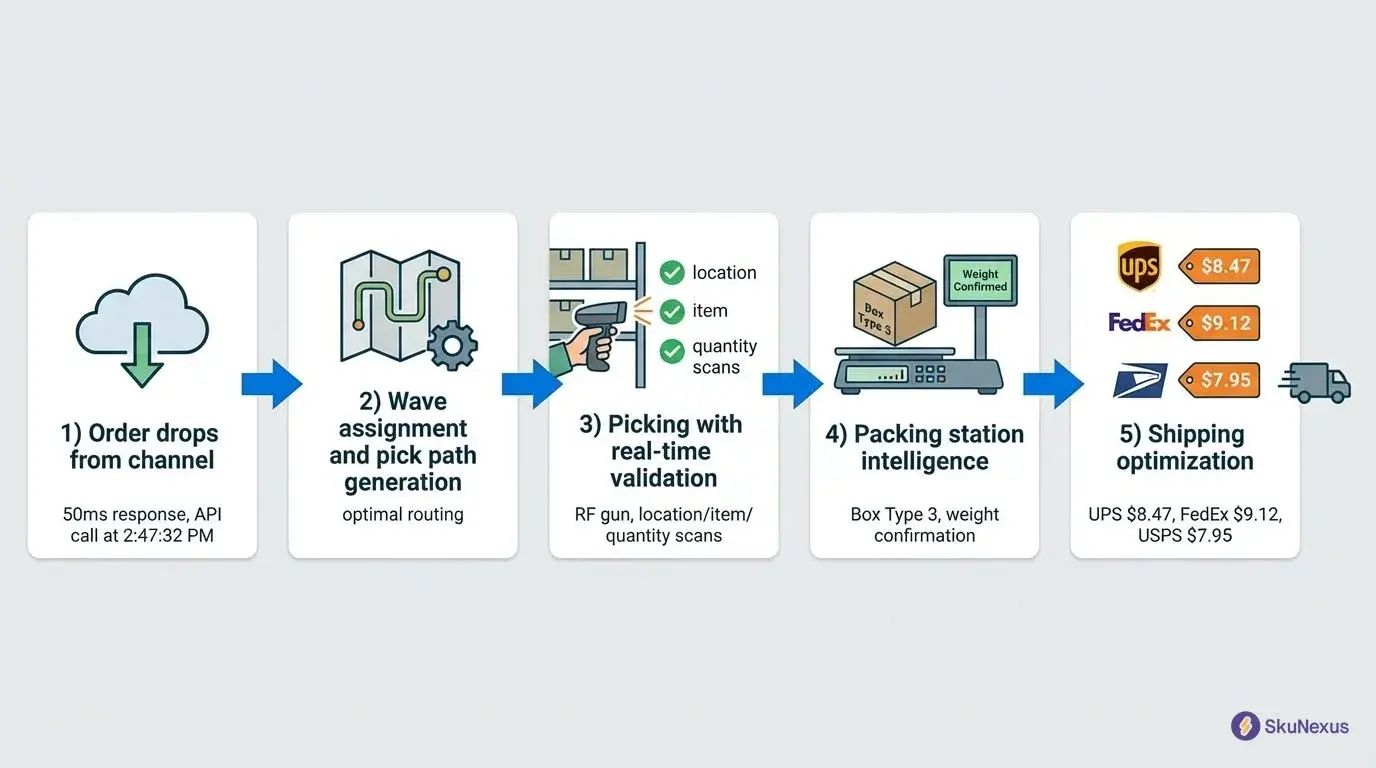
WMS integrations (Manhattan, HighJump) must handle pick/pack/ship updates. When warehouse ships an order, inventory adjusts automatically. No batch uploads at midnight.
E-commerce platforms (Shopify, BigCommerce, Magento) need order status webhooks. Order placed? Inventory reserves. Order cancelled? Inventory releases. Payment failed? Inventory releases after 30 minutes.
Accounting software (QuickBooks, Xero) integration prevents double-entry. Cost of goods sold posts automatically. Inventory valuations update with price changes.
Look for webhook support, not just API polling. Webhooks push updates instantly. Polling checks every X minutes and misses changes. Rate limits need to exceed 100 requests per minute. Anything less bottlenecks during busy periods.
ROI Calculation: Real Numbers From Real Implementations
Here's what inventory management actually costs and saves.
Most vendors wave their hands at ROI. I'll show you exact numbers from 50+ implementations. Spoiler: payback happens faster than you think.
📷 Retail inventory management ROI calculator
Year 1 Costs Breakdown
Licence cost tracks user count and which modules you turn on, with omnichannel sync and API access at the top of the list. Put your own numbers through the ROI calculator before you ask for a quote.
Hardware is a separate upfront line: roughly 20 RF scanners, 5 mobile printers and 10 tablets for a mid-size store fleet. Skip consumer-grade equipment - it breaks in warehouses.
Implementation is a separate line. Data migration takes about 80 hours, training 40, system setup another 60, and support is billed on top of the licence.
Add 20% buffer for overruns. That "clean" SKU list has 2,000 duplicates.
Measurable Savings by Month 6
Four levers move, and you can size each one on your own numbers. Inventory reduction delivers 15-25% lower carrying costs; one retailer cut inventory by more than 20% with zero stockout increase. Stockout reduction cuts lost sales by half, which typically recovers about 1% of revenue. Labor on counting drops about 30%, from 20 hours weekly to 14. Shrinkage falls from the 1.62% industry average to about 1.1% with perpetual counts.
Payback period: 4-6 months. I've never seen it take over 8 months. One client hit break-even in 3 months after finding "lost" inventory sitting in the wrong location.
Industry-Specific Playbooks
Generic advice fails because inventory velocity, margins, and compliance requirements vary drastically by vertical. Here's what works for each.
I've implemented retail inventory management across 50+ companies. Fashion fights seasonality. Food fights expiration. Electronics fights obsolescence. Each needs specific tactics.
Fashion: Beat the Seasonal Curve
Start markdowns at week 8 of 12-week season: 25% off slow movers, 40% at week 10, 60% at week 11. Earlier markdowns preserve profit.
Track size curves using the 2-3-2-1 ratio for S-M-L-XL. Reorder only complete size runs. Missing size M? Don't reorder S, L, and XL. Incomplete runs kill conversion rates.
Never reorder items with less than 3 turns projected. Eight weeks left in season, selling 2 units weekly? Order 16 units maximum.
Pre-pack new arrivals by store tier. Allocate 60% to A stores, 30% to B, 10% to C. Your flagship needs 100 units of that new dress. Strip mall location needs 10.
Week 8 markdowns aren't suggestions. One week late? You're competing with next season's arrivals.
Food & Beverage: FIFO or Die
Set expiration alerts: 30 days out for dry goods, 7 days for refrigerated, 3 days for prepared. Your retail inventory software needs automated alerts with push notifications to managers' phones.
Markdown schedule runs like clockwork. At 3 days to expire: 50% off. At 1 day: 75% off.
Track temperature logs every 4 hours and link to inventory records. Product stored at wrong temperature becomes dead inventory fast. A cheese shipment held at 50°F instead of 38°F is worthless in 48 hours.
Enable lot tracking and FDA compliance reports. Recall hits? Pull specific lots in minutes.
Rotate stock daily at 6 AM before opening. New deliveries go in back. Old product moves front. Food margins run thin - 8-12% net. One case of expired product wipes out profit from 10 cases sold.
Electronics: Price Protection Games
Monitor MAP pricing daily with automated alerts. Break MAP on that Samsung TV? Lose co-op advertising funds.
Track model transitions obsessively. New iPhone launches September? Stop reorders by July. You've got 60 days of selling season left.
Apply the 30-45-25 rule. First month after launch: sell 30% of total volume. Months 2-3: sell 45%. Final 25% needs aggressive pricing or bundling.
Never hold inventory past 180 days. Electronics depreciate 1% weekly after 90 days, so a laptop loses a fifth of its value between day 90 and day 180. Liquidate at any price.
Serial number tracking prevents returns fraud. Customer returns "defective" TV with different serial than purchased? That's fraud. We caught a ring returning stolen merchandise this way.
Move fast or eat the loss. Today's hot item is tomorrow's clearance burden.
The 5 Mistakes Killing Your Accuracy
Fix these first before buying new software.
Most retailers blow money on retail inventory software while ignoring broken processes. I've audited warehouses running full-featured systems at 82% accuracy. The software wasn't the problem. These five mistakes were.
What Manual Processes Cost You Every Year
Calculate your manual cost: (Hours on counts × Hourly rate) + (Error rate × Average order value × Orders).
You spend 30 hours weekly on manual counts, which is 1,560 hours a year. Add your error rate. Manual counts run 2-5% errors, and every one of those points comes off annual sales.

One client tracked their manual receiving: 4 hours daily scanning papers and typing. They bought mobile scanners. Receiving dropped to 90 minutes. ROI in 6 weeks.
Automate receiving first - biggest ROI. Scan products directly into locations. Skip the paper.
Next, automate cycle counts. Handheld scanners beat clipboards. Count accuracy jumps from 94% to 99%.
Wrong Data Destroys Everything
Audit monthly: count 100 random SKUs, compare to system. Below 95%? Stop everything and reconcile.
Mistake 2: Skipping scans during receiving. Staff skip scanning to "save time." Suppliers short-ship 1 in 5 orders. Those missing units never get caught. Fix: scan every item, every time.
Mistake 3: Ignoring theft patterns. High-value items disappear first. One retailer was losing phone accessories every week until they checked top SKUs daily. Pattern: always Thursdays, closing shift.
Mistake 4: Not writing off damaged goods. Broken products sit in corners for months. System thinks you have 10 sellable units. Reality? 7 sellable, 3 smashed.
Mistake 5: Processing returns incorrectly. Customer returns blue shirt, staff restocks red shirt. Now you're short blue, over on red. Happens 50+ times daily.
Install cameras at receiving dock - 50% reduction in "errors." Run exception reports daily. Look for negative quantities and items with zero movement for 90 days.
Count regularly. Investigate every variance above your tolerance. Monthly audits catch problems while they're fixable.
KPIs That Matter (Not Vanity Metrics)
Track these 6 metrics weekly. Ignore everything else.
Most retailers track 47 useless metrics while missing the 6 that actually matter. Here's what drives profit.
Check them every Monday at 9 AM. Fix what's broken before it compounds.
📷 Retail inventory KPI dashboard
Inventory Turnover by Category
Calculate: COGS ÷ Average Inventory Value.
Targets by category:
- Fashion: 4-6 turns
- Electronics: 8-12 turns
- Food: 12-24 turns
- Furniture: 2-4 turns
Below target? Reduce orders by 25%. Above target? Increase safety stock - you're leaving money on the table.
Fashion at 2 turns means dead styles. The same inventory at 5 turns moves two and a half times the volume without adding square footage.
Electronics below 8 turns signals obsolescence risk. Food below 12 turns means spoilage. Furniture gets leeway, but below 2 turns? You're a warehouse, not a store.
Review weekly, adjust monthly.
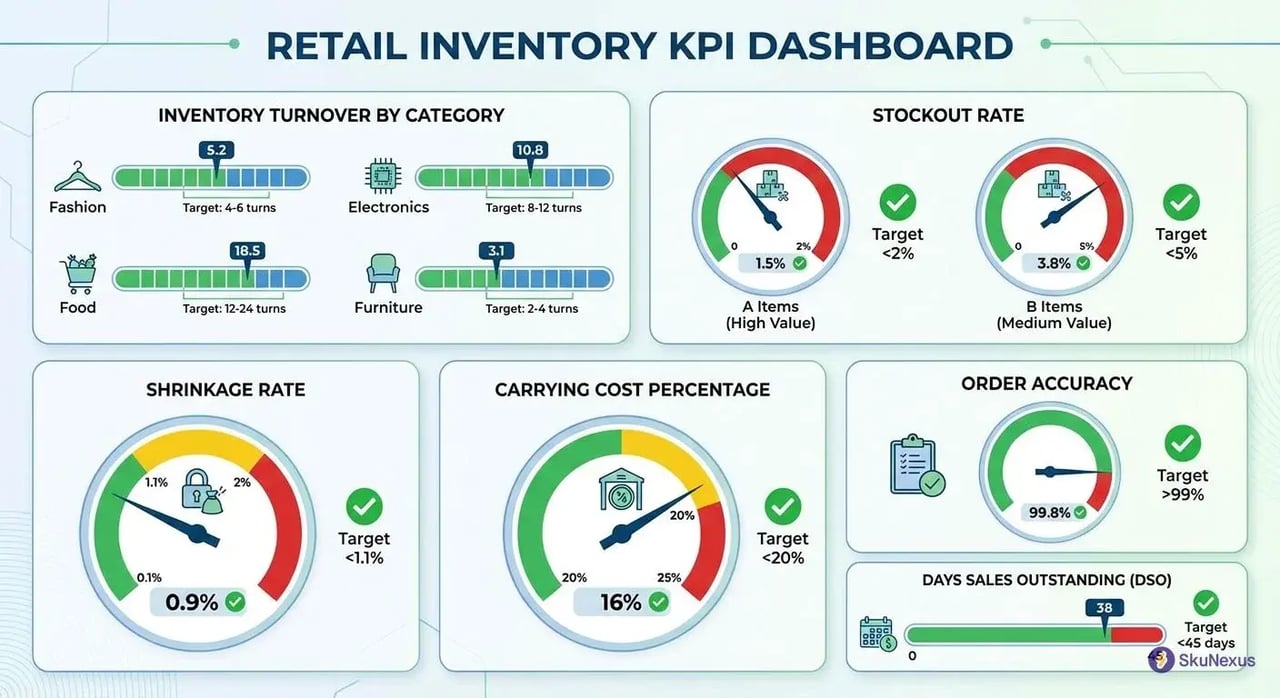
Stockout Rate and Lost Sales
Track daily: (# of stockout SKUs ÷ Total SKUs) × 100
Targets:
- A items: <2%
- B items: <5%
Calculate lost sales: Average daily sales × Days out of stock × 0.7 (30% will wait).
Missing your #1 SKU for 3 days? Multiply its daily sales by 3, then by 0.7, because 30% will wait. Plus customer trust.
Once stockouts show up as a material monthly loss, increase safety stock by 50% on affected SKUs. We run this report through SkuNexus every Monday morning. One client found most of their lost sales sat in their top 20 SKUs, fixed the reorder points, and recovered the bulk of it the next month.
Future-Proof Your Operation
Two shifts hit retail inventory by January 2026: mandatory sustainability reporting and AI-driven forecasting. Early adopters save 30% on implementation costs.
AI Demand Forecasting (Available Now)
Machine learning beats manual forecasts by 30-50%. Start with your top 100 SKUs - they represent 60% of revenue but need only basic data integration.
Feed the system 24 months of daily sales data, weather from nearest airport, and local event calendars. Temperature swings drive sales more than expected. That 85-degree Saturday? Sundress sales spike 300%. Marathon in town? Sports drinks sell 5x normal.
Implementation takes 90 days:
- Month 1: Clean and integrate data
- Month 2: Train models and backtest
- Month 3: Run parallel with human forecasts
Don't skip parallel testing. You need confidence before betting inventory dollars on algorithms.
Cost scales with SKU count, so a pilot catalog costs a fraction of the full one. ROI shows 20% reduction in safety stock and 35% fewer stockouts.
Sustainability Metrics You'll Track
California's SB 54 hits January 2026. Similar laws pass in NY, WA, and OR. You'll report packaging weight per SKU, recycled content percentage, and recyclability scores. Miss deadlines? The fines start day one.
Track these metrics now:
- Carbon footprint per shipping leg
- Packaging weight and material type
- Return rates by disposal method
- Recycling/donation percentages
Build sustainability fields into your omnichannel inventory system today. Adding them later means backfilling thousands of SKUs manually. One client had to hire consultants for retroactive carbon calculations.
Partner with certified recyclers now. Document their certifications. When audits come, "our waste company handles it" won't work. You need receipts showing pounds recycled or properly disposed.
Winners in 2026 display sustainability scores at purchase: "This item: 2.3kg CO2, 95% recyclable packaging." Start collecting while competitors scramble.
Ready to Transform Your Operations?
See how SkuNexus gives you full control over inventory, orders, warehouse, and shipping.
Schedule a Free Demo →
Keep Reading