What Pick and Pack Software Actually Does
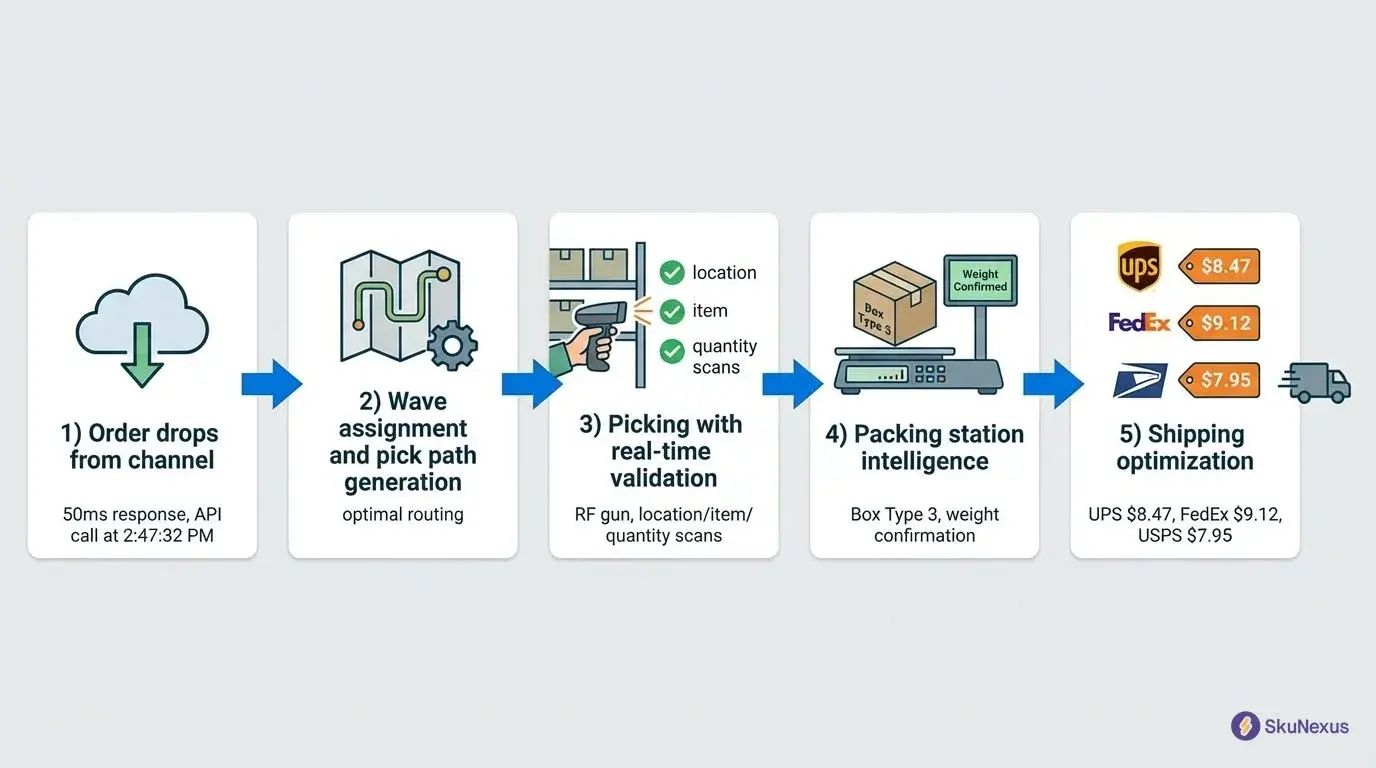
An order arrives. Somebody has to decide which units come off which shelf, walk to them, confirm the right ones were taken, choose a box, verify the contents, weigh it, buy a label, and tell the sales channel it shipped. Pick and pack software is the layer that makes those decisions and checks the work at each handoff, instead of leaving them to a printed sheet and a person's memory.
Three concrete things change on the floor when that layer exists:
- The route is decided for the picker. Items appear in walk-path order with aisle, shelf, and bin attached, so nobody backtracks and nobody memorizes locations.
- Every unit passes a check before it moves. A scan at the shelf confirms the product against what the order requires. A second scan at the bench confirms it again before the carton closes.
- Exceptions get a defined path. A shelf that is short, a damaged unit, a wrong item in the bin: each one has a reason code and a resolution queue rather than a sticky note.
Most software in this category does the first thing well and the second thing partially. The third thing is where operations actually leak time, and it is the part that vendor pages tend to skip. This page walks the real mechanics, including the exception paths, and states plainly where the answer depends on your configuration rather than ours.
Choosing Pick and Pack Software: The Short Answer
Most people searching for pick and pack software are past the definition and are trying to decide what to buy for a floor that is already busy. SkuNexus runs wave picking, directed putaway, and barcode-driven workflows sized for teams shipping 50 to 20,000 orders a day, without an 18-month enterprise implementation.
The decision usually reduces to one question: does the software direct and verify the work, or does it only record what a person already decided? A system that only records leaves the accuracy problem exactly where it was.
Evaluation Criteria That Separate Real Systems
- Guided picking with scan verification. The system should tell the picker where to go and confirm the item at the shelf, not after the box is sealed.
- Batching your team will actually use. Ask to see multi-order picking run against your own order profile and cart sizes rather than a demo data set.
- Rules you can change yourself. Pick paths, packing rules, and exception handling should be editable by your operations lead without a services engagement.
- Live inventory in both directions. Every pick should move stock in the same record your sales channels read from.
- Exception paths, shown live. Short picks, damaged units, substitutions, and partial shipments are the daily reality. Ask to watch each one performed.
Ready to see it against your own orders? Book a live SkuNexus demo and bring a real order profile.
The Four Picking Strategies, and Which One Fits Your Volume
Picking strategy is the single decision that changes throughput most, and it is mostly a function of order shape rather than warehouse size.
Piece picking is one order, start to finish, one walk. A packing slip prints, the picker takes it around the floor, and the order goes to the bench. It is the default almost everywhere because it needs no software at all. One media group evaluating a move back to in-house fulfillment described their previous outsourced fulfillment provider's method exactly this way: "pack slips were printed. You grab a pack slip, go and pick that order. You move on to the next pack slip, pick that order, and then you'd have someone at the station doing all the packaging" (Fathom 292958116). Piece picking stays efficient while orders are large or the catalog is small. It stops scaling the moment the average order is one or two lines, because the walk cost is paid per order regardless of how little is in it.
Batch picking collects the same SKU across many orders in one pass, then splits it out at the bench. A pre-packaged school-supplies operation on NetSuite with no WMS described their version: "We print out a pick list that has the bin location. We have in a logical order. So, it's easy for the pickers to pick. They'll pick a batch, which is equivalent to a grade at a school. We'll pick a batch at a time and then they bring those to the production area to be fulfilled" (Fathom 241064945). That works. The failure mode is the split at the end: without a physical binding between a unit and an order, sorting a batch back into orders is where the errors come from.
Zone picking assigns each person a section of the floor and passes the order between zones. It reduces walking to near zero per person and turns the operation into a relay. The tradeoff is coordination overhead and work-in-progress sitting between zones, which is why it usually appears only once a single walk genuinely cannot cover the floor.
Wave picking is batch picking with the sort moved to the front instead of the end. Multiple orders are picked in one walk, but each unit goes into a tote that is already bound to a specific order at the moment it is scanned. There is no reconstruction step. This is the strategy the mechanics section below covers in detail, because it is the one that most often gets bought and then abandoned.
Where SkuNexus actually sits, stated precisely: the documented execution modes are single-fulfillment picking, which follows an optimal walk path with scan confirmation at each location, and wave picking, which groups multiple fulfillments into one run with tote binding. Zone behavior is achievable by scoping waves to an area of the floor, but it is not a separate mode with its own screen, and we are not going to describe it as one. If a distinct zone-relay product is a hard requirement, that is a fair reason to look elsewhere.
Inside the Pack Workflow: Load, Pack, Ship, Done
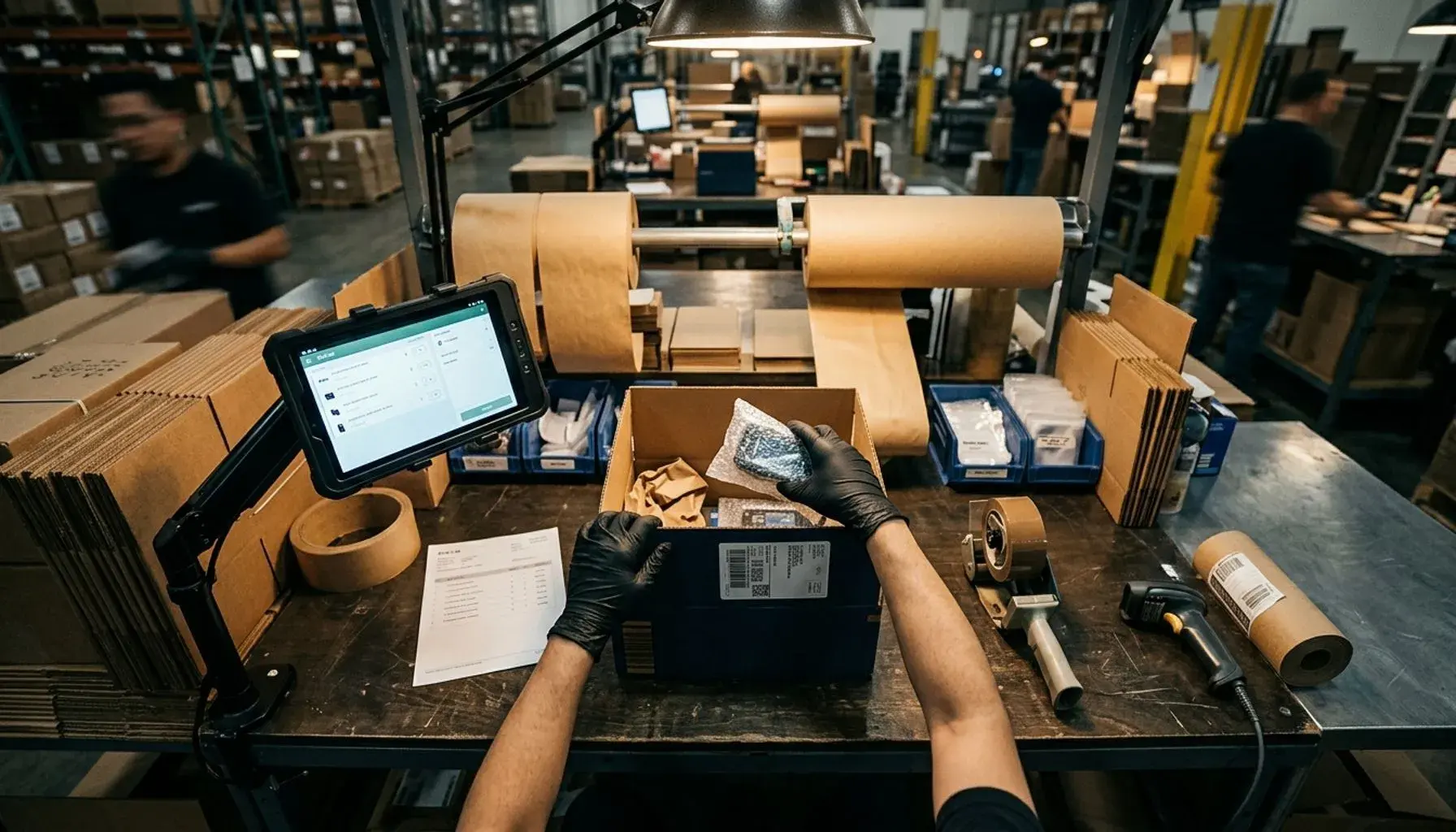
The pack bench is where most of the recoverable time and nearly all of the recoverable accuracy lives, and it is the part of the category that is almost never shown. Here is the actual four-stage flow, taken from the product documentation rather than a feature list.
Stage 1, Load. The operator scans the barcode on the pick sheet or the tote label. An order summary appears with order number, customer, and item count. Then, before any item goes into anything, a parcel picker appears and the operator chooses a box from pre-defined parcel templates.
That ordering is deliberate and it is the detail worth arguing about. Choosing the box at the start means the operator grabs the right carton from the shelf once, at the beginning of packing, rather than finishing the pack and then hunting for something the contents will fit into. It also means box choice is a system decision against known templates instead of a habit, which is the gap that same operation named directly when describing their ERP: "we generate our build and pick list, of our production documents come out of NetSuite, but we have nothing that does box sizing it at this time" (Fathom 241064945).
Stage 2, Pack. This is the scan loop. Items sit in a three-state table: Done rows collapse to a single line with a green check, the Active row is highlighted with an inline quantity stepper, and Pending rows are grayed out below. Scanning a product increments its quantity. When an item hits its required count it moves to Done automatically and the next Pending item becomes Active. The bench never waits for a mouse click.
Stage 3, Confirm and Ship. Four panels before any money is spent on a label: Items, a checklist confirming everything is packed; Parcel, showing the box chosen at Stage 1 and editable here if the operator switched; Carrier, covered in its own section below; and Weight, entered by hand or read from a USB scale. Then Purchase Label and Ship. The fulfillment is marked dispatched only on a successful label purchase.
Stage 4, Done. Order number, customer name, tracking number with a copy button, the carrier and service actually used, a print button if the station has a label printer, and Pack Next, which resets to Stage 1. If the order needs a second box, completing the first one through Done and hitting Pack Next opens a new Stage 1 for the same order with a secondary parcel.
The same pick and pack sequence runs when the customer collects the order in person rather than having it shipped. The difference is the final step: no label, and a "ready for pickup" status where "dispatched" would be. If you are standing up in-store collection alongside shipping, the BOPIS implementation checklist covers what changes and what does not.
How the System Catches Mistakes Before They Ship
Two mechanisms do the work here, and neither one is a percentage.
Over-scan detection at the bench
Scanning more than the required quantity on any item raises a warning. The operator can still proceed, because sometimes proceeding is correct, but the over-packed item is flagged for the ship stage so the discrepancy has to be looked at before the label is bought rather than discovered by the customer.
That specific failure, shipping more or fewer units than the order called for, is a stated problem rather than a hypothetical one. One eCommerce operation fulfilling roughly 10,000 orders a month opened their evaluation with it: they wanted "better processes throughout for put away and for verification at the pack station that we're shipping the right items, not overshipping or undershipping. We have somewhat of a problem with that" (Fathom 329872111). Under-shipping generates a support ticket. Over-shipping silently destroys margin and never generates one, which is why a system that only flags shortages is solving half the problem.
Scan verification is also the most commonly raised requirement in our own sales conversations. Across 78 buyer-eligible SkuNexus demo calls, the buyer raised barcode scanning in their own words in 51 of them. It is not a differentiator anymore. What differentiates is whether the scan actually gates the next action or just records that a scan happened, and that distinction is worth testing on your own floor. One retailer described their incumbent doing the latter: "Sometimes they're like picking software just doesn't work. Like we'll scan an item and it pulls up the wrong item" (Fathom 323753821).
Short-pick handling at the shelf
When fewer units are on the shelf than the order needs, the picker does not improvise. They mark the item short, enter the quantity actually picked, and select a reason.
| Logged at the shelf | What it tells the system |
|---|---|
| Out of stock | The location is empty. The count was wrong, not the picker. |
| Damaged | Physical units exist but are not sellable. Stock is present and unusable. |
| Not found | The count says it is there and it is not visibly there. A location discrepancy, not necessarily a shortage. |
Those three carry different consequences, which is why collapsing them into a single "unavailable" flag costs you the ability to fix anything upstream. What happens to the remaining units is set by your configuration, not by the reason code: the remainder can be re-routed to another warehouse, sent to the hospital queue for a supervisor, or back-ordered. We are stating that as configuration rather than as a fixed rule because it is one, and any vendor telling you the mapping is fixed is describing their limitation as a feature.
The hospital queue is where exceptions land when they cannot resolve themselves. Each item in a hospitalized fulfillment is classified independently rather than the whole order being cleared or cancelled as a unit. Missing quantity items can be cleared, if the stock turns up at the original location, or reassigned to a different location, which sends the fulfillment back to picking. Items that were picked but are no longer needed get an explicit put-away instruction: return to shelf, discharge to an overflow location, or move to non-pickable storage. A fulfillment can only be unhospitalized once every actionable item has a resolution.
Two behaviors in that flow are worth knowing before you buy anything in this category. First, when a fulfillment enters the hospital with missing items, the system deducts the missing stock from inventory at that location and flags sibling fulfillments picking the same product from the same location, so the next picker is not sent to a shelf that is already known to be empty. Second, cancelling a fulfillment that has picked items requires a put-away instruction for every one of those items, so no physical inventory is left stranded in a tote. Damaged units taken out of the flow this way are the same units that come back through a returned goods authorization process when they arrive from a customer instead of a shelf, and they need the same disposition decision either way.
Wave Picking: One Warehouse Walk, Multiple Orders
Wave picking is the capability most often asked for and most often quietly switched off after go-live. Both halves of that are worth explaining.
The mechanism: a cart is assigned to the wave, and the cart holds a tote for each fulfillment in it. The operator scans each tote barcode to bind that tote to a specific fulfillment. Then they walk the pick path once. At each location they scan the item, and the system names the tote it goes into. When the wave is complete, each tote goes to the pack station for its own fulfillment.
The binding step is the entire point. It converts sorting from a memory task performed at the end into a scan-verified instruction performed at the shelf. That is the difference between wave picking and batch picking, and it is the difference between a wave that survives contact with a busy floor and one that does not.
Here is the objection, from an operator who had already turned the feature off. A garden and nature retailer running a different vendor's stack told us they had disabled wave picking for most of their team ahead of peak: "I turned off the team members' ability to use wave picking at all, which hurts because I understand that it's theoretically more productive to wave pick than to just pick a single order." Their reasoning was specific: "you still have to scan each individual order, and then you have to scan each individual wreath, whether you wanted to organize all of your paperwork together or not. So it's not saving us much, in my opinion" (Fathom 299396170). They had also just hired seasonal staff, and errors had gone up.
That is a fair criticism of a wave implementation that adds scans without removing walks. It is worth testing against any system you evaluate, including ours: count the walks eliminated, not the features listed. Wave picking pays for itself when the walk was the expensive part. It does not when the same location is visited repeatedly anyway.
Where it does pay, the effect is structural rather than marginal. A France-based artisan knife company runs roughly 140 SKUs, including about 40 bundle configurations, through a warehouse staffed by one person for most of the year. At their steady volume of 800 orders a month, individual order picking cost that operator around an hour a day, which is fine. In November and December volume goes to 5,000 orders. Individual picking at five times the volume is not an hour a day, and there is no second operator to absorb it. Wave picking is what made that peak a workable shift instead of a hiring problem. The pattern generalizes: wave picking rarely changes a normal Tuesday much, and frequently decides whether peak season is survivable with the team you have.
Buyers describe the same threshold from the other side. A trading card retailer told us what they wanted before they had it: "I would want to have a pick list of, you know, 50 orders at a time where someone could pick all those orders all at the same time" (Fathom 467415592). A Shopify seller who had implemented a manufacturing-oriented tool and found no picking layer in it said flatly that he wanted "to implement like batch picking" for his packers (Fathom 238288133). Another operator, still picking one order at a time, put it as an aspiration: "We do one order at a time. I think wave picking would be very efficient if we can get into that" (Fathom 302883118). For the process-side playbook that sits underneath all of this, see our pick, pack, and ship strategies guide.
Rate Shopping at the Point of Pack
The carrier panel at Stage 3 runs in dual mode, and the choice between the two modes is an operational decision most buyers have never been asked to make.
Mode one: use the carrier and service already assigned to the fulfillment by the decision engine. The routing decision was made when the order was allocated, the operator confirms and prints, and the bench stays fast. Mode two: expand the rate-shop accordion on the same screen, compare live rates from every configured carrier, and pick a cheaper option before the label is purchased.
Running mode one by default and mode two by exception is usually the right setup, because a bench that stops to comparison shop every parcel is a bench that has stopped packing. The exception matters, though, and one buyer described exactly when: "whenever we're assembling a multiple part order, we don't always know exactly what the dimensions are going to be until just in time. So I just wanted to confirm that there's an easy way to do a carton or a box size override and then re-rate shop" (Fathom 329872111). That is the real sequence. The parcel panel at Stage 3 is editable, and changing the box changes the dimensional weight, which changes which carrier is actually cheapest. A system that locks the box after Stage 1 forces the operator to either eat a bad rate or restart the pack.
Rate differences are not uniform either, which is why "cheapest carrier" is not a setting you configure once. One distributor explained that their negotiated parcel rates beat the alternatives on larger shipments but not small ones: "for those small parcels, we just can't compete with the negotiations Amazon can get. I mean, their rates just blow ours out of the water" (Fathom 317076733). If your rate advantage flips by parcel size, the comparison has to happen at the bench with real dimensions and real weight, not in a routing rule written six months ago. The mechanics of that comparison are covered in more depth in our guide to shipping rate shopping.
What Actually Determines Implementation Speed
We do not publish a go-live duration for this, and the reason is specific rather than evasive: we have made contradictory implementation-time claims across our own pages in the past, and until one figure is measured and ratified internally, publishing any number would just be picking the most flattering one. Every competitor page on this query either states a timeline with no basis or avoids the question entirely. Here is the honest version instead.
Four factors set your timeline.
- How many systems you are connecting. One storefront and one carrier is fast. A storefront, an ERP, several marketplaces, and three carriers takes longer, because every connection has to be mapped and then tested against real orders.
- How clean your data already is. Accurate SKUs, real bin locations, product dimensions, and parcel templates make setup quick. Missing or inconsistent data has to be cleaned first, and that work happens on your side, not ours. This is the factor that most often moves a timeline, and it is entirely visible before you sign anything.
- How much you change on day one. Configuring the platform to mirror the picking and packing flow your team already runs is the fast path. Redesigning the floor at the same time you deploy new software is what stretches a rollout, and the two projects get blamed on each other when they slip.
- Who is available to run it. Operators learn a guided, scan-driven flow quickly. What takes calendar time is having someone senior enough to validate the first live orders, decide the short-pick configuration, and sign off on parcel templates.
The order the work happens in. Bin locations and barcodes first, because the pick path and every scan gate depend on them. Parcel templates next, because Stage 1 cannot function without a box list. Then the channel and carrier connections, then routing and short-pick configuration, then a pilot on one bench with real orders while the rest of the floor keeps running the old way. Rolling out station by station rather than all at once is slower on paper and faster in practice, because the first bench surfaces the data problems while there is still a working fallback.
Buyers rarely get to set that pace unilaterally. One team standing up a new warehouse told us: "our CEO would like to be shipping out of this new warehouse within 30 days," while also noting they had not yet hired a warehouse manager (Fathom 292958116). That is a common shape, and the honest response is that the constraint is the warehouse manager, not the software. Because SkuNexus is configured to your existing workflow rather than requiring you to adopt a prescribed one, the customization factor above generally works in favor of the timeline rather than against it. For how a pick and pack rollout fits inside a broader warehouse system deployment, see the warehouse management system guide. For where automation goes once the scan data exists, see AI in warehouse operations.
What to Measure After Go-Live
Three numbers move, and you should baseline all three for two weeks before you change anything, then read them again 60 days after the first bench goes live: picks per hour, mispick rate, and the share of orders that shipped in the box the system suggested. The third one is the leading indicator. It moves before the other two, and if it is not moving, the parcel templates are wrong and everything downstream of Stage 1 is guessing.
Pick and Pack Software FAQ
What does pick and pack software do?
It directs warehouse staff to the correct location for each item, verifies every unit by barcode scan before it is packed, chooses and confirms the shipping box, and updates inventory as units leave the shelf. Orders get assembled as a guided, checked sequence rather than from a printed sheet and memory. It also gives exceptions like short picks and damaged units a defined resolution path instead of leaving them to be worked out at the bench.
What happens if a packer scans more units than the order needs?
Scanning past the required quantity on an item raises a warning at the bench. The operator can still continue, because there are legitimate reasons to, but the over-packed item is flagged for the ship stage, so the discrepancy has to be reviewed before the shipping label is purchased. This matters because over-shipping, unlike under-shipping, never generates a customer complaint and so is invisible in support data.
What happens when there is not enough stock on the shelf to complete a pick?
The picker marks the item short, enters the quantity actually picked, and selects a reason: out of stock, damaged, or not found. What happens to the remainder is set by your configuration. It can be re-routed to another warehouse, sent to the hospital queue for a supervisor to resolve item by item, or back-ordered. When a fulfillment enters the hospital with missing stock, the system also deducts that stock at the location and flags other fulfillments picking the same product from the same shelf, so the next picker is not sent to an empty location.
Can we batch or wave pick multiple orders at once?
Yes. A cart is assigned to the wave and holds one tote per fulfillment. The operator scans each tote barcode to bind it to a specific fulfillment, walks the pick path once, and at each location scans the item while the system names the tote it belongs in. When the wave completes, each tote goes to the pack station for its own order. The tote binding is what separates this from batch picking, where the sort back into orders happens at the end from memory.
Can SkuNexus rate shop carriers and pick the cheapest service automatically?
The carrier panel at the ship-confirm stage runs two ways. It can use the carrier and service already assigned to the fulfillment by the decision engine, which keeps the bench moving, or the operator can expand a rate-shop comparison of live rates across every configured carrier and select a cheaper option before buying the label. Because the parcel is editable at that same stage, changing the box and re-running the comparison is a normal action rather than a restart.
How long does pick and pack software take to implement?
It depends on four things: how many systems you are connecting, how clean your SKU and bin data already is, how much you change about your workflow on day one, and whether someone senior is available to validate the first live orders. A single storefront with one carrier and accurate bin data goes live quickly. A multi-channel setup with an ERP and several carriers takes longer, because each connection is mapped and tested separately. We deliberately do not publish a fixed number, because the honest answer is set by your data and your availability rather than by our software.
See It Against Your Own Order Profile
The fastest way to evaluate anything on this page is to watch it run on orders you recognize. Bring a real order profile, including the messy ones with a short pick and a multi-box shipment, and book a live SkuNexus demo.
Ready to Transform Your Operations?
See how SkuNexus gives you full control over inventory, orders, warehouse, and shipping.
Schedule a Free Demo →
Yitz Lieblich
CEO & Founder, SkuNexus
Yitz Lieblich is the Founder and CEO of SkuNexus. He has spent 19 years in eCommerce, starting in 2007 when he founded Web Solutions NYC, an eCommerce agency he still leads today. His approach to inventory, order, and warehouse management did not come from a whiteboard. It came from the floor. Across nearly two decades, Yitz has worked with merchants of every size, from mom-and-pop startups to Fortune 100 enterprises, across auto parts, food and beverage, apparel, B2B wholesale, and retail/D2C. He has walked through hundreds of warehouses, watching where operations lose time, money, and orders, with one goal: optimize the operation and make it easier for the merchant. That hands-on pattern is what led him to build SkuNexus in 2018 as a full operational platform. The idea was simple. Configurable infrastructure that bends to each merchant workflow, supporting businesses that ship anywhere from 50 to 20,000 orders a day. A custom development background runs through everything he builds. When SkuNexus writes about fulfillment, WMS, or multi-channel inventory, it comes from operations Yitz has seen and solved firsthand. First as an agency partner since 2007, and now as the architect of the platform.
Keep Reading