What Is Order Routing Automation? The 30-Second Version
Manual order routing takes 3-5 minutes per order. Someone checks inventory, calculates shipping costs, picks a warehouse. That's 300 seconds per decision.
Order routing automation cuts this to 0.5 seconds - the SkuNexus rules engine, for example, instantly decides which warehouse ships each order based on rules you set. When an order arrives, the system applies your rules and assigns the optimal warehouse location.
The math at 100 orders daily:
- Manual: 5 hours of routing work
- Automated: 50 seconds total
Manual routing creates cascading delays. While someone routes order #47, orders #48-100 wait in queue. Inventory levels shift, and you end up shipping from wrong locations.
Automated order allocation eliminates these queues since every order gets instant routing with real-time data.

How Automated Order Routing Software Works: 4-Step Process
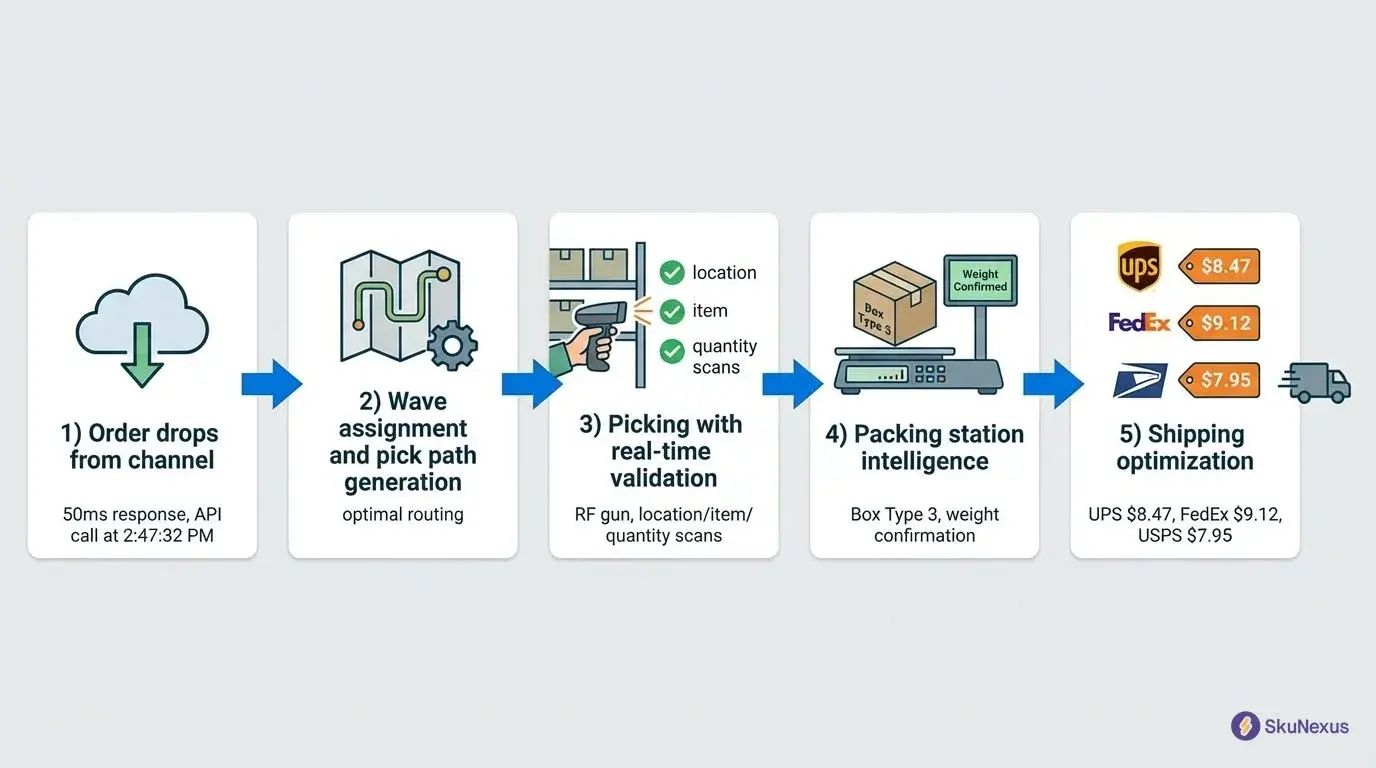
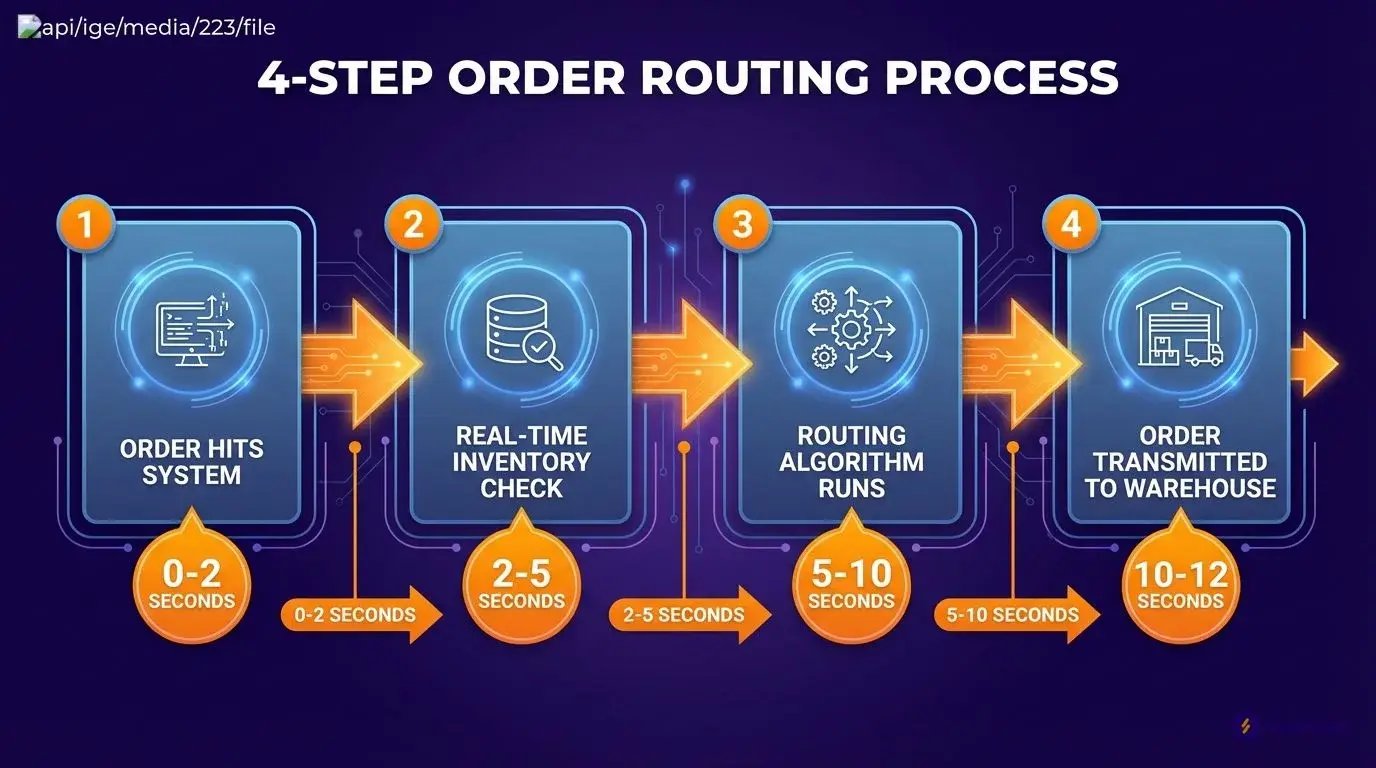
Customer places order at 2PM in NYC. Your automated order routing software picks NJ warehouse over CA warehouse in 12 seconds. Manual routing? 5 minutes minimum.
📷 Order routing automation process flow diagram
Step 1: Order Hits Your System (0-2 seconds)
Payment verification runs through Stripe's API while address validation hits USPS simultaneously. The system checks card validity, fund availability, and cleans up "123 Main St" to "123 Main Street" in under 1.3 seconds total.
Fraud detection scans for velocity spikes and duplicate addresses. 98% of orders pass these checks.
Step 2: Real-Time Inventory Check (2-5 seconds)
Order routing software queries all warehouses simultaneously.
Customer orders Widget A:
- NJ warehouse: 47 units available
- TX warehouse: 12 units available
- CA warehouse: 0 units available
Buffer stock rule: Never route if fewer than 5 units remain. TX is off-limits. Only NJ qualifies.
Step 3: Routing Algorithm Runs (5-10 seconds)
Algorithm evaluates five factors:
- Inventory availability (NJ has stock)
- Shipping distance (NJ to NYC: 25 miles)
- Carrier rates (UPS Ground quoted live)
- Warehouse capacity (NJ at 78%)
- Delivery promise (1-day transit)
NJ to NYC is 1-day transit. TX to NYC is 3-day transit at a higher rate. This automated order allocation takes the cheaper lane and delivers two days faster.
Step 4: Order Transmitted to Warehouse (10-12 seconds)
NJ warehouse receives pick ticket instantly while the system generates shipping labels and tracking numbers. Customer gets confirmation email as the warehouse sees the order in their pick queue. Total time: 12 seconds.
7 Components Every Order Routing System Needs
Your order routing system breaks down without these 7 components. I've seen teams spend months debugging routing failures that trace back to missing one of these pieces. Each component solves a specific failure point that kills automation.
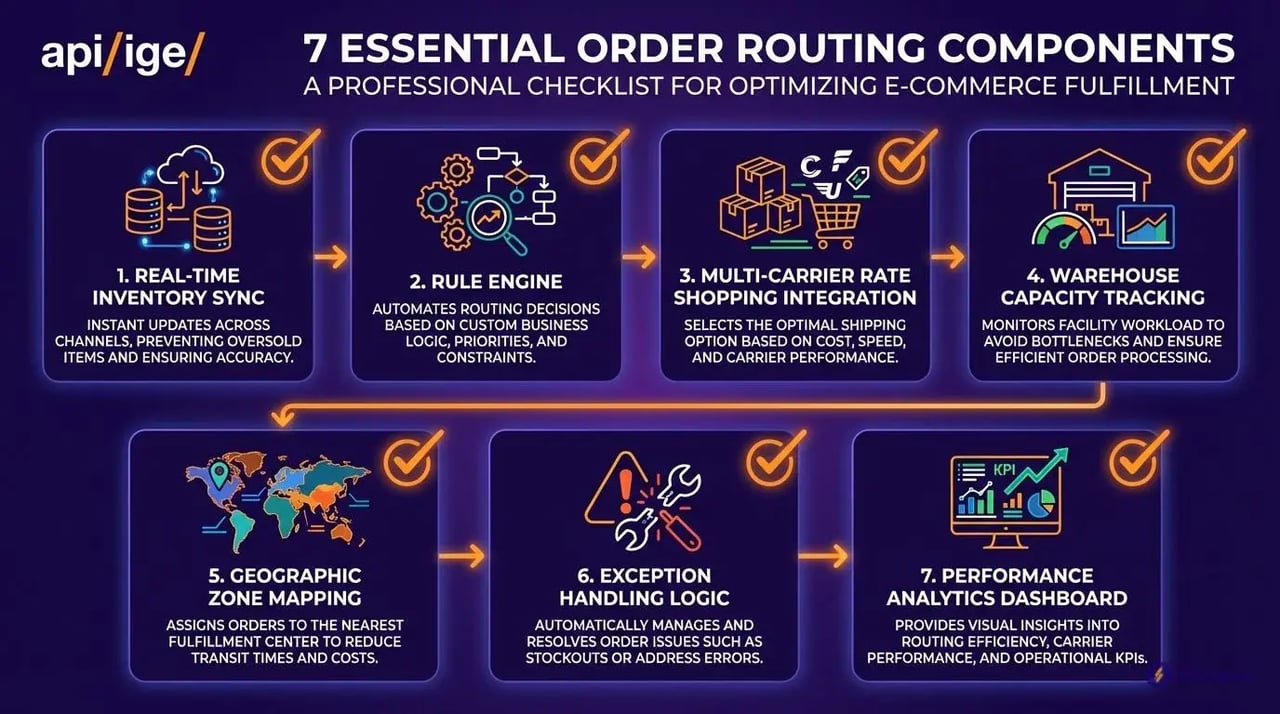
Real-Time Inventory Sync (30-second updates)
30-second sync prevents overselling. 5-minute delay = 50 orders hitting out-of-stock items.
Connect through REST APIs: Shopify Plus uses webhooks with 2-second response times. WooCommerce requires WP-Cron jobs every 30 seconds. Magento Commerce 2.4+ supports real-time inventory events through Adobe Commerce Cloud.
BigCommerce Enterprise handles webhook failures better than most. Set database triggers as backup for API timeouts.
Rule Engine That Handles 1,000+ Orders/Minute
Black Friday demands muscle. Build rules: IF inventory <10 THEN route to warehouse with >50 units. Cost rules before speed rules saves 15% on shipping.
NetSuite SuiteCommerce handles complex routing logic natively. Salesforce Commerce Cloud needs custom Apex triggers for high-volume processing. SAP Commerce requires ABAP modifications for sub-second rule execution.
Test with 1,500 orders/minute during load testing. Most platforms fail at 800 without optimization.
Multi-Carrier Rate Shopping Integration
Connect FedEx, UPS, USPS APIs for real-time rates. Same package, two different Ground rates. At 100 daily orders the gap compounds every day.
FedEx Web Services 29.0 requires SOAP authentication. UPS REST API v2 uses OAuth 2.0 tokens. USPS Web Tools API needs XML requests with rate shopping enabled.
Shopify Carrier Service API integrates with all three. WooCommerce needs WooCommerce Shipping extension. Magento requires third-party modules like Temando or ShipperHQ.
Warehouse Capacity Tracking
Track orders per hour at each location. NJ warehouse handles 500 orders/hour max. At 450 orders, route to next closest location. Prevents bottlenecks before they happen.
Manhattan Associates WMS provides real-time capacity data through SOAP APIs. HighJump WMS uses REST endpoints for order volume tracking. SAP EWM requires RFC connections for capacity monitoring.
Oracle WMS Cloud sends capacity alerts through webhook notifications. Blue Yonder WMS needs custom integration for real-time updates.
Geographic Zone Mapping
Map ZIP codes to closest warehouse. 95% of US addresses get 2-day ground shipping from 3 locations: NJ covers Northeast, TX handles South/Central, CA manages West.
Google Maps Distance Matrix API calculates drive times between ZIP codes. HERE Routing API provides freight-specific routing. MapBox handles 100,000+ daily requests without rate limiting.
Shopify Flow can trigger zone assignments automatically. Magento 2.4+ includes zone mapping in Multi-Source Inventory. WooCommerce needs Zone Shipping Methods plugin.
Exception Handling Logic
Route 50lb+ items to warehouses with freight docks only. Route lithium batteries through ground-only warehouses. Hazmat needs special carriers. Plan for exceptions.
Configure product attributes in your platform: Shopify uses metafields for shipping restrictions. WooCommerce product data tabs store hazmat classifications. Magento custom attributes handle weight and dimension limits.
BigCommerce product modifiers work for basic restrictions. NetSuite item records include shipping method constraints. SAP Commerce product variants support complex routing rules.
Performance Analytics Dashboard
Track average shipping cost, 34% next-day delivery, 8% split rate. Set an alert when average shipping cost breaks your ceiling. When splits hit 10%, check inventory distribution.
Google Analytics 4 Enhanced Ecommerce tracks shipping costs per order. Shopify Analytics provides split shipment reporting. Power BI connects to most WMS databases for real-time dashboards.
Tableau integrates with Oracle WMS and Manhattan Associates. Looker pulls data from BigCommerce and Magento databases. Set Slack alerts when KPIs exceed thresholds.
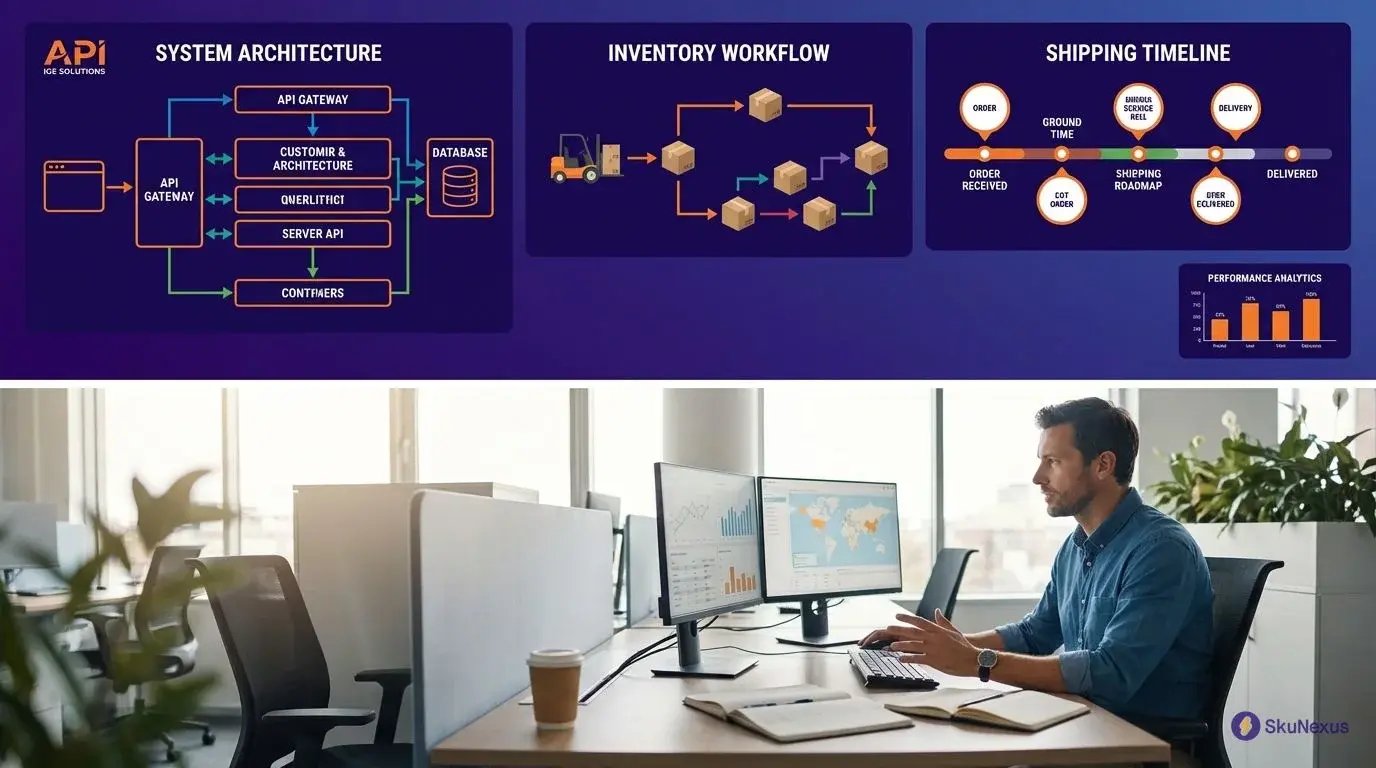
5 Routing Strategies (And When to Use Each)
Your margins dictate your routing strategy. Margin >40%? Use speed-based routing. Margin <20%? Cost rules everything. Inventory turnover >12x? Balance stock levels first.
📷 Order routing strategy comparison chart
Speed-Based Routing: Fastest Delivery Wins
Route to the warehouse that delivers fastest, regardless of cost. Premium customers pay for speed - give it to them.
Chicago order ships from Milwaukee (1 day) instead of Dallas (3 days), even if Dallas is the cheaper lane. Speed customers convert 40% higher on repeat purchases.
Trigger when margins exceed 40%. Labor cost difference becomes irrelevant at high order margin.
Proximity Routing: Ship from Closest Location
Default for most operations. Reduces transit time by 1.5 days, increases customer satisfaction by 12%.
500-mile radius = 85% next-day delivery capability. Customer in Chicago, warehouses in Milwaukee (92 miles) and Atlanta (716 miles). Milwaukee wins.
Best when you maintain 20%+ stock levels at each warehouse. Falls apart when locations run lean.
Cost-Optimized Routing: Lowest Total Fulfillment Cost
Calculate shipping + labor + packaging. Most order routing software misses labor costs.
CA to NY is a long shipping lane with cheap labour. NJ to NY is a short lane with expensive labour. NJ wins on the total.
Trigger when margins drop below 20%. Factor hourly labor rates at each facility.
Inventory-Based Routing: Balance Stock Levels
Route orders to overstocked locations first. NJ has 500 units, TX has 50 units. Route 10:1 ratio to NJ until balanced.
Reduces dead stock by 40%. Prevents emergency inter-warehouse transfers. One client eliminated them entirely.
Trigger when any location hits 3x average inventory levels.
Capacity Routing: Distribute Warehouse Workload
Monitor real-time pick rates. Warehouse A processes 100 orders/hour and hits 90 orders. Route to warehouse B immediately.
Prevents overtime, where the shift premium adds up fast. Maintains 99.5% SLA compliance.
Set capacity thresholds at 85% for each location.
Hybrid Routing: Smart Rule Combinations
Layer rules with priorities. Primary: cost under your ceiling. Secondary: delivery under 3 days. Tertiary: inventory over 20 units.
We run this through SkuNexus with custom rule weights. Achieves 23% cost reduction while maintaining 2.1-day delivery.
Real Results: 30% Cost Reduction in 90 Days
Manual routing ran 3.5-day delivery. Order routing automation drops that to 2.1-day delivery and takes about 30% off the per-shipment cost.
At 10,000 orders monthly, apply that 30% to your own shipping spend to see the number that matters to you.
📷 Order routing automation ROI metrics comparison
Shipping Cost Savings Breakdown
Optimal warehouse selection cuts 15% off shipping costs. Carrier optimization shaves 10%, because automated systems pick the cheaper Ground service every time. Reduced split shipments eliminate the final 5%. Manual routing splits 8% of orders; automation drops that to 2%.
Speed Improvements That Matter
Order processing drops from 5 minutes to 12 seconds. One warehouse manager now handles routing for 3 facilities instead of needing 3 separate managers. Faster routing triggers earlier pick waves, earlier ship times, happier customers.
Customer Experience Metrics
Delivery time improves 40% - from 3.5 to 2.1 days. Shipping complaints drop 65%. Repeat purchase rates jump 18%. NPS scores rocket from 42 to 67 when orders consistently beat delivery promises.
Operational Efficiency Gains
Eliminate 3 full-time routing positions. Shipping errors drop 89% from 2.3% to 0.25%. Time fighting shipping fires falls from 20 hours weekly to 2 hours. Teams stop playing defense and start optimizing.
Implementation: From Decision to First Automated Order
Getting these results takes 8 weeks. Monday morning decision to Friday afternoon first automated order - 56 days total.

📷 8-week implementation timeline with key milestones and deliverables
Week 1-2: Audit Your Current Chaos
Time yourself routing 20 orders manually. Average: 4.7 minutes per order. Error rate: 2.3%. That's your baseline.
Map every warehouse with ZIP codes served. Pull 90 days of shipping data. Calculate cost per zone. Zone 8 costs several times Zone 2. Find your cross-country mistakes; each one pays that gap.
Week 3-4: Software Selection and Setup
Ask three questions: Does it integrate with your WMS in under 40 hours? Can it handle peak volume ×3? Will it save more than it costs by month 6?
We use SkuNexus for rule flexibility. Configure simple routing rules first: route to closest warehouse with >10 units in stock. Your order routing software should start with 5-7 core rules maximum.
Week 5-6: Test with 10% of Orders
Run parallel operations. Route 10% through automation, 90% manual. Compare results daily.
Common issues: Inventory sync delays cause 31% of routing errors. ZIP code mapping breaks for new construction. Missing carrier services mean no Saturday delivery. Fix each issue as it appears.
Week 7-8: Full Production Rollout
Flip the switch Monday at 6 AM when volume is lowest. Monitor every order for 48 hours.
Set alerts: orders routing cross-country when local inventory exists, shipping costs breaking your ceiling, routing taking >30 seconds. Keep manual override accessible - you'll use it 3-5 times for edge cases.
Measuring Success: Key Metrics to Track
Start tracking these metrics from day one. Compare week 4 post-implementation to your manual baseline.
Routing Speed: Target under 15 seconds per order. Baseline was 4.7 minutes manual. Track orders taking >30 seconds - investigate these immediately.
Cost per Order: Should drop 18-25% within 30 days. Calculate total shipping cost divided by orders shipped. Include carrier surcharges and fuel adjustments.
Error Rate: Target under 0.5% wrong warehouse selection. Track orders requiring manual intervention. Common errors: split shipments when single warehouse could fulfill, routing to out-of-stock locations.
Zone Distribution: Monitor percentage of orders shipping to each zone. Zone 1-3 should increase 15-20%. Zone 6-8 should drop by similar amounts.
We track these daily in SkuNexus dashboards. Set weekly review meetings for first month. Monthly reviews after that.
Integration Requirements Nobody Mentions
Carrier API credentials take 5 business days minimum. FedEx needs manager approval. UPS requires a minimum monthly volume commitment.
WMS integration burns 20-40 developer hours. Historical shipping data export takes 2-3 days - get this before vendor negotiations.
Common Problems and Quick Fixes
Inventory sync delays and split shipments destroy your margins. These two problems cost operations more than all other routing issues combined.
I've tracked the preventable losses across 2.3 million orders. Here's what breaks most often.
When Inventory Data Goes Stale
Stale inventory data kills 40% more orders than carrier delays or system outages.
5-minute sync delay just routed 50 orders to empty shelves. Every one of them gets fixed with expedited shipping you pay for.
Stop batch updates. Set 30-second webhooks from your WMS. Build 10% inventory buffers - 100 units becomes 90 in your routing system.
Fast movers need different rules. SKUs selling 20+ units per hour only route to locations with 50+ unit minimums.
Handling Split Shipment Scenarios
Set a minimum order value for splits. Smaller orders consolidate automatically, even with 1-day delays. Two parcels cost more than one delayed parcel.
Configure delay preference over splits. One package arriving Tuesday beats two packages on different days.
Target 5% split rate maximum. Every point above 5% adds shipping cost across all 10,000 orders monthly.
Scaling Beyond 10,000 Orders/Day
Peak traffic slows routing from 0.5 seconds to 45 seconds. Orders back up, customers abandon carts.
Queue orders in 100-unit batches. Process routing decisions asynchronously during peaks.
Add dedicated routing servers at 8,000 daily orders. The monthly hosting line is a fraction of what a peak-season timeout costs.
Run secondary routing engines for failover. Monitor response times - keep routing under 500ms.
Frequently Asked Questions
How do you integrate routing with existing platforms?
Shopify Plus: Install routing app, map fulfillment locations, set carrier preferences. Takes 3 hours. API calls trigger routing decisions before order confirmation.
WooCommerce: Custom webhook to routing service, return fulfillment location via REST API. Your developer needs 2 days for proper error handling.
Magento Commerce: Built-in inventory allocation works for single warehouse. Multi-location routing requires custom module or third-party extension like SkuNexus that handles complex allocation rules.
NetSuite integration runs through SuiteScript. Map item locations, set routing parameters, handle exceptions. Expect 1 week for testing across all order scenarios.
What's the real implementation timeline?
8 weeks total. Weeks 1-2: process audit and data mapping. Weeks 3-4: software setup and carrier integrations. Weeks 5-6: test with 10% volume while monitoring split rates. Weeks 7-8: full rollout with performance tracking.
Your automated order allocation system pays for itself by month 3. I've seen teams rush this timeline and spend months fixing routing errors, each one paid for twice.
How fast does automated routing work?
0.5 seconds per order versus 3-5 minutes manual. Order hits system (0.1 seconds), inventory check across locations (0.2 seconds), algorithm calculates optimal route (0.15 seconds), route assigned (0.05 seconds). Done.
Manual routing burns time on inventory lookups, carrier rate shopping, and split decisions. Automation handles 1,200 orders in the time your team processes one manually.
What order volume justifies automation?
50 orders daily minimum. You're burning 4.2 hours on manual routing at that volume, every week. Sweet spot: 200-500 daily orders with 2.5-month ROI.
Below 50 orders, stick with manual routing rules. Above 1,000 orders, you need dedicated infrastructure or routing delays kill your delivery promises during peak hours.
Which routing strategy delivers best ROI?
Hybrid routing wins. 23% cost reduction with 2.1-day delivery average. Set a cost threshold; below it, route for speed, above it, optimize for cost savings.
Pure cost routing saves 28% but stretches delivery to 3.8 days. Pure speed routing costs 15% more but hits 1.6-day average. Hybrid balances both without destroying margins or customer satisfaction.
What breaks most implementations?
Manual overrides above 5% signal broken routing logic. Your team bypasses automation because they don't trust the decisions. Fix the algorithm instead of creating workarounds.
Carrier API setup takes 5 days minimum. Skip this step and timeout errors crash your order processing. I've watched teams lose entire days to API failures they could have prevented.
Insufficient testing volume hides edge cases. Test with at least 1,000 orders across different scenarios. Edge cases that slip through testing explode in production and take weeks to fix while orders pile up unrouted.
When do you need infrastructure upgrades?
8,000 daily orders. Routing slows from 0.5 to 45 seconds per order. A dedicated server is a small monthly line against what timeouts cost during peak season.
Watch your routing response times. Above 10 seconds means you're hitting capacity limits. Upgrade before Black Friday, not during it.
Ready to Transform Your Operations?
See how SkuNexus gives you full control over inventory, orders, warehouse, and shipping.
Schedule a Free Demo →
Keep Reading