Pick and Pack Software Implementation: From Selection to 99.9% Accuracy
Pick and Pack Software Fundamentals: Beyond Basic WMS
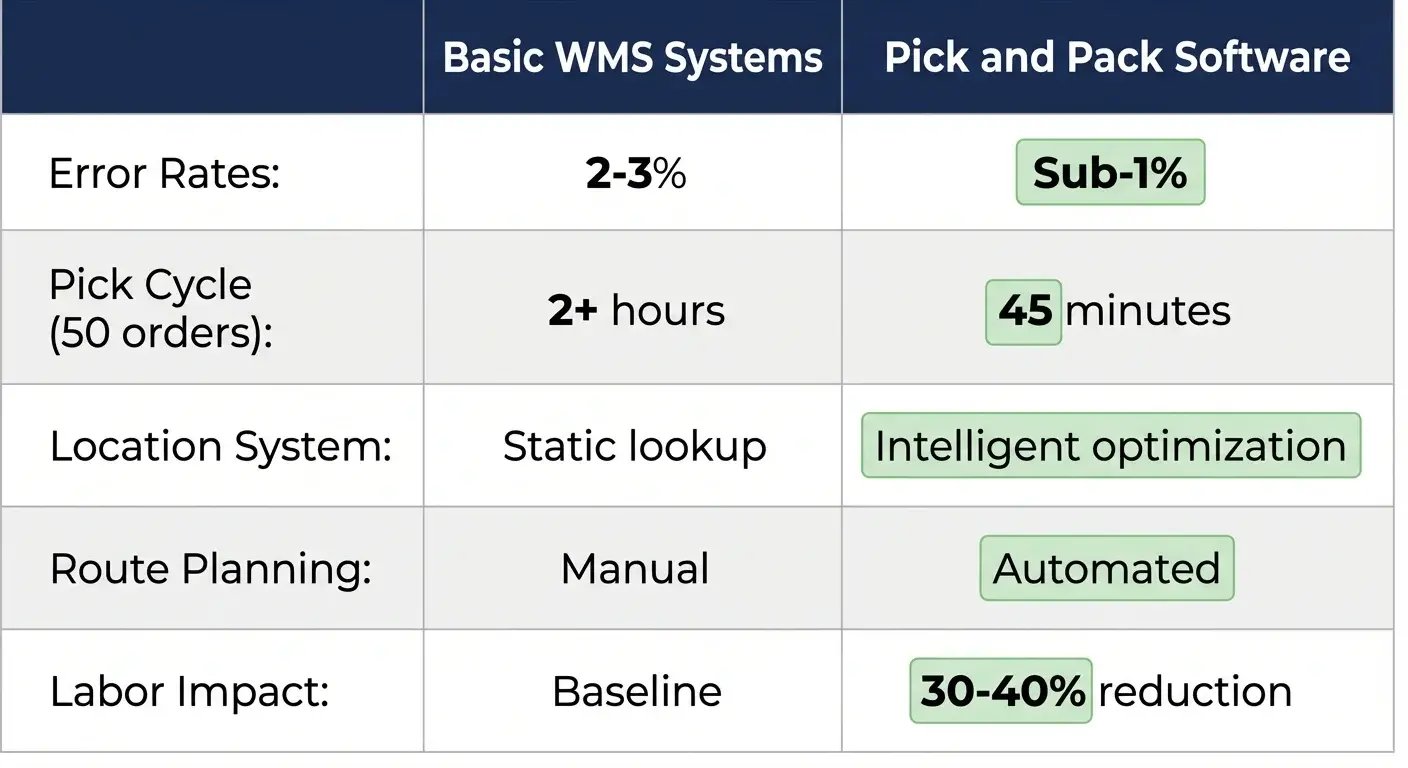
Most warehouses still rely on paper pick lists and static location systems. These operations report error rates around 2-3% and struggle with inefficient pick routes that waste hours daily. Warehouses using dedicated pick and pack software achieve sub-1% error rates while cutting labor requirements by 30-40%.

The difference isn't technology cost—it's understanding what pick and pack software actually does versus basic warehouse management systems.
Basic WMS systems tell you product X sits in location B-12-4. Pick and pack software calculates optimized pick routes combining multiple orders, then validates each item scan against specific order requirements. That intelligence layer transforms warehouse operations from location lookup to guided workflow execution.
Warehouses running basic WMS typically average 2+ hour pick cycles for 50 orders. The same facilities drop to 45-minute cycles once they implement intelligent batching and route optimization—without adding staff or changing layouts.
How Pick and Pack Software Works
The software operates through three integrated processes. First, it analyzes incoming orders and groups them by logical criteria—product location, shipping speed, or package size. Second, it calculates optimal pick routes through required warehouse locations, minimizing travel distance. Third, it validates each pick through barcode scanning, preventing wrong items from entering shipments.
Key Capabilities That Drive Results
Real-time inventory tracking prevents phantom stock issues that send pickers hunting through empty bins. Mobile barcode scanning catches errors at the source—wrong SKU selections that cost 20 minutes to resolve downstream. Automated cartonization selects optimal box sizes to minimize dimensional weight surcharges. Multi-carrier rate shopping finds the cheapest shipping option for each package without manual comparison.
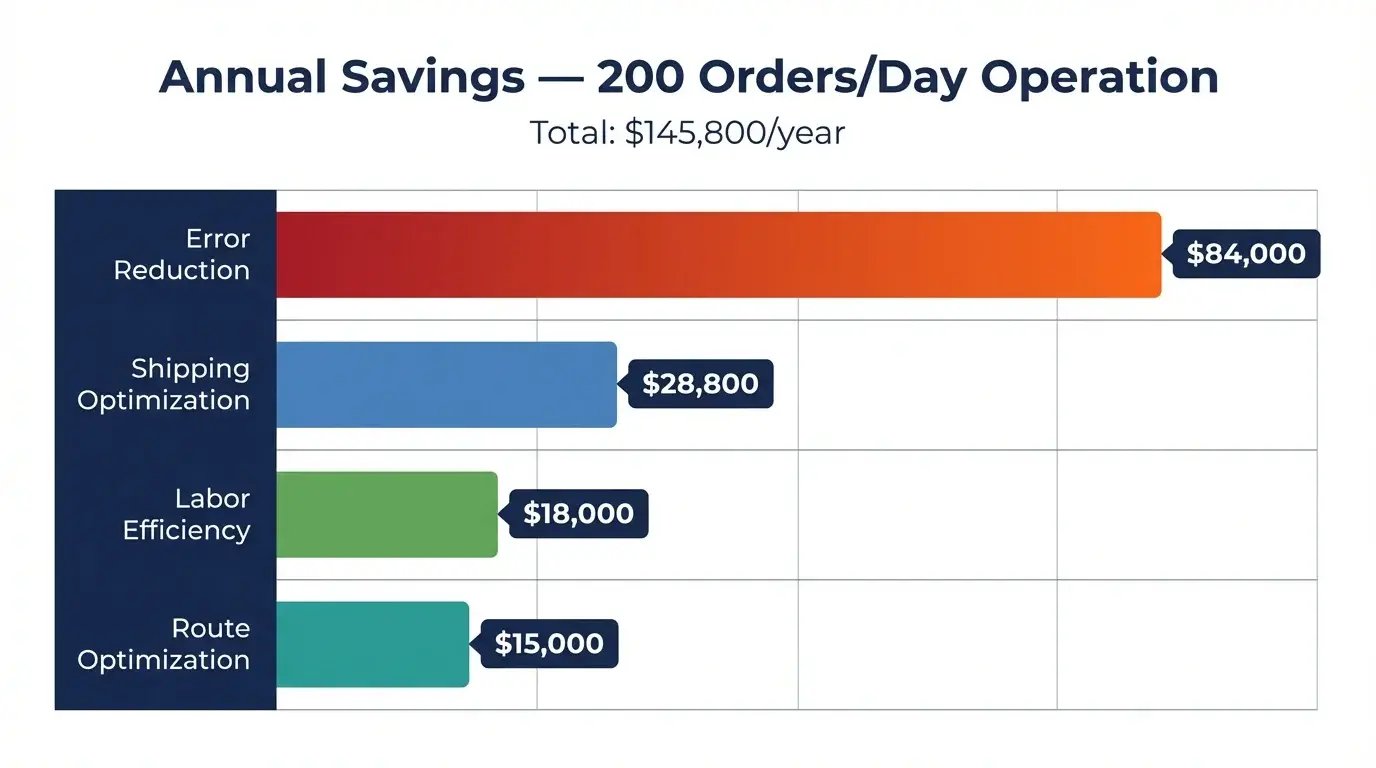
Route optimization delivers the most immediate impact—a typical 200-order operation can reclaim 2-3 labor hours daily through smarter pathing alone. Labor represents 60-70% of fulfillment costs. Cutting 3 hours of picking time daily saves roughly $15,000 annually at standard warehouse wages—enough to justify software investment in the first year.
The 4-Step Pick and Pack Workflow That Cuts Errors by 89%
Manual processes collapse under volume. Orders scattered across clipboards, pickers wandering aisles, packers guessing at box sizes.

This workflow eliminates those breakdowns. One SkuNexus customer dropped their error rate from 2.1% to 0.2% within six weeks—that's the 89% reduction through systematic error prevention.
Step 1: Order Import and Intelligent Batching
Smart batching groups orders by logical criteria, not arrival sequence. Single-item orders batch together because they move fast—a picker knocks out 15 jewelry orders in one trip through accessories. Multi-item orders need different handling since they require more verification steps.
Facilities cut picking time by 40-50% from better grouping logic. One trip with a multi-compartment cart versus 15 separate walks to the same section.
Step 2: Dynamic Route Optimization
Static pick lists force pickers to zigzag across warehouses following order sequence. Dynamic routing calculates the shortest path through required locations, sequencing picks to minimize backtracking.
One operation measured their improvement: 450 feet average before optimization, 280 feet after. Those saved steps compound across hundreds of daily orders.
Step 3: Scan-to-Verify Picking
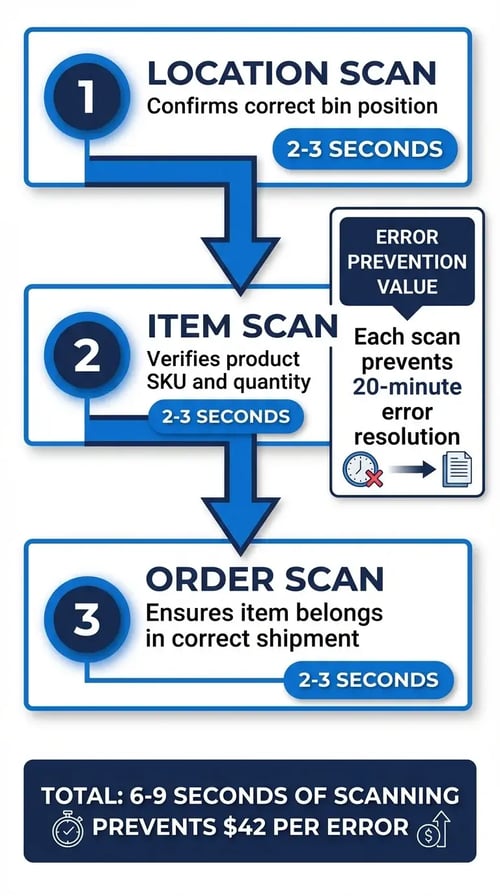
Three scans catch different error types. Location scan confirms you're in the right spot. Item scan verifies correct product and quantity. Order scan ensures the item belongs in that specific shipment. Each scan takes 2-3 seconds but prevents errors that cost 20 minutes to resolve.
Step 4: Automated Shipping Selection
Rate shopping happens automatically during label generation. The software queries multiple carriers simultaneously and selects based on your business rules—fastest service, lowest cost, or preferred carrier by destination zone.
USPS often beats UPS and FedEx on lightweight items under 1 pound, especially for residential delivery. The reverse applies for business addresses or heavier packages. Automated rate shopping captures these nuances without forcing staff to manually compare options.
Picking Method Selection: Match Your Volume to the Right Strategy
Daily order volume misaligned with picking strategy kills throughput by 25-35%. Small facilities attempt zone picking without sufficient volume. High-volume warehouses stick with individual order picking because "that's how we've always done it."

Your picking method determines staffing requirements, equipment needs, software configuration, and warehouse layout. Get it wrong and you're fighting inefficiency daily.
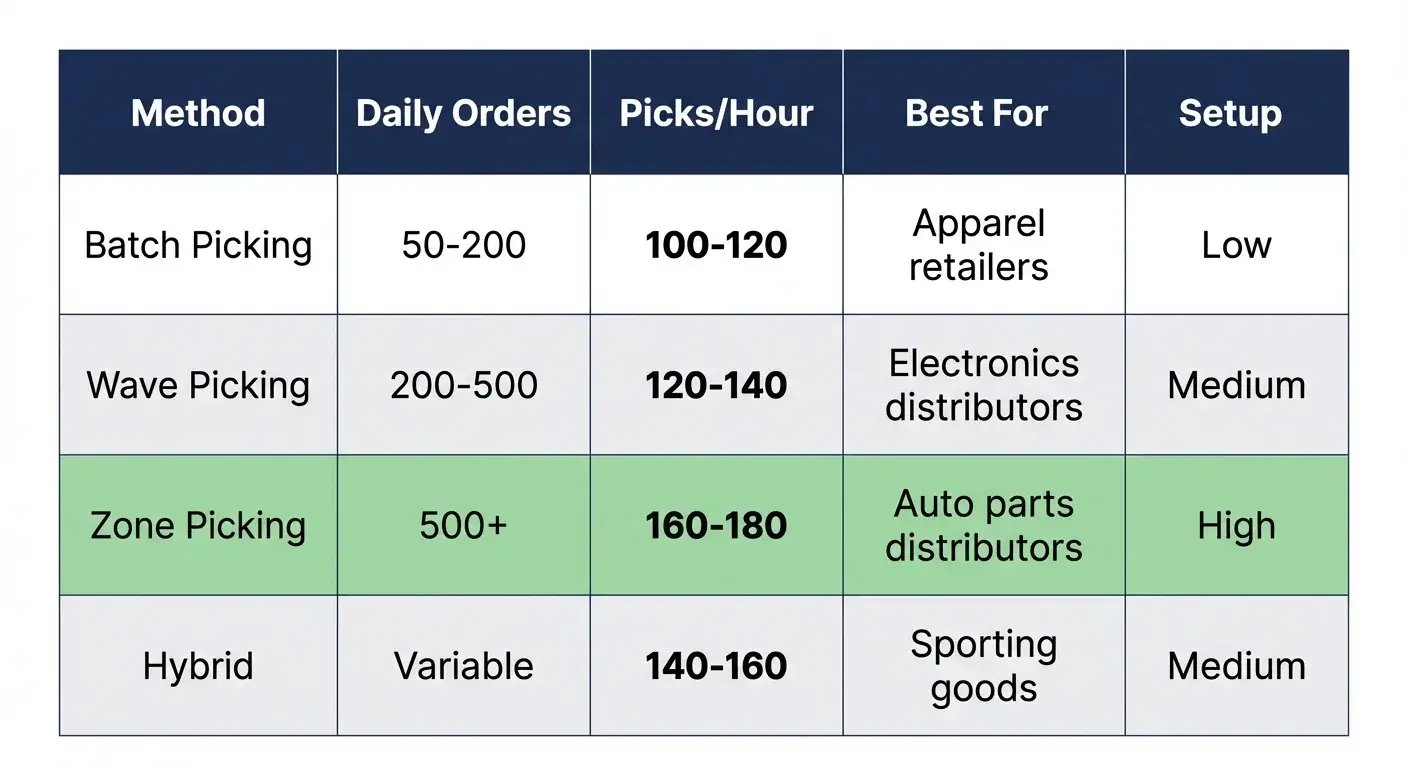
Batch Picking: 50-200 Daily Orders
Group 15-20 orders and complete them in one trip. A 16-compartment cart handles 16 orders simultaneously—each compartment gets labeled with an order number, and the picker drops items into the correct slot. This cuts picking time by 40-50% versus individual order processing.
Apparel retailers excel here because products are similar-sized and pack efficiently. Rush orders get their own batch to maintain service levels, while standard orders group by logical warehouse zones.
Wave Picking: 200-500 Daily Orders
Create three focused waves—typically 10 AM, 2 PM, and 4:30 PM to align with carrier pickups. Each wave processes 60-80 orders with multiple pickers working simultaneously. Packing stations never wait more than 5 minutes for picked orders.
Electronics distributors favor wave picking because it coordinates fragile item handling. All laptop orders get picked in the same wave, so the packing team sets up protective materials once rather than switching between standard and fragile protocols all day.
The software monitors completion rates and reassigns orders automatically to keep waves on track when pickers fall behind schedule.
Zone Picking: 500+ Daily Orders
Divide the warehouse into 4-6 dedicated zones and assign pickers who become experts in their territory. Auto parts distributors separate heavy and light items logically—engines and transmissions stay in Zone A near the loading dock, while filters and small parts live in Zone D where pickers aren't fighting forklift traffic.
Orders move between zones via tote handoff with 2-minute transitions. Each picker achieves 160-180 picks per hour compared to 100-120 in single-picker models—that productivity gain justifies the infrastructure investment.
Zone picking requires more management oversight and breaks down if one zone falls behind. For high-volume operations, it's the only method that scales efficiently.
Hybrid Approach: Maximum Flexibility
Smart operations don't lock into one method. A sporting goods distributor runs morning batch picking for overnight orders that need same-day shipping, then switches to wave picking for afternoon volume.
At 9 AM, the software automatically switches modes based on order profiles. Late orders with expedited shipping get batched for immediate processing. Standard orders wait for the first wave at 10 AM and flow through the zone system.
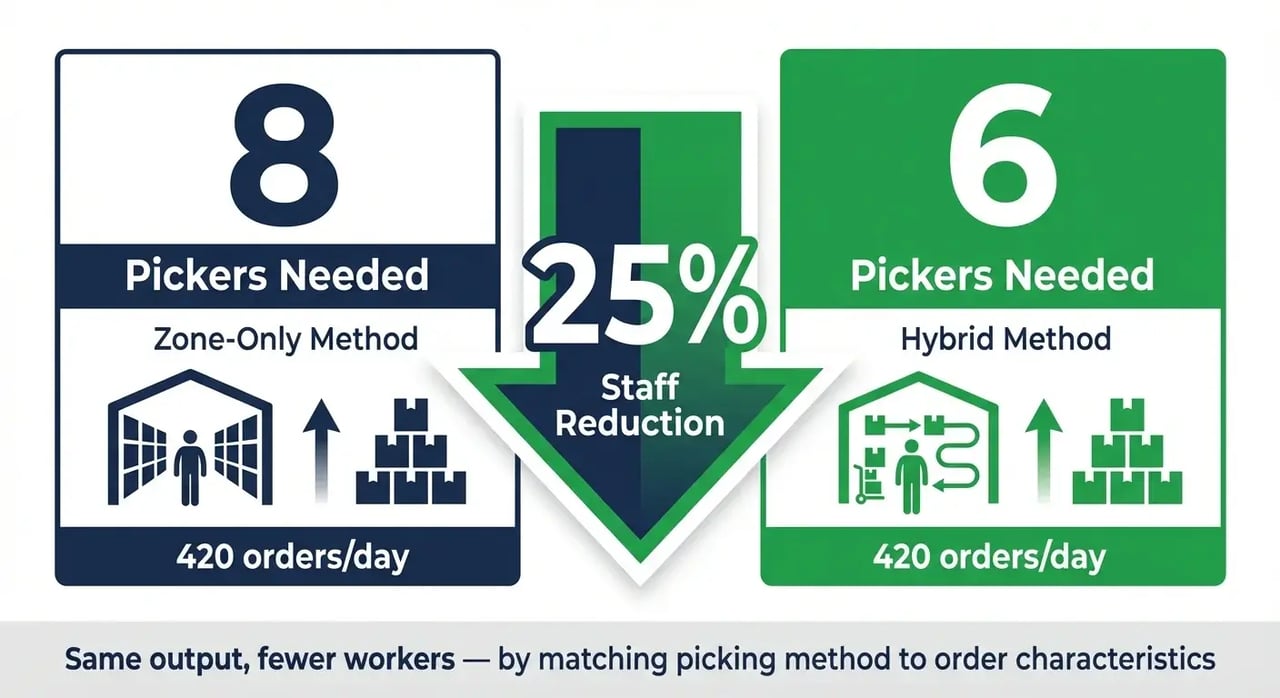
Results consistently beat single-method operations—420 orders completed with 6 pickers versus 8 pickers using zone-only approaches. That's 25% efficiency gain from matching method to demand patterns rather than forcing everything through the same process.
7 Non-Negotiable Features Your Pick and Pack Software Needs
Most warehouses buy pick and pack software that looks impressive in demos but falls apart under real-world pressure. Vendors show perfect barcode scans in controlled environments, then your pickers struggle with damaged labels and poor lighting. They promise "real-time inventory" but deliver 15-minute sync delays that create phantom stock issues.

Your software needs to handle daily warehouse chaos, not sanitized vendor demonstrations.
Real-Time Inventory with Bin-Level Precision
Your inventory system either knows exactly where every item sits, or it doesn't. No middle ground exists when pickers stand in aisles waiting for location updates.
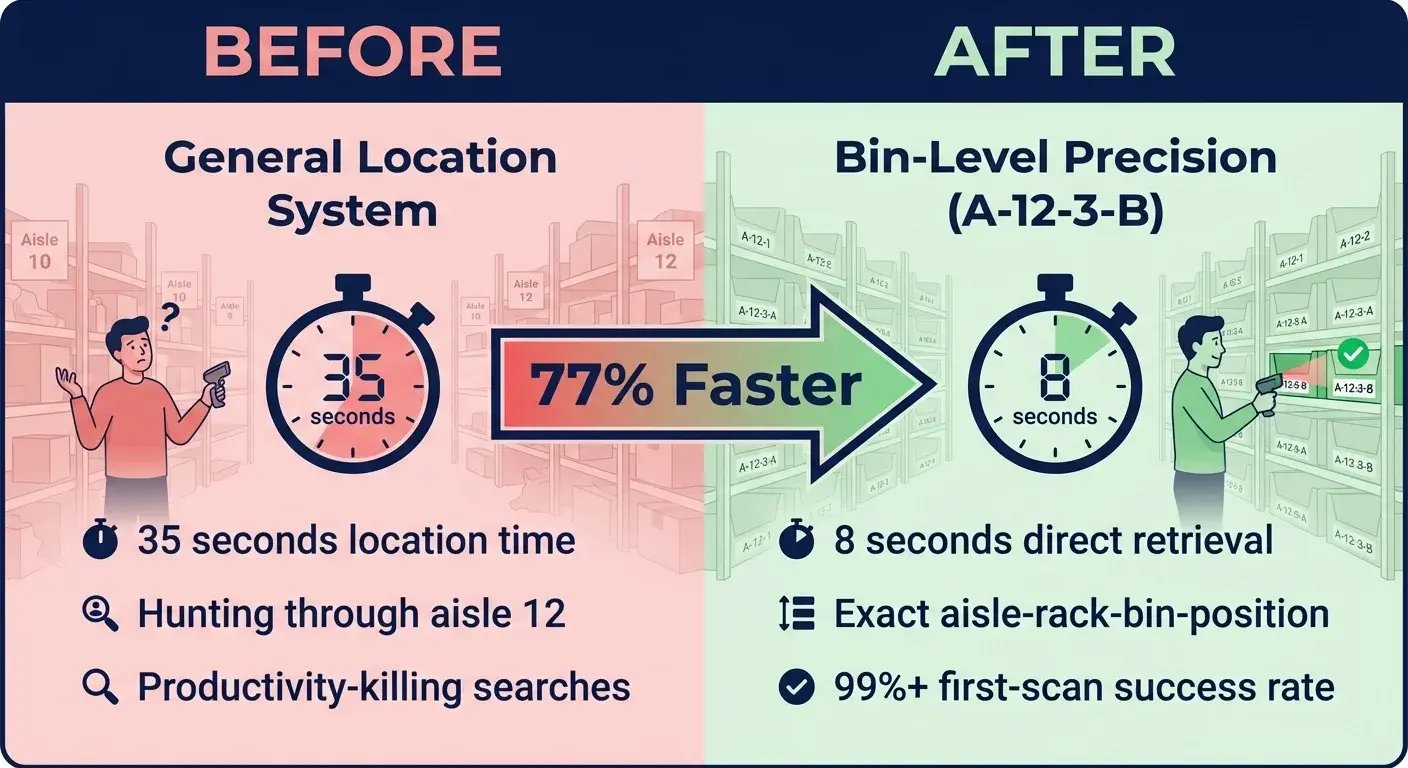
Sub-location tracking down to aisle-rack-bin-position level (A-12-3-B) eliminates productivity-killing searches. Instead of "somewhere in aisle 12," pickers get precise coordinates. Location time drops from 35 seconds of hunting to 8 seconds of direct retrieval.
Cycle count integration updates counts continuously without disrupting active picks. Inventory accuracy degrades daily through picking errors and receiving mistakes—systems that can't handle real-time updates create phantom stock issues that frustrate customers.
Mobile Barcode Scanning with Offline Capability
Barcode scanning accuracy determines everything downstream. Poor scan rates force pickers to manually enter SKUs, destroying the error prevention that justifies software investment.
Target 99%+ first-scan success rates. Below this threshold, pickers spend significant time rescanning items instead of picking. Standard Android devices achieve this performance with proper software algorithms.
Offline capability prevents connectivity failures that shut down operations. WiFi dead zones and network outages happen in every warehouse. Software should queue several hundred scans locally and sync when connection returns.
Algorithmic Cartonization Beyond Basic Rules
Box selection directly impacts shipping costs through dimensional weight calculations. Poor cartonization triggers surcharges adding several dollars per shipment on lightweight items.
Smart algorithms consider actual product dimensions plus packing material requirements. The software should know that a 12×8×4 box fits three t-shirts better than a 10×10×6 cube, even though both seem similar on paper.
Pick Path Optimization with Dynamic Rerouting
Static pick lists force inefficient warehouse traversal patterns. Dynamic routing calculates optimal paths through required locations and adapts when conditions change.
Real-time recalculation handles exceptions that break static routes. When items are out of stock, the system should reroute automatically rather than sending pickers to empty locations.
Multi-Carrier Integration with Business Rules
Rate shopping across multiple carriers captures shipping savings that compound quickly across high-volume operations. Manual carrier selection leaves money on the table because staff can't compare rates for every shipment.
Business rules automate carrier selection based on your specific requirements. You might prefer FedEx for high-value shipments due to better insurance coverage, or USPS for lightweight residential deliveries.
Performance Analytics That Drive Decisions
Picker-level metrics reveal training opportunities and process bottlenecks invisible in aggregate data. Track picks per hour, error rates, and distance traveled by picker. This data shows whether performance issues stem from training gaps, route inefficiencies, or system problems.
Exception reporting highlights edge cases causing disproportionate problems. The 5% of orders requiring special handling often consume 30% of management attention. Analytics should identify these patterns so you can address root causes.
API-First Architecture for System Integration
Your pick and pack software needs to connect with existing systems without requiring custom development for basic functionality. ERP platforms, ecommerce engines, and shipping tools should integrate through standard APIs.
REST APIs with documented endpoints and reliable uptime enable integrations that make warehouse software valuable. Poor API design forces expensive custom development and creates maintenance headaches when systems update.
SkuNexus provides pre-built connectors for major platforms with straightforward setup processes. The goal is operational integration, not technical projects consuming months of implementation time.
ROI Calculation: Proving the 4-Month Payback Period
Here's the math for a 10,000-order monthly operation. We've tracked similar returns across SkuNexus deployments, though results depend on your baseline efficiency.

Labor Efficiency: 43% Productivity Gain
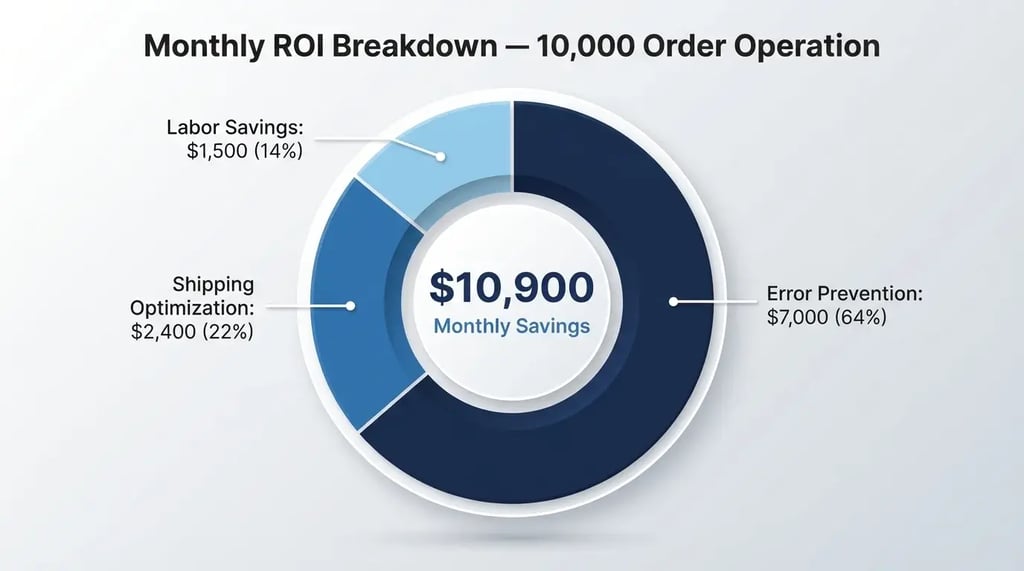
Operations averaging 35 orders per hour jump to 50+ orders per hour through route optimization and scan validation. At $18 fully loaded labor cost, that's $0.51 per order dropping to $0.36 per order.
For 10,000 monthly orders, the $0.15 savings equals $1,500 monthly. Overtime elimination adds another $800-1,200 monthly when regular shifts handle volume efficiently.
Error Prevention: $7,000 Monthly Recovery
Manual operations run 2-3% error rates. Each mistake costs $35 average to resolve—finding the wrong item, reprocessing, expedited shipping.
At 2.3% error rates, 10,000 orders generate 230 mistakes monthly costing $8,050. Post-implementation rates drop to 0.3%—just 30 errors costing $1,050. Net savings: $7,000 monthly.
Shipping Optimization: $2,400 Hidden Value
Rate shopping captures $1.50-3 per package on 40% of shipments where carrier pricing varies significantly. Conservative estimate: $2 average savings on 1,200 packages equals $2,400 monthly through automated carrier selection.
Investment Breakdown
Software licensing: $1,000 monthly for 10,000-order volume
Hardware: $8,000 upfront for scanners and mobile devices
Implementation: $15,000 for setup and training
Total first-year cost: $135,000
Monthly savings: $10,900
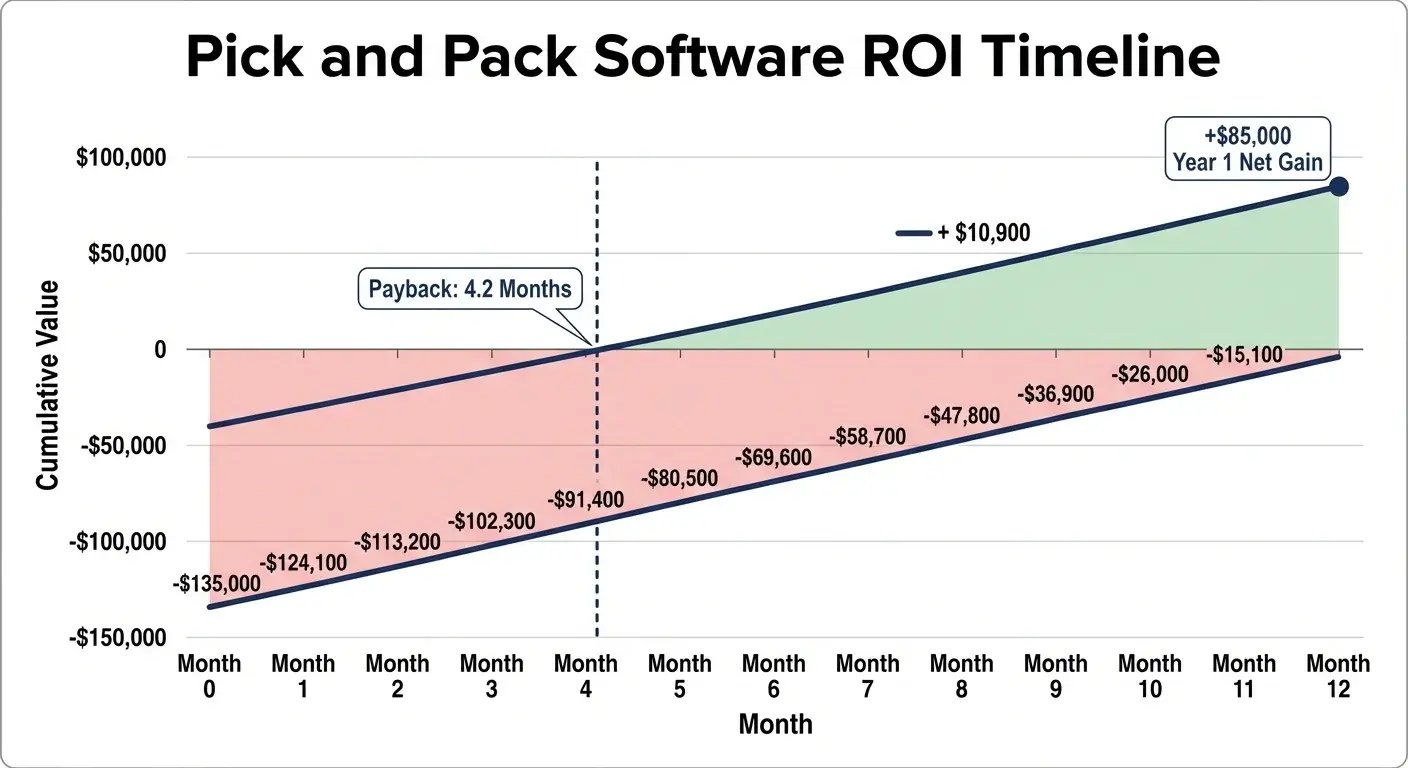
Payback period: 4.2 months
Implementation Roadmap: 30 Days to Full Deployment
Most warehouses drag implementation across 3-6 months because they treat software deployment like an IT project instead of an operational change. The facilities that succeed fast treat it like a process improvement initiative with clear daily milestones.

We've guided dozens of SkuNexus deployments through this 30-day schedule. The key is parallel workstreams—data cleanup happens while hardware deploys, training runs while pilot testing validates workflows.
Days 1-7: Data Migration and System Setup
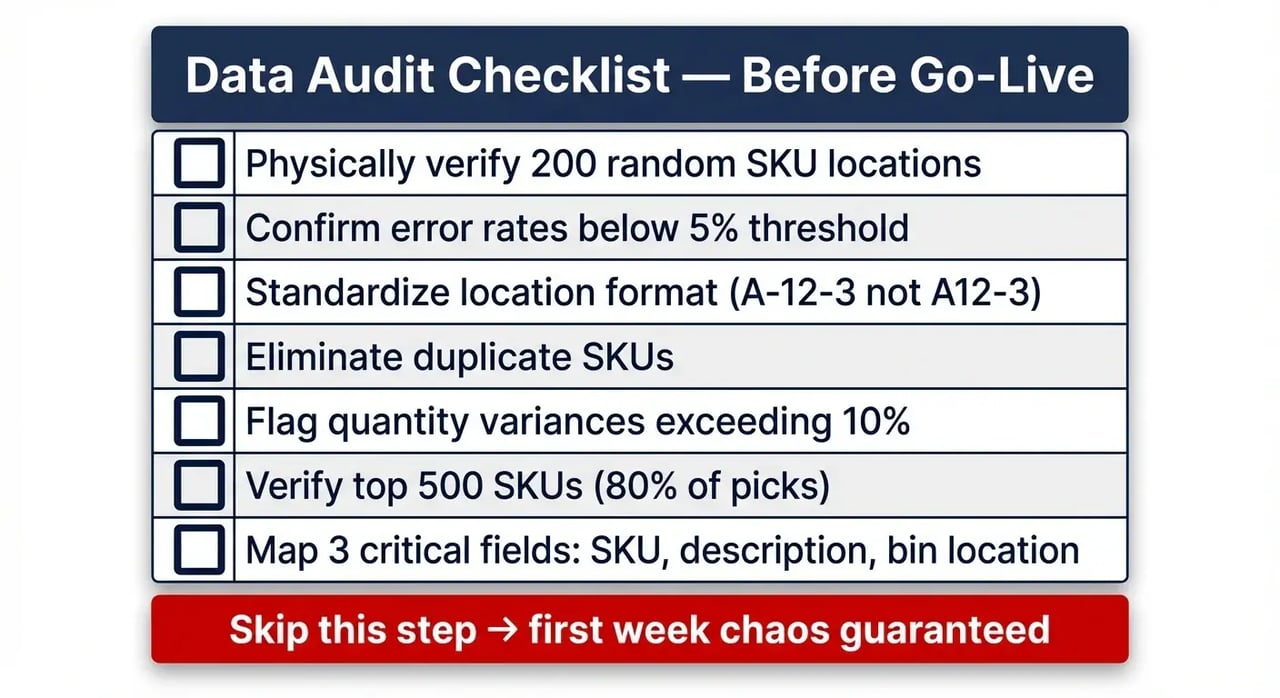
Clean your top 500 SKUs first—these represent 80% of daily picks and determine whether go-live succeeds or fails. Assign two staff members to verify bin locations physically. Error rates above 5% require complete cycle counting before cutover.
Map three critical data fields: SKU, description, and precise bin location. Skip product weight, vendor codes, and category tags initially—add these post-deployment. Focus on data that prevents pickers from hunting for items.
Set up user accounts with role-based permissions by day 6. Pickers get scan access but not inventory adjustment rights. Supervisors get full access.
Days 8-14: Process Design and Hardware Deployment
Configure picking methods based on your actual order patterns, not theoretical best practices. Analyze 90 days of order data to determine batch sizes and wave timing. Deploy mobile scanners and train three power users who become your internal support team.
Create SOPs with screenshots, not lengthy text descriptions. Show exactly where to scan, which buttons to press, and how to handle common exceptions.
Days 15-21: Staff Training and Pilot Testing
Run focused 2-hour training sessions for small groups. Process 50 test orders daily alongside your existing paper system. Target 90% accuracy and 70% of expected speed before full cutover.
Document the top 5 confusion points that emerge during pilot testing. Scanner positioning, batch picking compartment organization, and exception handling typically need the most clarification.
Days 22-30: Full Deployment and Performance Tuning
Switch to live operations with 48-hour paper backup running parallel. Monitor performance hourly and adjust pick routes based on actual bottlenecks, not theoretical optimization.
Fine-tune batch sizes and wave timing using real performance data. Achieve target metrics by day 30: 45+ orders per hour with sub-1% error rates.
Common Implementation Failures and Prevention Strategies
Three failures kill most implementations before they deliver value. Dirty data sends pickers hunting through empty bins, staff abandon scanning workflows that feel slower than paper, and integrations turn into months-long development projects.
Dirty Data: The Reality Check That Prevents Chaos
Wrong bin locations destroy picking productivity faster than any other factor. When your system claims SKU ABC-123 sits in location B-15-2, but the picker finds empty shelves, they waste 10-15 minutes hunting before calling for help.
Run a location accuracy audit before go-live: physically verify 200 random SKU locations across your warehouse. Error rates above 5% mean you need complete cycle counting before cutover. One customer ignored this step and spent three weeks debugging "software glitches" that were actually data problems.
Your audit checklist should cover location format consistency (A-12-3 versus A12-3), duplicate SKU detection, and quantity variances exceeding 10%. Clean data prevents the support tickets that consume implementation resources and frustrate staff during critical first weeks.
Staff Resistance: Making Scanning Feel Faster Than Paper
Pickers resist scanning because they believe it slows them down. The math proves otherwise—manual operations average 35 orders per hour with 2-3% error rates, while scan-verified picking hits 45+ orders per hour with under 0.5% errors.
The breakthrough happens when pickers realize scanning eliminates the 20-minute error resolution walks that kill their daily productivity numbers. Gamify accuracy with visible daily leaderboards showing picks completed per error. "Sarah: 847 picks, 0 errors" motivates better than abstract accuracy percentages.
One warehouse achieved complete staff buy-in within eight days using $50 weekly bonuses for zero-error performance combined with scan compliance. The key was making the benefits obvious rather than mandating new procedures.
Integration Nightmares: When Compatible Means Custom Development
Platform compatibility claims often hide expensive development requirements. Shopify orders typically flow smoothly into most systems. Amazon orders require custom field mapping for 14+ data points, consuming 40+ developer hours. WooCommerce falls between—standard fields work fine, but custom checkout fields break synchronization.
Prevent integration surprises by demanding sandbox testing before contract signature. Require vendors to process 100 test orders from each of your sales channels, covering order import, inventory sync, shipping confirmation, and return processing. That's 15+ connection points where things break in real operations.
Budget 2-3x quoted integration time for heavily customized platforms. "Compatible" often means "possible with significant development work"—not the plug-and-play experience vendors demonstrate.
Frequently Asked Questions
What's the actual cost of pick and pack software for a 50-order daily operation?
Budget $450-800 monthly for cloud-based systems handling 50 daily orders. That includes 5 user licenses, basic integrations, and standard support. Hardware adds $1,200-2,400 upfront for 4 Android scanners. Total first-year investment runs $6,600-12,000.
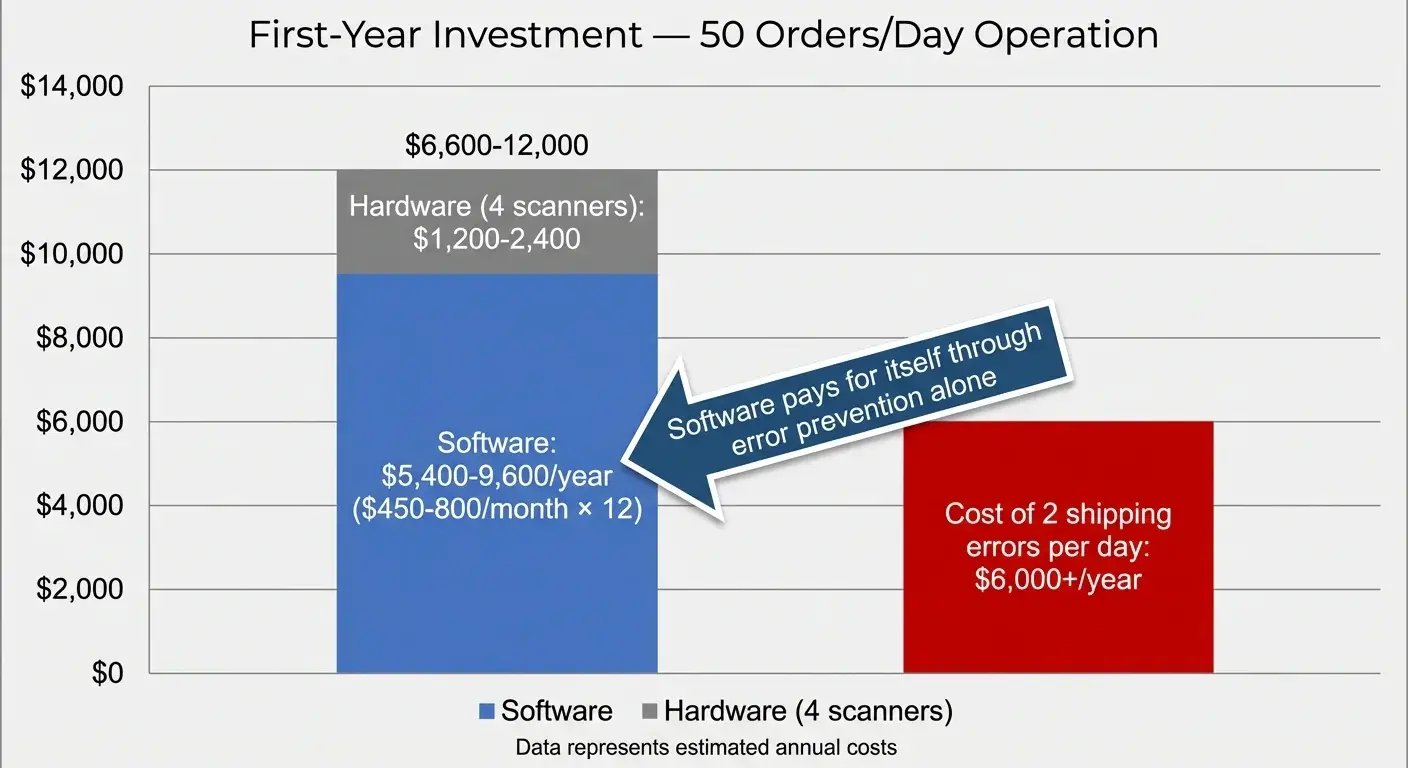
One mis-shipped pallet to the wrong coast hits you for $3,000+ in expedited freight and customer recovery. Operations pay for their entire software investment with just two prevented shipping errors.
Can pick and pack software integrate with our existing NetSuite ERP?
NetSuite integration takes 8-12 hours of configuration for standard field mapping. Most systems connect via SuiteScript APIs, syncing orders every 5 minutes. Critical data points include order status, inventory levels, and shipping confirmations.
Budget $2,000-3,500 for custom field mapping if you've heavily modified NetSuite's standard order structure.
How long before staff actually adopt new scanning procedures?
Staff resistance drops after day 8 of consistent use. Days 1-3 bring complaints about speed, days 4-7 show grudging acceptance, day 8 brings the breakthrough when accuracy benefits become obvious.
One warehouse went from 6 scan refusers to zero in 9 days using $50 weekly bonuses for zero errors with full scan compliance. Make the benefits visible rather than just mandating compliance.
What happens when internet connectivity fails during picking?
Modern systems store 500-1,000 offline transactions per device—enough for 2-3 hours of normal picking activity. Pickers continue scanning normally while the system stores data locally. When connection returns, all picks sync automatically.
Do we need expensive ruggedized scanners or will smartphones work?
Consumer Android devices in $30 protective cases handle most warehouse environments. Only freezer operations below -10°F require ruggedized units. Standard smartphones achieve excellent first-scan rates with modern software.
Save the $1,500 per ruggedized scanner unless you're picking frozen foods daily.
How quickly can we switch between batch and wave picking methods?
Switching picking methods takes 5 minutes of configuration changes. The real constraint is staff familiarity—allow 2 days for pickers to adjust workflows.
Can we start with one section of the warehouse and expand gradually?
Start with your fastest-moving SKUs—typically 20% of products generating 80% of picks. Get that section running smoothly before expanding to slower-moving inventory.