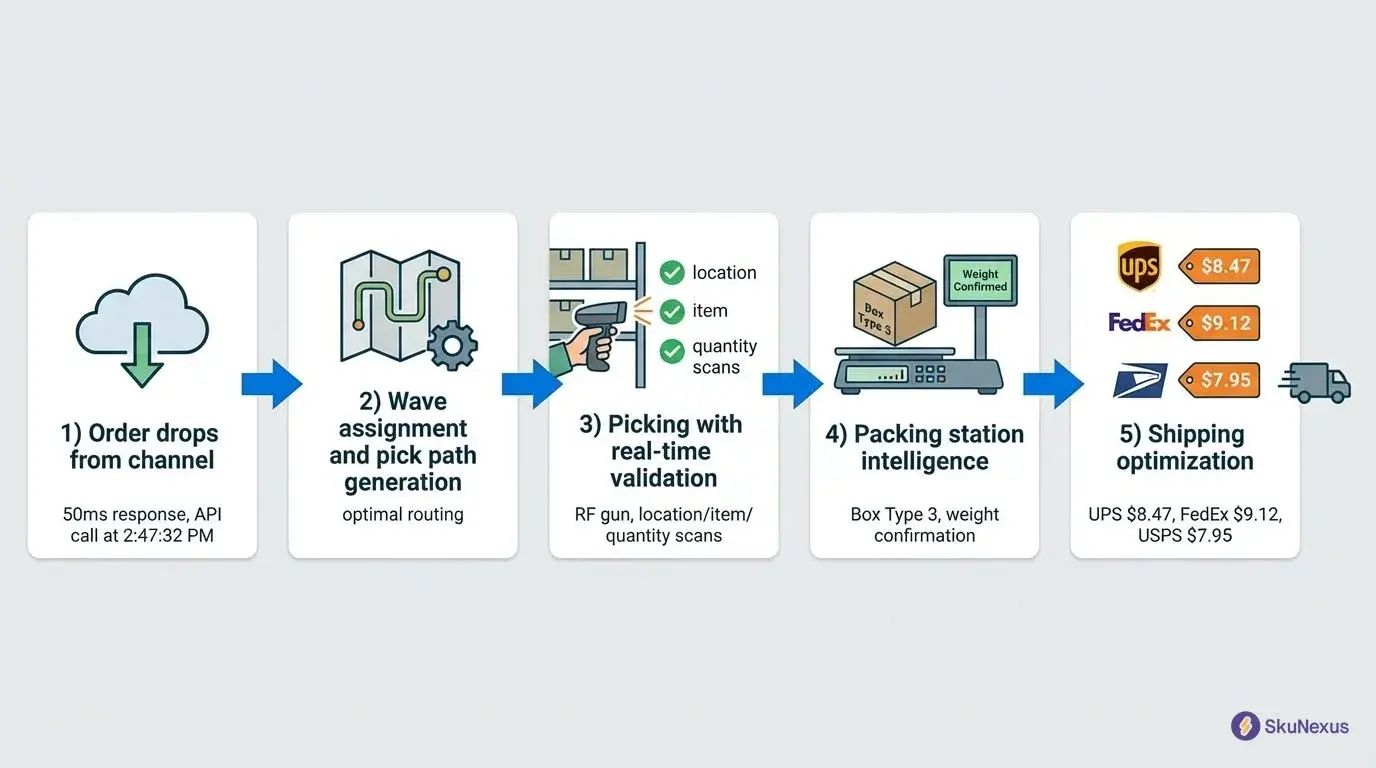
A barcode rollout runs in a fixed order: clean your item and location data, set barcode prefixes so every scan resolves to a product, location, cart, or tote, then pilot the scanned workflow in one area before going warehouse-wide. Data first, prefixes second, hardware third, pilot fourth.
How a Barcode Rollout Runs, in Order
This guide is written from implementation work, not from a spec sheet. SkuNexus has been building eCommerce operations software since 2018, and the ordering below is the ordering that holds up in a real warehouse.
What this guide covers:
-
The prep work that decides whether the rollout is boring or painful: workflow audit, item and location data, code format.
-
The build: labeling scheme, location and bin naming, printers, and the handoff into your WMS.
-
The rollout itself: pilot area, training, cutover, and the problems that show up in week one.
What Goes Wrong Without Scanning
If you run a warehouse without barcode scanning, manual data entry is slow and error-prone, and small mistakes compound. Stock levels drift from reality, pickers spend time hunting for misplaced items, and the wrong products ship. All of it traces back to a count nobody can trust.
The failure modes are specific, and buyers name them out loud. Across 78 buyer-eligible SkuNexus demo calls, buyers themselves raised overselling or running out of stock in 9 of them and picking or shipping the wrong item in 4, both of which are downstream of an inventory count that cannot be relied on.
Choosing Hardware and Software First?
This guide assumes you have already picked, or are close to picking, the scanner and the platform behind it. If you have not, start there instead: our team ran seven scanners through 92 days of live warehouse work in our tested guide to warehouse barcode scanners and barcode inventory systems, which also covers how the scanner, labels, network, and software fit together. Come back here for the rollout.
What to Know Before Implementing a Barcode System
Implementing a barcode system is not about slapping a code on a product. It changes how the warehouse records every move. Before the tech, lay the foundation: audit what is working and what is not, choose the barcode format, and confirm the hardware fits the job. Getting this part right is what makes the rollout smooth.
Assess Your Current Workflow and Pain Points
Before you think about hardware, look hard at your current workflow. Where are pickers wasting time hunting for products? Where do stock levels go wrong because of manual entry? Those are the pain points a barcode system removes, but first you have to name them.
Start with a workflow audit. Track inventory from the moment it hits the receiving dock to when it leaves for shipment, and talk to the team on the floor, who see the inefficiencies you might not. Write the bottlenecks down before you shop. "Pickers hunt for items in aisle 4" and "receiving keys quantities into a spreadsheet twice" are the kind of findings that tell you which workflow to scan-enable first.
Choosing 1D vs. 2D Barcodes
1D (one-dimensional) barcodes are the most common. They are the UPC codes you see on groceries: quick to read on any standard scanner, fine for tracking a SKU or basic stock level, but limited in how much they store.
2D barcodes, like QR codes, hold much more in a smaller space and can be scanned at any angle. The practical difference is this: a 2D code can carry more than an identifier, so a single label can hold a lot number, expiry, or order reference alongside the SKU. If you need any of that on the label itself rather than looked up from a database, choose 2D and buy imagers that read it.
Selecting Scanners and Devices
For most warehouses, wireless scanners let the team move without being tethered to a terminal, which means faster picking. With Bluetooth and Wi-Fi they sync to the warehouse management system (WMS) without delay, and SkuNexus works with most modern scanners, so the on-hand count changes the moment a product is scanned.
Handheld devices that combine scanning with inventory software let the team scan products, track stock, update orders, and process returns from one unit. Match the device to the job before you compare brands: fixed stations tolerate corded units, roaming pickers do not, and anyone climbing or carrying needs a hand free.
Designing Your Barcode System
With the foundation in place, build the system around your operation rather than a template: the labels themselves, how products are stored, and how it all feeds the WMS.
Building a Labeling System for Your Products
Your labels need to be reliable and unambiguous. Start with SKU numbers. Every product needs a unique SKU (Stock Keeping Unit), and the format should be consistent and readable for both people and scanners. A SKU can reflect product type, size, or location; "SHOE-BLK-9" might represent a black size 9 shoe.
Then decide on the barcode format. For most 1D use, Code 128 is a good fit: compact and able to encode alphanumeric characters. For 2D, QR codes give more room for extra product data. Test a small batch of labels before rolling out across the full inventory, and use durable stock. Warehouse environments are tough, so waterproof or scratch-resistant labels save trouble later.
Organizing the Warehouse for Scanning
A barcode system is only as good as the layout that supports it. Store high-demand items in easily accessible areas near packing stations or the front of the warehouse to cut picker travel. Group products that are frequently ordered together so pickers are not running end to end.
Label shelves and bins with their own barcodes so a picker can scan the shelf to confirm the right location before scanning the product. Layout and labeling are one job, not two. If bin labels are unreadable from the aisle or two locations share a name, the scan step gets skipped and the count drifts again.
Integrating with Your WMS
The point of a barcode system is how the data flows, not the labels or scanners on their own. It has to work with your Warehouse Management System (WMS), and integration latency is the thing to pin down.
As soon as an item is scanned, whether during receiving, picking, or shipping, the count changes in your WMS. That part is immediate. Pushing the new count out to your sales channels is not: connectors poll on an interval, 5 minutes by default on Shopify and 60 on the other supported platforms. Ask a vendor for the number rather than the phrase.
The integration test worth running before cutover: scan one item in receiving, then confirm the quantity moved in the WMS, on the storefront, and on the location record. If any of the three lags, fix that before more scanners reach the floor.
How to Implement a Barcode System, Step by Step
With the strategy designed and the warehouse organized, it is time to stand the system up: printers and software first, then training, then a pilot.
Setting Up Printers and Software
Start with a reliable barcode printer sized for your volume. Industrial-grade printers handle large runs without dropping label quality; Zebra Technologies and Honeywell are common choices, but pick what fits your needs.
Once the printer is set up, configure your barcode software to design, print, and manage labels. Create templates for each label type, whether for products, shelves, or shipping cartons, and include the SKU, product description, and any other details you need. Then test: print a short batch on the exact stock and printer you will use in production, and scan those labels with the exact device the operators will hold. Label problems are cheap to fix at ten labels and expensive at ten thousand.
Training Your Staff
Even the best system is useless if the team cannot use it. Every team member should know how to scan, what the system is tracking, and how to handle a barcode that will not scan or a record that does not update. Make the standard operating procedures for scanning during picking, packing, and shipping clear.
Use hands-on training. Set up mock workflows where the team practices scanning items, updating inventory, and tracking shipments, and assign a few barcode champions who know the system well and can help others. Train on the exception paths, not just the happy path. Most week-one support tickets are not "how do I scan" but "what do I do when the scan is rejected, the bin is empty, or the label is torn."
Running a Pilot Before Full Rollout
Before rolling out across the whole warehouse, run a pilot in a controlled area. Pick a small section or a single product category and track everything: how smoothly scanning goes, how accurate the inventory updates are, and where bottlenecks show up. Watch the real-time data flow between the barcode system and the WMS.
A two-week pilot on high-traffic products surfaces the boring failures early: label sizes that scan poorly at arm's length, bins whose labels sit behind stock, and dead spots where the read never reaches the server. Once the pilot runs clean, roll out to the rest of the warehouse.
Troubleshooting a Live Barcode Rollout
Even with good preparation, some things break in week one. The common ones have quick fixes.
Scanner Malfunctions and Read Errors
If a scanner will not read, first check for dirt or smudges on the lens; a wipe-down solves it more often than you would expect. If the barcode itself is the problem, it may be too small, faded, or damaged, so reprint at higher resolution or increase the label size.
Check scanning distance, since some scanners work best within a set range, and check contrast: a barcode printed with poor contrast is harder to read, so use dark codes on light backgrounds. Finally, keep scanner firmware up to date, because older firmware can cause glitches.
When Integration Does Not Work
Nothing is more frustrating than scanning an item and not seeing it in the WMS. Pinpoint where the breakdown is. First, confirm the network connection is stable, since real-time updates depend on it and a poor connection causes lag or dropped updates. If the network is fine, check the API settings on both the barcode system and the WMS so they use the same format with the right permissions.
Then review the data mapping between the two. Fields mapped wrong cause scanned data to get lost or misread, for example a SKU not syncing to the correct WMS field. SkuNexus support can help troubleshoot integration issues, so reach out if you get stuck.
Label Placement and Durability
Poor placement or cheap labels defeat a good system. Place labels where they are easy to see and scan without moving the item much, and avoid edges or corners that bend and wear. Leave enough flat surface for the scanner to read the whole code in one motion.
Durability matters just as much. In harsh environments with moisture, heat, or dust, use waterproof and scratch-resistant materials so the code stays scannable.
Optimizing Operations After Rollout
Once the system is live, the value comes from what the scan data lets you do next.
Inventory Visibility
Barcodes close the gap between the physical move and the record of it, so knowing what is in the warehouse stops depending on someone remembering to write it down. Each time a product is scanned, the count changes in your WMS immediately, and each connected channel picks that change up on its next sync rather than at the same instant.
With scanning at receiving, picking, and shipping, inventory movement is recorded at each step instead of reconstructed at month end. That visibility matters most when you manage inventory across eCommerce platforms, retail, and wholesale channels.
Order Fulfillment and Fewer Picking Errors
Scanning during the pick is what turns the barcode into a control rather than a record. In SkuNexus the scan is validated against the fulfillment, so the wrong item is rejected at the shelf instead of discovered by the customer.
SkuNexus takes this further with automated order decision rules that route orders to the closest warehouse or optimize picking sequences based on product locations. Less running around means faster fulfillment.
Data for Forecasting and Reporting
Barcode data is not just for tracking inventory. Every scan collects data you can use to forecast and report. Analyzing it shows which items move quickly, which sit on the shelf, and where seasonal patterns appear, which helps you plan stock orders and avoid both overstocking and stockouts. SkuNexus also generates custom reports from barcode data, whether you want picker efficiency, stock turnover, or fulfillment times.
FAQs: Implementing Barcode Systems in Warehouse Management
How long does it take to implement a barcode system?
It varies with warehouse size, workflow complexity, and how prepared you are. For a small to medium-sized warehouse, expect roughly 2 to 4 weeks, covering printer setup, software configuration, staff training, and pilot tests. Larger or more complex operations take longer, but a focused plan can have the system live within a month.
What are the costs involved in barcode system implementation?
Budget by component rather than by a single number, because the mix is what moves: scanners and the count of them, a label printer per print station, label stock in the material and size your environment needs, the software that receives the scans, and the internal hours for data cleanup and training. Sites with cold storage, outdoor yards, or heavy drop exposure spend more on hardware and less on everything else.
The cost that gets missed is the data work. Cleaning item and location records is unglamorous, it happens before a single label prints, and skipping it is what turns a two-week rollout into a two-month one.
Do I need a WMS to implement a barcode system?
You can technically run a barcode system without a full Warehouse Management System (WMS), but it is far from ideal. A WMS is what lets you automate processes, track inventory as it moves, and optimize order fulfillment from barcode data. Without one, you use scanning in a manual fashion, which defeats the point of automating warehouse tasks.
Can barcode systems handle high-volume operations?
Yes. The more volume you manage, the more scanning earns its keep, whether you track hundreds or tens of thousands of SKUs. SkuNexus supports operations shipping 50 to 20,000 orders a day, and volume is exactly where the check happens at the shelf and the packing bench rather than in an end-of-day reconciliation.
How SkuNexus Handles Warehouse Barcoding
For a concrete reference point, here is what the moving parts of a rollout map to inside SkuNexus.
- Prefixes decide what a scan means. Barcode prefixes are configured per warehouse so the system auto-detects whether a scanned code is a product, a location, a cart, or a tote, and acts accordingly.
- Locations carry their own barcode. Each bin, shelf, or staging area is created with a label, a scannable barcode value, a location type, and rules such as pickable and allow multi-SKU. Locations can be bulk-created with naming patterns.
- Labels are built, not bought. The label template builder places barcodes, text, images, and dynamic variables such as order number and SKU on your own stock.
- Receiving records by scan. The scan interface takes a product barcode and a quantity per scan, with manual SKU search as the fallback.
- Picking validates the scan. Items are presented in walk-path order with SKU, quantity, and location. Scanning the item confirms the pick; a short pick takes the real quantity and a reason, and the remainder routes by your configuration to another warehouse, to hospitalization, or to back-order.
- Packing runs as a scan loop. Pack Station moves an operator through load, pack, ship, and done, starting from a scanned fulfillment barcode with the box chosen before packing begins.
- Counts reuse the same barcodes. Cycle counts walk locations in path order and require a location scan to confirm the operator is in the right place before quantities are recorded.
- Each warehouse can differ. Pick method and pack verification level are part of per-warehouse workflow configuration, so a second site does not have to run like the first.
Getting Started with SkuNexus
If you want to see the workflow above run against your own SKUs, bin naming, and scanners before you commit to a rollout, book a demo and bring a real order with you. A working session on your data is more useful than a feature tour.
Rollout Checklist
The actions from this guide in order, with a column to track your own progress.
| Action Step | Description of Action Step | Status (Fill In Yourself) |
|---|---|---|
| Assess Current Workflow | Identify bottlenecks and inefficiencies that can be improved with a barcode system. | |
| Choose Barcode Technology | Select between 1D or 2D barcodes based on your warehouse needs. | |
| Set Up Barcode Printers & Software | Install and configure printers, and test your barcode software. | |
| Train Staff on Barcode Usage | Ensure your team is comfortable using scanners and following proper workflows. | |
| Conduct a Pilot Run | Test the system in a controlled environment before full implementation. | |
| Address Common Challenges | Troubleshoot scanner malfunctions and fix label placement issues. | |
| Integrate with WMS | Ensure real-time updates and smooth data flow between your barcode system and WMS. | |
| Optimize Warehouse Layout | Organize your warehouse for maximum efficiency and ease of scanning. | |
| Monitor and Scale | Use barcode data to track performance and scale the system as your business grows. |
Related Resources
-
Barcode Programs for Inventory: Top Software Solutions Explained
Learn about barcode programs for inventory management. -
Scannable Inventory System: The All-In-One Solution
How a scannable inventory system can streamline operations and improve accuracy. -
Online Sales and Inventory Management System: The Complete Guide
How an online sales and inventory management system connects barcode strategy with multichannel sales. -
Best Barcode Software for Warehouse Management: Ultimate Guide
Barcode software for warehouse management, for teams comparing platforms rather than devices. -
Best Cloud-Based Warehouse Management System
A cloud-based WMS can be the answer to optimizing your barcode integration. -
Best Inventory Tracking Software with Barcode Scanner
Inventory tracking software paired with barcode scanners for real-time visibility. -
Best SaaS WMS Solution and Guide
Why a SaaS WMS suits growing businesses that need integration with barcode systems. -
Best Shopify Inventory Management Software
Managing inventory on Shopify? Software to integrate with your barcode system. -
Auto Parts Inventory Management Guide
Tailored for auto parts inventory management with barcode tracking tips. -
Best Ecommerce Warehouse Management System
How an eCommerce WMS supports barcode-driven receiving, picking, and packing.
Where to Go Next
Still choosing devices and software? Start with our tested guide to warehouse barcode scanners and barcode inventory systems. Ready to run this sequence on your own data? Book a demo.
About The Author
Yitz Lieblich (Itzchak Lieblich) is founder and CEO of SkuNexus. He has worked in eCommerce since 2007, founded Web Solutions NYC that year, and started SkuNexus in 2018 to run inventory, order, and warehouse operations for merchants shipping 50 to 20,000 orders a day. He has been hands-on in hundreds of warehouses across auto parts, food and beverage, apparel, B2B wholesale, and retail/D2C, with merchants ranging from mom-and-pop startups to Fortune 100.
Ready to Transform Your Operations?
See how SkuNexus gives you full control over inventory, orders, warehouse, and shipping.
Schedule a Free Demo →
Yitz Lieblich
CEO & Founder, SkuNexus
Yitz Lieblich is the Founder and CEO of SkuNexus. He has spent 19 years in eCommerce, starting in 2007 when he founded Web Solutions NYC, an eCommerce agency he still leads today. His approach to inventory, order, and warehouse management did not come from a whiteboard. It came from the floor. Across nearly two decades, Yitz has worked with merchants of every size, from mom-and-pop startups to Fortune 100 enterprises, across auto parts, food and beverage, apparel, B2B wholesale, and retail/D2C. He has walked through hundreds of warehouses, watching where operations lose time, money, and orders, with one goal: optimize the operation and make it easier for the merchant. That hands-on pattern is what led him to build SkuNexus in 2018 as a full operational platform. The idea was simple. Configurable infrastructure that bends to each merchant workflow, supporting businesses that ship anywhere from 50 to 20,000 orders a day. A custom development background runs through everything he builds. When SkuNexus writes about fulfillment, WMS, or multi-channel inventory, it comes from operations Yitz has seen and solved firsthand. First as an agency partner since 2007, and now as the architect of the platform.
Keep Reading
WooCommerce Warehouse and Inventory Management
September 16, 2026