WooCommerce will happily track one number per product forever; a warehouse is where that stops being enough. Here is where the built-in stock settings end, and what replacing them as the system of record actually involves.
What WooCommerce's built-in stock management actually does
WooCommerce inventory management is the practice of tracking stock levels for the products a WooCommerce store sells, whether through the platform's built-in stock settings, a plugin that extends them, or an external inventory or warehouse system connected to the store. At its core it means keeping inventory levels in the storefront synced with what can actually be shipped, so the store neither oversells stock it does not have nor hides stock it does.
The built-in layer covers more of that job than it usually gets credit for. As WooCommerce documents its own stock settings, they provide per-product stock control: enable stock management on a product or variation, enter a quantity, and the store maintains that count and the product's stock status as orders come in. Store-wide defaults live under WooCommerce > Settings > Products > Inventory; per-product and per-variation overrides live in the Inventory tab of that product's Product data box, including on variable products where each variation carries its own stock control. The settings screens cover:
- Manage stock toggle and quantity - per product, or per variation on a variable product.
- Stock status - in stock, out of stock, or on backorder.
- Backorder handling - do not allow, allow, or allow but notify the customer.
- Low stock and out of stock thresholds - store-wide defaults with per-product overrides, tied to notification emails for the store admin.
- Out-of-stock visibility - an option to hide sold-out items from the catalog.
- Hold stock for unpaid orders - a minutes value for reserving stock against pending orders.
- Bulk edit - change stock status, backorder handling or quantity for several selected products at once from the product list, scoped to whichever page of the list you are viewing.
For a single store shipping from a single room, with a catalog you can hold in your head, that set of settings plus a disciplined counting habit is a legitimate answer. Nothing here needs replacing on principle.
The boundary shows in those same screens. There is one quantity per product - nothing in the settings describes a second stock location, a bin, a receiving or putaway step, a pick list, or a pack station. And the store knows only about itself: no part of WooCommerce's stock settings is aware that the same units may be for sale somewhere else.
Where WooCommerce inventory management runs out
WooCommerce tracks how many units you own. It does not track where they are, who is picking them, or what else is selling them. Those three gaps produce most of the pain.
Orders that never reach the warehouse
The assumption that every paid order lands in your queue is worth testing. A minute-by-minute log reconstruction on one storefront proved that the storefront's search index had dropped thirteen paid orders before they were ever handed over. That failure is invisible from the storefront side - the customer paid, the order exists, and nothing in the warehouse ever knew about it.
Counts that drift between the screen and the shelf
Inventory accuracy measures how much of what the system says matches what the shelf actually holds. A single quantity field cannot tell you where a mismatch came from, which is why race conditions survive so long; one such bug - two pickers, one unit - was diagnosed only by replaying the client's workflow against a database copy.
Supplier data that changes underneath you
If any part of your availability comes from a vendor feed, the feed is a dependency you do not control. In one case a distributor was caught silently renaming its inventory file, which is the kind of change that fails quietly rather than loudly.
Catalogs that outgrow the admin screen
Editing stock a product at a time stops being viable well before most people admit it. Catalogs in the tens of thousands of variants have run behind single storefronts - at that scale nobody manages stock through the admin product list.
The plugin tier: what it adds, and what it can't change
Between the built-in settings and a full warehouse system sits a middle tier: plugins that install into the same WordPress dashboard and extend what the product list can do. As a category, they add a single screen with more control over every product at once - editable stock quantities, SKUs and prices inline, without opening one product at a time. Most add supplier records and purchase orders, so restocking has a paper trail instead of a memory. Many add reorder-point alerts pegged to sales velocity rather than a flat threshold, plus demand forecasting built from historical sales data. Several add CSV import and export, and reporting beyond WooCommerce's own stock report.
What the category cannot change is the architecture underneath it. A plugin still runs inside the WooCommerce database: one quantity per product, no concept of a physical location, no picking or packing workflow, and no visibility into what another storefront or marketplace has sold. It makes that single number easier to manage at scale; it does not add a second number for a second location, or coordinate that number across sales channels the way a connected warehouse system does. The tier above native WooCommerce stock management is plugins that extend it, not systems that replace it.
The plugin tier is the right stopping point for a lot of stores. If everything sells from one place through one channel, and the catalog has simply outgrown what one person can review a product at a time while stock still lives in a single room, a plugin adding bulk editing, supplier tracking and forecasting on top of WooCommerce's own settings is a complete answer. It stops being enough at the same three points native settings do: a second physical location, a second selling channel drawing on the same stock, or a pick-and-pack operation that needs more than a product list to run.
One pile of stock, several storefronts
If the same item sells on more than one site, the correct model is one warehouse SKU, many channel listings, and one inventory count. The warehouse knows about products; the websites know about listings; the listing is the bridge between them.
The arithmetic follows automatically: a sale on any one channel decrements the single warehouse count, and every other listing re-computes from that new number. Disabling a listing cuts off updates to that channel alone, leaving on-hand and the other channels untouched. The logic holds regardless of how many sales channels are involved - two or a dozen, the warehouse count is still the one number everything else reads from. The full model, worked examples included, is in our multi-channel inventory management guide.
Two details matter to anyone running WooCommerce alongside another storefront. The channel SKU does not have to match your internal SKU - an order arriving with the channel's own SKU is resolved through the listing back to the warehouse product. And the deliberate exceptions live on the listing rather than the product: an inventory cap, a reserve pool, a safety stock override and an allocation priority can each be set per channel.
Be clear-eyed about marketplaces: Amazon and eBay have no active connector adapter and cannot be connected directly. In production, marketplace and ERP order flows have instead been carried over SFTP file pipes.
Running a WooCommerce warehouse: locations, bins and picking
A warehouse management system, or WMS, is the layer that handles the physical side WooCommerce has no model for: where stock sits, how it gets picked, how it is packed, and what happens when it comes back. The storefront keeps selling; the WMS becomes the system of record for the count.
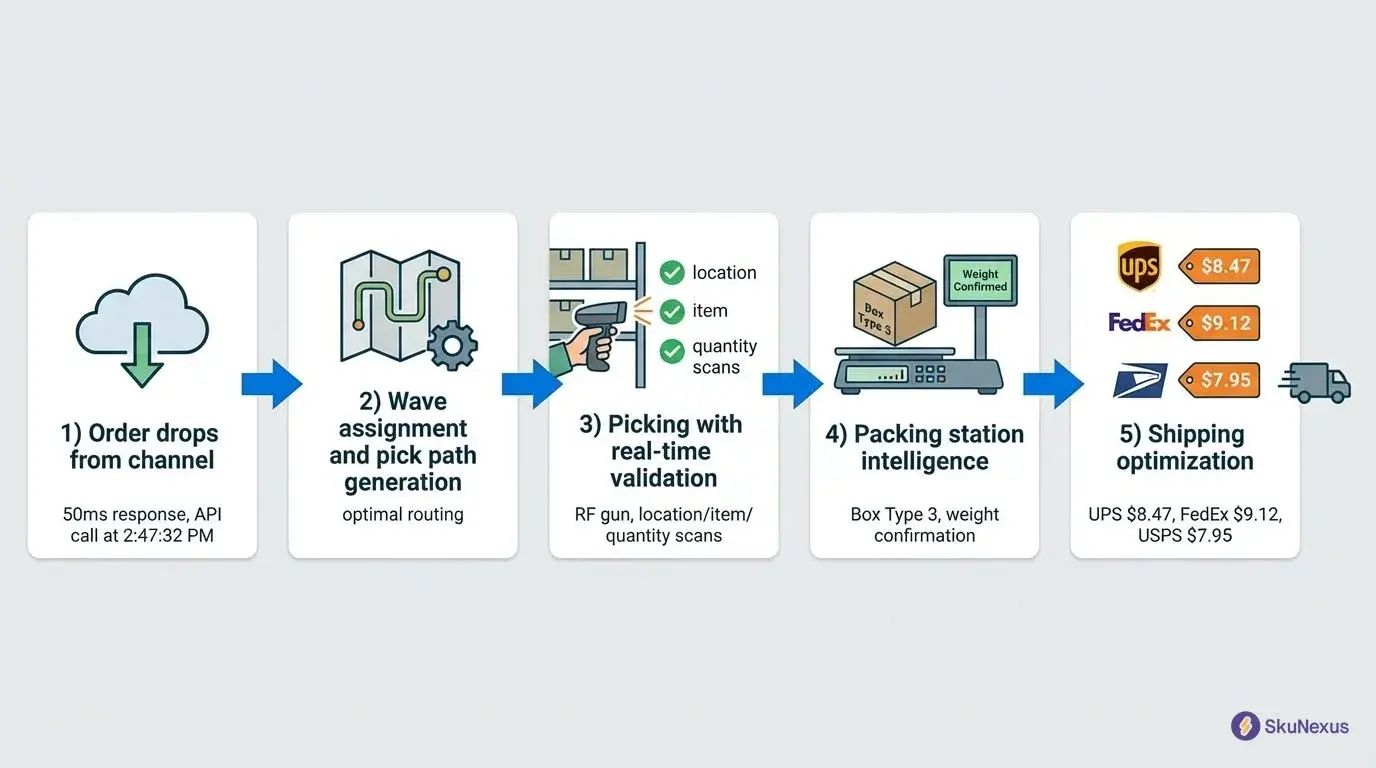
Concretely, that means pick and pack workflows rather than a printed order list - single picks, wave picking and pack stations, with an exception queue and a returns and RMA path for the items that do not go cleanly out the door. It also means stock has an address. One trading-card operation runs 8,100 bin locations behind its storefront, a level of granularity no per-product quantity field can express.
Native, plugin, or WMS: which tier matches your operation
Stay on WooCommerce's built-in stock management when the operation matches its assumptions: one selling channel, one place the stock physically sits, a catalog small enough to audit by eye, and a pick process that one person can hold in their head.
Move up to the plugin tier when the catalog or the admin workload has outgrown that, but the underlying operation has not: still one location, still one channel, just too many products to manage one at a time. A plugin's bulk editing, supplier tracking and forecasting solve an admin-screen problem, not a warehouse problem - if the pain is clicking into products one by one rather than where the stock physically sits, this tier is the fix, not a WMS.
Start looking at a WMS when any of these are true:
- Stock sits in more than one location, or you have started tracking bins on a spreadsheet beside the admin.
- The same units are sold on more than one channel and you are manually holding back a buffer to avoid oversells.
- Daily pick and pack volume needs more than one person working at once, which is where race conditions and short picks begin.
- Cycle counts keep finding the same drift and nobody can reconstruct what caused it.
- Availability depends on supplier files or an ERP, so your stock truth arrives from outside the store.
The numbers worth watching before you decide
Keep the measurements plain and unbenchmarked - what matters is your own trend, not someone else's published figure.
- Inventory accuracy - the share of records that match the physical shelf.
- Stock-out rate - the share of sellable items unavailable when a customer wanted them.
- Inventory turnover - cost of goods sold across a period, divided by the average inventory held during it.
- Oversell rate - orders accepted that could not be filled from stock you actually had.
- Order aging - how long orders sit before anything happens to them.
Aging is easier to see once orders carry a real status rather than a single "processing" bucket - the gap where WooCommerce order management usually moves to the warehouse system too. Order records separate open, in fulfillment, partial, on hold, cancelled and closed, and can be filtered by the source they arrived from.
How the sync actually works, and where it can lie to you
This is the part vendor pages skip. Order ingestion runs on polling: the connector pulls new orders on a configurable interval, so an order placed on the store can take up to one full interval to reach the warehouse. Webhooks are supported where the platform offers them, WooCommerce included, but they supplement polling to detect divergence rather than replacing it - a missed webhook should never mean a missed order.
Three configuration facts decide whether the numbers stay honest:
- Sync direction per entity. Orders, products, inventory, customers and fulfillment notifications are each set independently to inbound, outbound, bidirectional or disabled.
- Location mappings. External locations must be mapped to warehouses, or inventory will not push correctly.
- Conflict strategy. When both sides changed the same record, the connector resolves it by source wins, newest wins, or manual review. Choosing this deliberately is what stops a storefront edit from silently overwriting a counted quantity.
Connecting a WooCommerce site uses the store URL plus a consumer key and secret generated in the WordPress admin with read/write permission.
Integrations fail; the question is what happens next. Self-healing behavior has shipped in production deployments - automatic retries on a widening schedule, lookback windows that took missed orders down to a zero confirmed by audit, request timeouts so a storefront outage cannot wedge a queue, and quarantine folders for failed files. The design was proven the hard way: a client's storefront was deliberately taken down for four hours to test the retry system, and zero failed jobs remained afterward.
The audits are the evidence that matters. A full-day pull-log audit for a trading-card retailer concluded "whole day has been covered"; a complete missed-order check for an auto-parts retailer found exactly one recoverable order; a three-month historical re-import for a branded-merch fulfiller produced exactly three failures, matching the three storefront products that genuinely had no SKU.
What to ask before you move the system of record
Ask how long it takes and what shape the work is. Documented implementations have run from about nine weeks at the light end to about six and a half months where the scope took in POS, ERP pipes or multiple distributor integrations; the phase-by-phase breakdown is in our WMS implementation and go-live checklist.
Ask how changes get tested before they touch your orders. Examples on record include a thirteen-scenario cancellation-sync test matrix covering split and non-split orders against cancel and refund across fulfillment states, 118 shipping mappers client-verified on a development environment before a carrier swap, and an independent QA re-derivation of a rebuilt replenishment formula.
Ask what happens when something big changes underneath you. Five zero-downtime scale events are on record, covering storefront, carrier, warehouse and data-growth changes without taking fulfillment offline.
If your WooCommerce store is one channel, one location and a catalog you can count, the built-in settings are the right tool and this decision can wait. If stock is in several places, selling through several channels, and being picked by several people at once, the count needs to live where the work happens.
WooCommerce inventory questions, answered
Does WooCommerce do inventory management?
Yes, at the product level. WooCommerce's own settings let a store track a quantity per product or variation, mark items in stock, out of stock or on backorder, flag low stock to the admin, and hold stock briefly against unpaid orders. What those settings do not describe is anything physical - locations, bins, receiving, picking or packing - so a store running its own warehouse typically pairs WooCommerce with a system built for that side of the work.
What are the disadvantages of WooCommerce?
For most stores, fewer than its reputation suggests; the platform is capable and widely extended. The limits that matter show up on the operations side: stock is a single number per product, there is no model of where inventory physically sits, and the store cannot see units committed on other channels. These are boundaries of scope rather than flaws, and they only begin to cost money once an operation adds a warehouse or a second sales channel.
What is the best inventory management system for WordPress?
There is no single answer, because "best" depends on which tier the problem actually lives in. If the pain is an admin screen that is slow to update one product at a time, a plugin adding bulk editing and supplier tracking on top of WooCommerce's own settings is usually enough. If the pain is physical - stock in more than one place, sold through more than one channel, or picked by more than one person at once - no plugin changes that, because plugins still run on the same single stock number WooCommerce already tracks. That operation needs a system built around locations and channels, not a bigger admin screen for the same one.
Which e-commerce platform is best for managing inventory?
The storefront matters less than where the count lives. Any major platform can present accurate availability if a single system of record feeds it, and any of them will oversell if each channel keeps its own ledger. Merchants with physical warehouses usually get further by choosing the inventory layer first and treating the storefront as a channel connected to it.
Ready to Transform Your Operations?
See how SkuNexus gives you full control over inventory, orders, warehouse, and shipping.
Schedule a Free Demo →
Yitz Lieblich
CEO & Founder, SkuNexus
Yitz Lieblich is the Founder and CEO of SkuNexus. He has spent 19 years in eCommerce, starting in 2007 when he founded Web Solutions NYC, an eCommerce agency he still leads today. His approach to inventory, order, and warehouse management did not come from a whiteboard. It came from the floor. Across nearly two decades, Yitz has worked with merchants of every size, from mom-and-pop startups to Fortune 100 enterprises, across auto parts, food and beverage, apparel, B2B wholesale, and retail/D2C. He has walked through hundreds of warehouses, watching where operations lose time, money, and orders, with one goal: optimize the operation and make it easier for the merchant. That hands-on pattern is what led him to build SkuNexus in 2018 as a full operational platform. The idea was simple. Configurable infrastructure that bends to each merchant workflow, supporting businesses that ship anywhere from 50 to 20,000 orders a day. A custom development background runs through everything he builds. When SkuNexus writes about fulfillment, WMS, or multi-channel inventory, it comes from operations Yitz has seen and solved firsthand. First as an agency partner since 2007, and now as the architect of the platform.
Keep Reading