ERP (Enterprise Resource Planning) runs core business processes such as finance, purchasing, and accounting across a whole company. WMS (Warehouse Management System) runs the warehouse itself: receiving, putaway, inventory accuracy, picking, packing, and shipping. Most growing operations need both. The ERP owns the financial record and the master data; the WMS owns what happens on the floor. Where they meet is inventory and order data, which has to stay synchronized in both directions so finance and fulfillment always agree.
What ERP is, and what it owns
ERP is a suite of integrated applications that manage a company's core processes: finance and accounting, purchasing, human resources, and often manufacturing and sales. Its job is to provide one connected system of record so that a purchase order, an invoice, and a stock receipt all reference the same data. When someone in finance closes the books, they are working from the same numbers that purchasing used to place an order and that sales used to promise a delivery date.
Within that scope, ERP usually includes basic inventory functions: item masters, stock valuation, and simple on-hand quantities. That is enough for planning and accounting purposes. It tells you how much stock you own and what it is worth. What it typically does not do well is run a busy warehouse where you need to direct a picker to a specific bin, confirm a barcode scan against the right unit, or split a single shipment across multiple carriers based on cost and destination.
This is the source of a lot of confusion. Because an ERP has an inventory module, businesses assume it can also run the warehouse. It can hold the inventory record. It generally cannot orchestrate the physical work that keeps that record accurate.
What WMS is, and what it owns
A WMS is built for the physical warehouse. It manages locations and bins, directs receiving and putaway, tracks inventory in real time at the location level, and drives picking, packing, and shipping. A capable WMS handles cycle counts, wave and batch picking, lot and serial tracking, and carrier-level shipping logic. It is the system a warehouse worker actually touches during the day, usually through a scanner or a mobile device.
The distinction that matters: ERP tells you how much stock you own and what it is worth; a WMS tells you exactly where each unit sits and moves it through fulfillment accurately. ERP inventory is an accounting view. WMS inventory is an operational view. Both are correct at what they are for, and problems appear when a business tries to make one do the other's job.
A WMS also enforces good data at the moment work happens. When a receiver scans an incoming pallet into a location, the count updates then and there. When a picker scans a unit into an order, the system confirms it is the right item before it ships. That scan-driven discipline is what keeps inventory accurate, and it is difficult to reproduce with an ERP inventory module alone.
ERP vs WMS: where the line falls
It is not a question of which system is better. They solve different problems. ERP is broad and covers the business; WMS is deep and covers the warehouse. Some businesses run an ERP with light warehouse features and get by, particularly when volume is low and they operate from a single location. Others, especially those shipping high volume across multiple locations and channels, need a dedicated WMS working alongside the ERP.
- ERP owns: financials, purchasing, supplier records, stock valuation, and the master item and customer data.
- WMS owns: bin-level inventory, receiving and putaway, pick-pack-ship execution, and warehouse labor workflows.
- They share: item masters, on-hand inventory counts, and order status, which must stay in sync between both systems.
Think of it in terms of decisions. The ERP answers business questions: what did we buy, what did we sell, what is our stock worth, what do we owe suppliers. The WMS answers warehouse questions: where is this SKU, who is picking it, has it shipped, is the count on the shelf right. A business needs both sets of answers, and it needs them to be consistent.
Signs you have outgrown ERP-only inventory
A few practical signals suggest a business needs a dedicated WMS rather than the ERP's built-in inventory:
- Inventory counts in the system regularly disagree with what is physically on the shelf.
- Order volume or the number of SKUs has grown to the point where manual picking and packing decisions cause errors.
- You operate more than one warehouse and need to route orders to the right location.
- You are selling across multiple channels and need one accurate stock picture behind all of them.
- Warehouse staff work from paper or spreadsheets rather than a scanner-driven process.
None of these means the ERP is failing. They mean the warehouse has grown past what a general-purpose inventory module was designed to handle.
Where ERP and WMS meet: integration
The value of running both comes from keeping them connected. When an order lands in the ERP, it needs to flow to the WMS for fulfillment. When the WMS ships that order and decrements stock, the ERP needs the updated counts and the shipment confirmation for invoicing. If that loop is broken, the two systems drift apart and someone spends their day reconciling spreadsheets.
Integration usually covers a handful of data flows:
- Item and product data from ERP to WMS, so the warehouse works from the same catalog and units of measure.
- Sales orders from ERP to WMS for picking and shipping.
- Inventory adjustments and cycle counts from WMS back to ERP, so the financial record matches the floor.
- Shipment and receipt confirmations from WMS to ERP to close orders and trigger invoicing.
Real-time or near-real-time synchronization reduces manual re-keying and the errors that come with it. The goal is one accurate picture of inventory and orders, regardless of which system you are looking at. When integration is done well, nobody has to ask which system to trust because both show the same thing. For more on this, see our guide on ERP WMS integration.
What happens when they are not synchronized
When the ERP and WMS are not connected, the same problems recur. Finance closes the books on stock figures that the warehouse has already moved past. Customer service quotes availability from stale numbers and oversells. Purchasing reorders based on counts that do not reflect what is actually on the shelf. Each of these traces back to two systems holding two versions of the truth. Integration is not a nice-to-have here; it is the point of running both systems in the first place.
Features that matter when you evaluate
When comparing ERP and WMS options, the features that tend to separate a workable system from a frustrating one are practical, not flashy:
- Real-time inventory accuracy at the location level, not just a company total. See real-time inventory tracking.
- Flexible order routing and fulfillment across multiple warehouses and channels, so orders go to the right place automatically.
- Barcode scanning for receiving, picking, and cycle counts, which is what keeps data clean at the point of work.
- Configurable workflows so the system fits how your warehouse actually works rather than forcing a change in process.
- Open, API-driven integration so the ERP, WMS, storefront, and carriers exchange data reliably.
- Reporting and visibility into stock, order status, and warehouse throughput, so managers can see problems before customers do.
Be wary of feature lists that read as marketing rather than operations. The question to ask about any feature is simple: does it help my team receive, store, pick, pack, and ship more accurately, and does it keep my inventory record honest. For a deeper checklist, see our key features of warehouse management software resource.
How an order flows through both systems
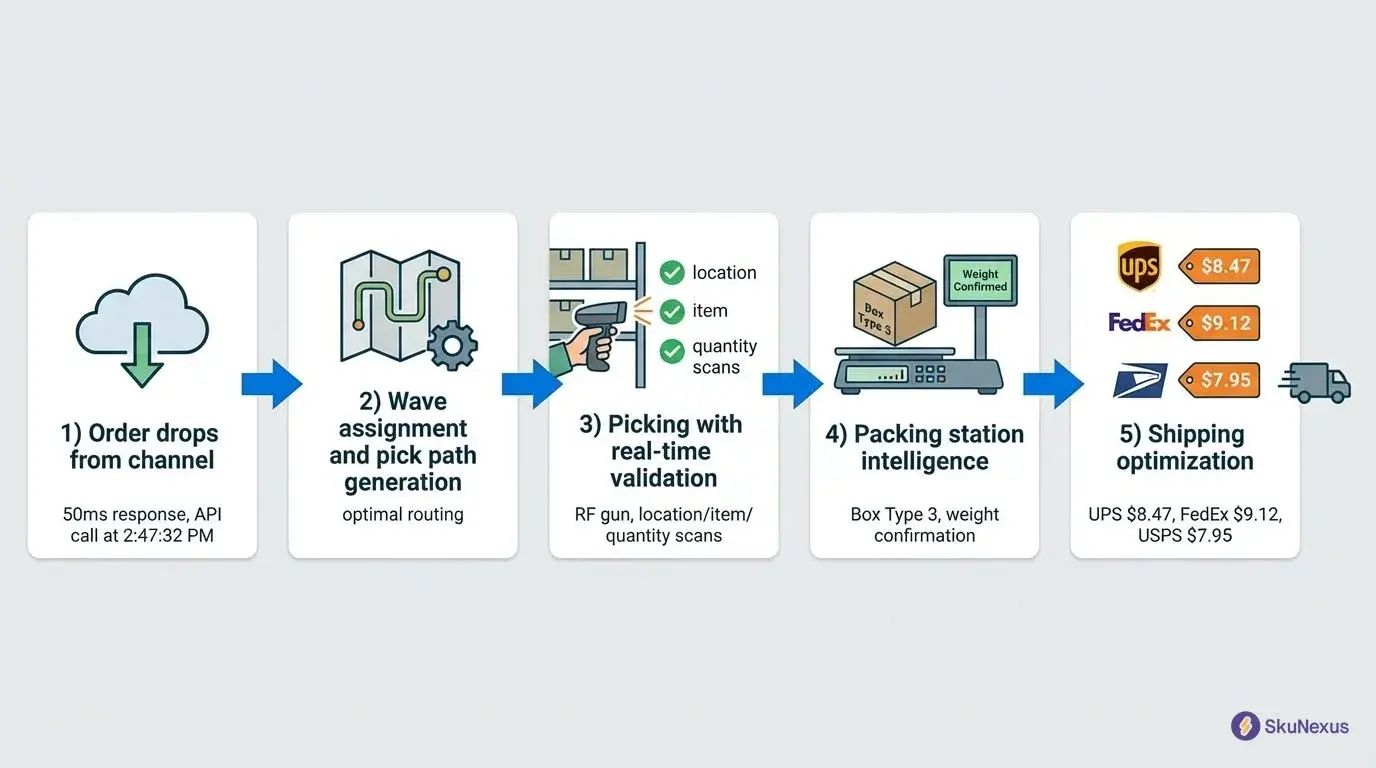
It helps to trace a single order end to end. A customer places an order on your storefront. The order lands in the ERP, which records the sale and the financial detail. The order then passes to the WMS, which decides which location should fulfill it, directs a worker to pick the items, confirms each unit by scan, and packs and ships it through the chosen carrier.
As the WMS completes each step, it sends status back: the stock is decremented, the shipment is confirmed, and tracking is recorded. The ERP uses that confirmation to close the order and trigger invoicing. At no point does anyone re-key the order or manually adjust stock, because the two systems are exchanging the data automatically. That is the shape of a healthy ERP and WMS pairing.
Implementation: how to approach it
ERP and WMS projects fail more often from poor process than from bad software. A phased, deliberate approach protects your operations:
- Assess current systems. Map what you have, what works, and where the gaps are between your ERP and warehouse operations. You cannot fix what you have not documented.
- Define clear goals. Set measurable objectives, such as inventory accuracy targets or order-processing time, so you can judge success rather than relying on impressions.
- Gather requirements from the people who use the system. Warehouse staff, finance, and customer service each see different needs, and the people on the floor often surface the details that make or break adoption.
- Evaluate solutions against those requirements, not against a generic feature list. A shorter feature list that fits your process beats a longer one that does not.
- Clean your data before you migrate it. Inaccurate item masters and stale counts will follow you into the new system and undermine trust in it from day one.
- Roll out in phases. Prove one warehouse or one workflow, learn from it, then expand. A single big-bang cutover concentrates risk at the worst possible moment.
- Train thoroughly and keep optimizing. Adoption on the floor decides whether the system delivers. Treat go-live as the start of tuning, not the finish line.
Common mistakes to avoid: skipping the requirements stage, underestimating data cleanup, over-customizing before you understand real usage, and treating go-live as the end of the project. If you are weighing options, our ERP evaluation process guide walks through the steps in more detail.
How SkuNexus fits
SkuNexus provides ERP and WMS capabilities on a customizable, API-driven platform. The core idea is that most inventory, order, and warehouse operations do not fit a rigid template, so the system is built to be configured to how your business runs rather than forcing your business to match the software. That matters most for operations that have grown their own way of working and do not want to abandon it to adopt new technology.
Customizable to your operation
Whether you manage a single warehouse or multiple locations, workflows, roles, and fulfillment logic can be tailored to your requirements. Retail, manufacturing, and logistics operations each run differently, and the platform is configured to match rather than assuming one standard process fits all of them.
Open integration
An API-driven approach connects the platform with your existing systems, from eCommerce storefronts to accounting software, so inventory levels, orders, and customer data stay synchronized. Flexible middleware bridges gaps between systems that were never designed to talk to each other, which is often the real obstacle when a business tries to connect an ERP, a WMS, and several sales channels.
End-to-end implementation and support
Engagements start with a needs assessment to understand how you actually operate, move through a phased rollout to limit disruption, include training so teams can use the system with confidence, and continue with ongoing support after go-live so the platform keeps pace as your operation changes.
Keeping the inventory record honest
Whichever systems you run, the underlying goal is one trustworthy inventory record. Inventory sits at the exact point where ERP and WMS overlap, which is why it causes the most trouble when they are out of sync. The ERP needs accurate counts for valuation and reordering. The WMS needs accurate counts to promise fulfillment and direct picking. When they disagree, every downstream decision inherits the error.
A few habits keep the record clean. Scan-driven receiving and picking capture changes as they happen rather than after the fact. Regular cycle counts catch small discrepancies before they compound. Clear ownership of the master item data prevents two systems from defining the same SKU differently. And a well-defined integration keeps the counts flowing so neither system falls behind the other. These are not glamorous, but they are what separates an operation that trusts its numbers from one that constantly reconciles them.
Customer stories
Graeter's Ice Cream automates order fulfillment
Graeter's Ice Cream is a family-owned business in Cincinnati, Ohio, known for its artisanal French Pot ice cream process. Despite producing over a quarter-million pints annually, Graeter's faced operational challenges with multi-warehouse order management and manual fulfillment.
Their inventory data was scattered, packing decisions were manual, and tracking orders across multiple warehouses was difficult. Their existing SaaS platform was inadequate for their expanding eCommerce operations. SkuNexus developed a customized ERP and WMS solution that integrated with Graeter's Magento eCommerce platform, automating packing instructions, standardizing dry ice quantities, and assigning specific roles and workflows. The implementation eliminated manual errors, improved inventory accuracy, and automated order fulfillment. Over the years, SkuNexus has continued to enhance the system with wave picking, custom shipping labels, and disaster response functionality. Graeter's now manages inventory rotations and has doubled its eCommerce sales to over 550,000 pints annually.
Carewell optimizes branded dropshipping
Carewell is an eCommerce retailer specializing in home health products, founded to better support caregivers. Rapid growth required a robust solution to manage dropshipping and improve order accuracy. Carewell faced inconsistent data flow between their BigCommerce platform and vendors, and needed to automate the dropshipping process. SkuNexus delivered a solution that improved order accuracy and integrated data flow across their systems.
FAQs about ERP and WMS systems
What is the difference between WMS and ERP software?
WMS focuses specifically on warehouse operations such as inventory tracking, picking, packing, and shipping. ERP is a comprehensive system that manages business processes across an organization, including finance, HR, and supply chain. WMS is deep on the warehouse; ERP is broad across the business.
What is an ERP system in a warehouse?
An ERP system in a warehouse integrates warehouse activity with the rest of the business, providing data on inventory levels and order status and keeping that data consistent across finance and operations. Its warehouse inventory view is primarily an accounting view rather than a bin-level operational one.
Is WMS a CRM?
No. WMS manages warehouse operations. CRM (Customer Relationship Management) manages customer interactions, sales, and service. They serve different purposes and are not interchangeable.
How do I choose the right ERP and WMS for my business?
Start from your requirements, not a feature list. Assess your current systems, define measurable goals, and gather input from warehouse, finance, and customer service. Then evaluate options against those needs, favoring systems that integrate openly and can be configured to your workflows.
How long does it take to implement ERP and WMS systems?
It depends on scope, data quality, and how many locations and workflows are involved. A phased rollout that proves one warehouse or workflow before expanding is generally lower risk than a single large cutover.
See SkuNexus in action
The clearest way to understand how ERP and WMS work together is to see it applied to your operation. Sign up for a strategy session and demo to walk through your inventory, order, and warehouse workflows.
Author
Yitzchak Lieblich is the founder and CEO of SkuNexus. With over two decades of experience in technology and logistics, he works with businesses on the operational challenges of managing inventory, orders, and warehouses across complex supply chains.
Related reading
Ready to Transform Your Operations?
See how SkuNexus gives you full control over inventory, orders, warehouse, and shipping.
Schedule a Free Demo →
Yitz Lieblich
CEO & Founder, SkuNexus
Yitz Lieblich is the Founder and CEO of SkuNexus. He has spent 19 years in eCommerce, starting in 2007 when he founded Web Solutions NYC, an eCommerce agency he still leads today. His approach to inventory, order, and warehouse management did not come from a whiteboard. It came from the floor. Across nearly two decades, Yitz has worked with merchants of every size, from mom-and-pop startups to Fortune 100 enterprises, across auto parts, food and beverage, apparel, B2B wholesale, and retail/D2C. He has walked through hundreds of warehouses, watching where operations lose time, money, and orders, with one goal: optimize the operation and make it easier for the merchant. That hands-on pattern is what led him to build SkuNexus in 2018 as a full operational platform. The idea was simple. Configurable infrastructure that bends to each merchant workflow, supporting businesses that ship anywhere from 50 to 20,000 orders a day. A custom development background runs through everything he builds. When SkuNexus writes about fulfillment, WMS, or multi-channel inventory, it comes from operations Yitz has seen and solved firsthand. First as an agency partner since 2007, and now as the architect of the platform.
Keep Reading
WooCommerce Warehouse and Inventory Management
September 16, 2026