A Shopify order management system is the layer that decides which location fills each order, whether that order splits, and what gets written back to Shopify when it ships. Shopify keeps the storefront and the checkout. The order management system owns allocation, routing, and fulfillment execution once one warehouse and one clean order pattern stop describing your operation.
Shopify handles order management well until your operation stops looking like a single warehouse shipping single-line orders. Add a second location, a dropship vendor, a B2B account with its own rules, or a shipping profile that changes by product, and the gaps start showing up as manual work.
This guide is about running order management on Shopify at mid-market volume: how Shopify's location model behaves once you ship from more than one building, what happens when an order has to split, how routing rules actually get written, and where a platform like SkuNexus takes over without displacing the storefront.
What an order management system takes over from Shopify
Four jobs define the category, whatever the vendor calls it:
- Order intake. Pull orders from Shopify and every other channel into one queue, in one format, with one status vocabulary.
- Allocation. Decide which physical units are promised to which order, and keep the available number honest everywhere it is published.
- Routing. Decide where each order ships from, whether it splits, and what happens when the first choice cannot fill it.
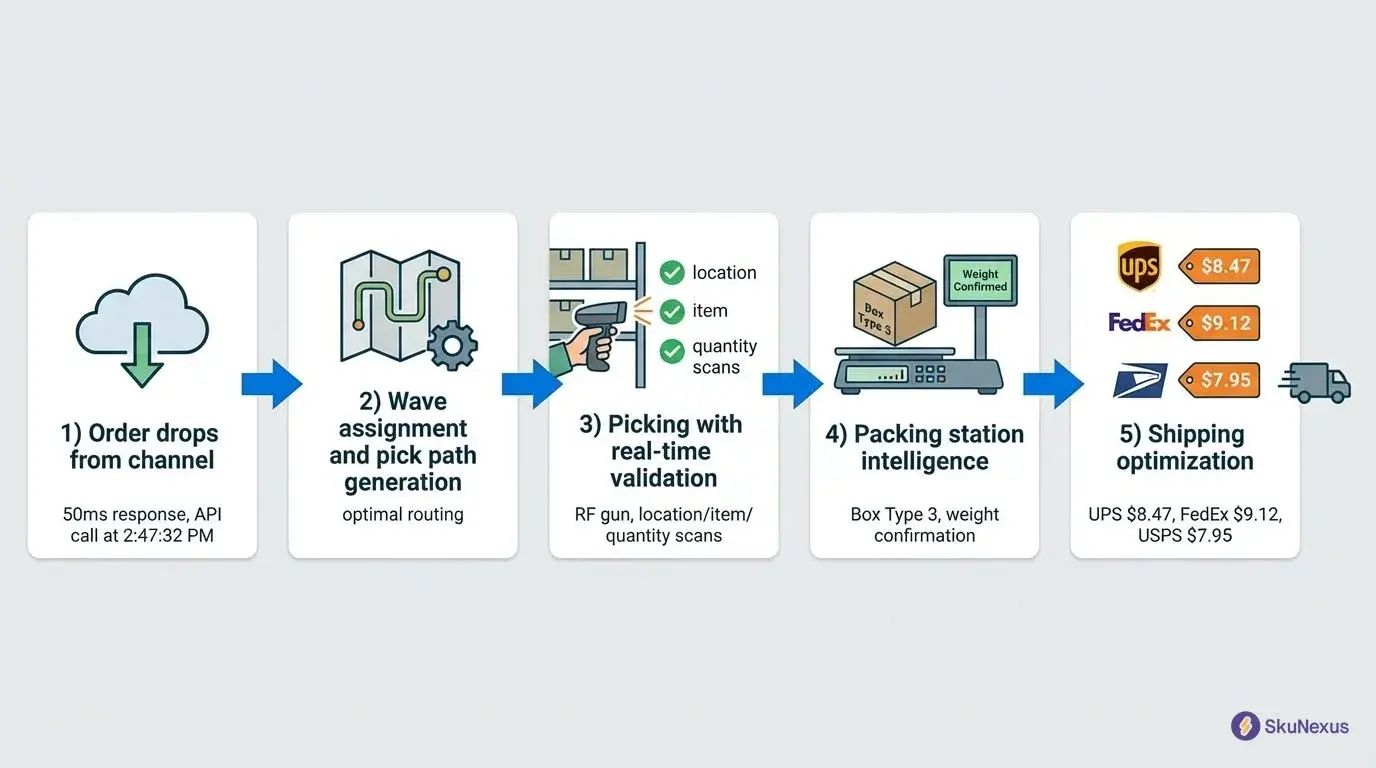
- Execution and write-back. Move the order through picking, packing, and shipping, then push the fulfillment and tracking back to Shopify so support and the customer see what the warehouse did.
Shopify does a version of all four. For how Shopify itself moves an order from placement to fulfillment handoff, and where its native tooling stops, see the Shopify order management reference. This page picks up at the operational question: what changes when the answer to "which location ships this?" stops being obvious.
Shopify locations and the warehouses you actually ship from
Shopify models stock by location, and that model is the seam every Shopify order management project runs into. A Shopify location is a place inventory is published from. A warehouse is a building with aisles, bins, pickers, and a cut-off time. The two are not always one to one.
In SkuNexus that relationship is configured explicitly, as a location mapping. Each Shopify location maps to one or more SkuNexus warehouses, and the combined on-hand stock of those warehouses is what gets reported back to that Shopify location. Mappings carry a priority so multiple mappings evaluate in a defined order, and any mapping can be switched off without being deleted. For a warehouse with no Shopify counterpart yet, a Push Warehouse to Shopify action creates the Shopify location from the warehouse address and builds the mapping with it.
Three consequences are worth knowing before you design anything:
- Without a location mapping, inventory does not push correctly. This is the most common reason a new connector looks connected while the numbers refuse to move.
- Two warehouses can report as one Shopify location. Useful when the customer-facing story is one region and the operation is two buildings.
- What counts as available is a separate decision. Location types such as staging, quality hold, and shipping can be excluded from the available number, so stock physically in the building is not automatically stock you are willing to sell.
Availability logic across locations, and how many locations Shopify itself allows, are covered in depth in multi-location inventory management on Shopify. If you are still deciding how tracking should be configured inside Shopify in the first place, start with Shopify inventory tracking.
Splitting a Shopify order across two locations
The split order is the first real exception most growing Shopify merchants hit, and it is where the storefront and the warehouse quietly start to disagree.
The decision itself happens during routing. When the engine evaluates an order it produces a decision plan naming the warehouse or warehouses, the fulfillment method (ship, pickup, or dropship), and, if the order is being split, which items go where. One order can carry several fulfillments, each moving through pick and pack on its own clock.
What the customer sees depends on one connector setting. Partial Fulfillment has two positions:
- Allow. Each fulfillment pushes to Shopify as it completes. The customer gets the first tracking number as soon as the first box leaves, then a second when the rest ships.
- Hold Until Complete. Nothing pushes until every line on the order is fulfilled. One notification, one tracking event, later.
Two settings sit next to it. Notify Customer controls whether Shopify sends its own notification when a fulfillment is pushed, and Auto Close Order controls whether the order closes on the channel once fulfillment is written back. Orders caught mid-split sit under a Partial status, so "some items shipped, some pending" is a state your team can filter and work, not a condition you discover in a support ticket.
Choose the setting to match your support posture rather than your warehouse convenience. Merchants who split often and communicate well use Allow. Merchants selling sets and bundles, where a half-shipped order reads as a mistake, use Hold Until Complete. The mechanics of order splitting are documented separately.
Routing rules when Shopify stays the storefront
Multi-warehouse routing is the reason most mid-market Shopify merchants start looking in the first place. In at least 19 of 78 buyer-eligible SkuNexus demo calls, the buyer used multi-warehouse or multi-location language in their own words. The pattern counts locations, not routing, and nothing in it tells us who raised the subject first; our own benchmark page reports this topic is raised by vendors more often than volunteered by buyers.
One of them, running three brands and three Shopify stores out of warehouses in California, Nevada, and Pennsylvania, described the goal precisely. His words, as spoken, with only his brand name replaced:
"So like in a perfect world, if you're on our, you know, [brand] website, you buy something. And if you're based in New York, and we have inventory of it in all three locations, you know, we want that order to come into Shopify, Shopify to recognize that your, you know, proximity is closest to our Pennsylvania warehouse, it decreases the inventory there, inventory ships out of Pennsylvania, so the proximity routing taking place."
His blocker was architectural rather than commercial. The warehouse system he was on allowed one account per warehouse and one Shopify store per account, so two of his three buildings could not fulfill for his main storefront at all.
Routing in SkuNexus is a rules engine rather than a fixed strategy. Each rule carries a priority, condition groups (order value, SKU, shipping method, customer type, and so on), a strategy for selecting the warehouse, and the fulfillment methods it is allowed to use. Rules evaluate in priority order, the first match wins, and evaluation stops there. That design has practical consequences:
- Rule order is the design. A broad rule sitting above a specific one will swallow the exact orders the specific rule was written for.
- Nothing routes somewhere odd by accident. If no rule matches, the order stays unrouted and appears in a review queue for a human instead of defaulting silently. A default warehouse can be set as a deliberate fallback.
- You can test a rule before you trust it. A dry run on any order shows which rule would match, which warehouse and method it would assign, and which conditions failed on the rules that did not match. It changes nothing about the order.
- Routing runs automatically or on request. The engine can evaluate every order the moment it imports, or wait for an operator to click, which is what teams that want eyes on orders during a peak week actually use.
- Batches route together. Select a day of orders and route the whole selection in one action rather than one at a time.
Start narrow. Automate the status transitions and the one clean pattern that covers most of your volume, leave the exceptions queued for a person, and write a rule for an exception only after you have watched it enough times to describe it exactly. Rules written for last year's location footprint are a common reason orders ship from the wrong building this year.
Five things that show up before anyone budgets for an OMS
Most teams do not decide to buy an order management system. They notice the same five things and eventually add them up:
- A daily spreadsheet exists that reconciles stock, routes orders, or tracks which vendor got what. Someone rebuilds it every morning.
- Two people know the exceptions. When they are out, orders sit or ship from the wrong place.
- Overselling shows up in support tickets rather than in a report, which means customers tell you about inventory drift before your own systems do.
- Peak requires temporary headcount for work that is clicking, printing, and copying rather than picking and packing.
- New sales channels get delayed because operations cannot absorb another order source without more manual work.
A fiber and yarn retailer described where the third one ends up, on a recorded demo call: "there's product everywhere... We don't know what we have. The Shopify's inventory is way off." None of this is Shopify failing at what it is for. It is the point where order orchestration has become its own job, separate from running a storefront.
What SkuNexus takes over, and what it leaves alone
SkuNexus is an order, inventory, and warehouse management platform for mid-market merchants shipping 50 to 20,000 orders a day, who have outgrown off-the-shelf apps and cannot justify an enterprise suite. On a Shopify stack, the boundary is the important part.
Shopify keeps the storefront, the checkout, customer accounts, customer notifications, and product data. Products are created in Shopify and pulled down. SkuNexus is not where you write product descriptions or manage images.
SkuNexus takes inventory as the master number, order allocation, routing, and everything that happens after the decision is made: pick, pack, ship, dropship, pickup, and returns.
That boundary is not a marketing position, it is what merchants ask for. Across the recorded SkuNexus demo corpus, Shopify comes up in 60 of 78 buyer-eligible conversations (any speaker), and in 41 of 78 the buyer raises it directly. Read across those calls, the storefront is nearly always the part staying put while the operations behind it change. That is our qualitative read of the extraction, not something the count measures, so no number is attached to it. One tactical gear retailer put the fair version of the objection on the table mid-demo: "But Shopify can do that. Why would I not just continue with Shopify?" The honest answer is that Shopify does do a version of it, with apps, and the case for a separate order management layer only exists once your routing, split, and exception logic has outgrown what an app can express.
How the data actually moves
Order ingestion is polling-primary. A background worker checks Shopify on an interval you set, five minutes by default, and webhooks are registered where Shopify supports them to catch changes made directly on the channel between polls. Webhooks supplement the poll, they do not replace it. Expect up to one poll interval between checkout and the order appearing in the order management system. Anyone promising instant, event-only intake is describing a different architecture than the one that survives an API outage.
Each entity type carries its own direction. Orders inbound, products inbound, inventory outbound, customers inbound, and fulfillment outbound are the typical defaults, and each can be set to inbound, outbound, bidirectional, or disabled. When both sides change the same field between syncs, a conflict strategy decides the winner: the channel wins, the newest timestamp wins, or the record goes to a review queue for a person.
Inbound orders are filtered before they ever reach a picker. You can import only certain financial statuses, filter by source, include or exclude by tag, auto-confirm, and skip orders that cannot be fulfilled from available stock. On one demo call an order stopped importing for exactly this reason: the paid status had been switched off in the financial status filter. Unglamorous, and much better than the alternative, which is a flagged order reaching the warehouse.
Write-back is where the customer experience lives. A fulfillment pushes with its tracking number, and the Shopify order reflects what actually happened in the warehouse. That path matters more than it sounds. One merchant's entire evaluation came down to whether voiding a shipping label and buying a replacement "overwrites the tracking number in Shopify," because his team does that regularly and doing it in two systems is how customers end up following the wrong parcel.
In the warehouse
Pick, pack, and ship run as configurable workflows per warehouse, with bulk label purchase for volume days instead of one label at a time. Bulk order actions cover hold, cancel, and routing an entire selection at once. Pickup runs as its own workflow, identical to shipping except there is no label and the order finalizes when the customer collects it. Dropship routes to the vendor as a fulfillment type on the same order. Where the returns module is enabled, returns run as an RMA lifecycle: authorize, receive, inspect with a condition grade, then disposition to restock, quarantine, or discard, with restocked units becoming available again immediately.
Carrier setup, rate shopping, and label mechanics are covered in Shopify shipping management software. The warehouse side is in Shopify WMS, and the platform beyond Shopify is in the order management guide.
Where an operation needs something a standard connector does not cover, a second Shopify store, a marketplace with its own SKU scheme, or an ERP that owns purchasing, the integration is customizable rather than fixed. That is the actual differentiator, and it is worth being blunt about why: a connector you cannot change becomes the ceiling on how your operation is allowed to grow.
Two Shopify operations, and what changed
An artisan knife company: one operator, a December cliff
Roughly 140 SKUs, about 40 of them bundles, orders arriving primarily through Shopify, and a warehouse that is a one-person job for most of the year. At 800 orders a month, picking one complete order at a time took about an hour a day. In November and December volume goes to 5,000 orders, and order-by-order picking stops being arithmetic and starts being impossible.
Two things broke before the picking did. Bundle inventory had to be reconciled by hand, because what Shopify showed as available and what existed at the component level were maintained separately. And the previous shipping tool had no native support for the French domestic carriers their customers expected, so every domestic label carried a workaround.
What changed: wave picking replaced order-by-order picking, batching multiple orders by product location. Bundles are now tracked at the component level, so Shopify availability reflects real component stock rather than a hand-maintained bundle count. GLS and Relaiscolis labels generate inside the normal shipping workflow. Peak season is handled by the same single operator.
An entertainment merchandise agency: several Shopify storefronts at once
This one runs eCommerce operations for multiple entertainment brands. Each brand has its own licensed product line and its own Shopify storefront, and fulfillment runs across consignment inventory at multiple partner facilities plus vendor dropship in several countries. A homegrown system built for a smaller portfolio could not coordinate it.
Every brand's Shopify storefront now connects to a single instance, and orders land in one queue with brand-level filtering. Routing picks the fulfillment source per order based on inventory position, proximity, and brand-specific rules, and the rules for one brand can change without touching another. Each vendor gets a portal scoped to their own inventory and orders, and nothing else. Onboarding a new brand is a configuration task: connect the Shopify store, define the vendor relationships, set the rules.
Neither operation replaced Shopify. Both kept it as the storefront and moved the decisions behind it.
Checklist: evaluating a Shopify order management system
Use this before demos, not after. Answer each item with your own numbers, then make every vendor show you the answer inside their product rather than on a slide.
- Write down your three hardest routing rules. Not the common case. The exceptions your team handles by hand today. Ask to see them configured live.
- Count your inventory sources. Every location, dropship vendor, and store that holds sellable stock. Ask how each one reports availability and how fast that number reaches Shopify.
- Name every channel that shares that stock. Shopify, marketplaces, wholesale, retail. Ask what happens when two channels sell the last unit inside the same minute.
- Bring your order mix. Standard, dropship, backorder, preorder, B2B, pickup. Ask which are native workflows and which need a workaround.
- Define peak. Your highest order day, not your average. Ask which actions can be run in bulk on that day and how many orders one packer can process in an hour.
- Decide your split policy first. Whether partial fulfillments push to Shopify as they complete or wait for the whole order is a customer experience decision, and you should walk into demos knowing your answer.
- Test the write-back. Ask exactly which fields flow back into Shopify, on what interval, and what happens to the Shopify order when fulfillment changes on the other side.
- Ask what happens when your process changes. A new location, a new channel, a changed rule. Ask whether that is a configuration change, a services engagement, or a request that joins a product roadmap.
- List the systems that must stay. ERP, accounting, carrier accounts, returns tools. Ask what the integration method is and who owns it after go-live.
- Agree on what success looks like. Pick two or three measures, such as orders per labor hour, inventory accuracy, or time from order to label, and record today's number before you start.
Item eight is the one most teams skip and most regret. Off-the-shelf systems are fine until your process changes and the system cannot follow.
What implementation involves
Rollout starts with the connector: install the Shopify app or connect a custom app, set the sync direction for each entity type, map every Shopify location to the warehouses behind it, and map your carriers to the codes the channel expects. Then the operation gets configured: user roles, notifications, warehouse workflows, and the routing rules you documented during evaluation.
Data migration follows. Inventory levels, order history, and customer records move across, with verification that they arrived intact before cutover. Most teams run both systems briefly instead of switching everything on one day. Training is role-based, because a picker and an operations manager use completely different parts of the platform. Plan for it as an operations project with software in it, not a software project that operations attends.
Frequently asked questions
Does Shopify have an order management system?
Yes. Shopify has built-in order management, and for a single-location merchant with a straightforward order pattern it is usually enough. It gets thin when you need cross-location routing logic, split fulfillment policy, and exception handling that you can describe as rules rather than as habits.
Can a Shopify order ship from two different warehouses?
Yes, when something upstream decides the split. A routing decision plan can assign different line items to different warehouses, creating multiple fulfillments on one order. What the customer sees is controlled by a partial fulfillment setting: either each fulfillment pushes to Shopify with its own tracking as it completes, or nothing pushes until the whole order is done.
How fast do orders reach an order management system from Shopify?
With SkuNexus, order ingestion polls Shopify on a configurable interval, five minutes by default, with webhooks catching changes made on the channel between polls. Expect up to one poll interval of latency between checkout and the order landing in the queue. That number is a setting, not a fixed property, so a merchant who wants tighter intake can shorten it.
Does an order management system replace Shopify?
No. Shopify stays the storefront, the checkout, and the product master. The order management system takes inventory, allocation, routing, and warehouse execution, then writes fulfillment and tracking back. Blurring that boundary is what produces the double-writes and status conflicts that make integrations feel unreliable.
Does Shopify have a purchase order system?
Shopify does not include purchase order management, so merchants usually add a tool for it. SkuNexus covers purchase orders alongside vendor management and transfers between locations, which keeps supplier orders in the same system that holds the stock they replenish.
Can SkuNexus handle bulk order processing for Shopify stores?
Yes. Orders can be held, cancelled, or routed in bulk from the order list, labels can be purchased in bulk for packed fulfillments, and wave picking batches multiple orders into a single pass through the warehouse instead of one walk per order. That is the difference between a manageable peak week and a temporary-headcount peak week.
See it against your own order flow
The useful version of a demo is not a feature tour. Bring your three hardest routing rules, your order mix, and your actual peak day, and ask to see them handled in the product.
Book a SkuNexus demo and we will walk your Shopify order flow end to end, from intake through routing, fulfillment, and write-back.
Ready to Transform Your Operations?
See how SkuNexus gives you full control over inventory, orders, warehouse, and shipping.
Schedule a Free Demo →
Yitz Lieblich
CEO & Founder, SkuNexus
Yitz Lieblich is the Founder and CEO of SkuNexus. He has spent 19 years in eCommerce, starting in 2007 when he founded Web Solutions NYC, an eCommerce agency he still leads today. His approach to inventory, order, and warehouse management did not come from a whiteboard. It came from the floor. Across nearly two decades, Yitz has worked with merchants of every size, from mom-and-pop startups to Fortune 100 enterprises, across auto parts, food and beverage, apparel, B2B wholesale, and retail/D2C. He has walked through hundreds of warehouses, watching where operations lose time, money, and orders, with one goal: optimize the operation and make it easier for the merchant. That hands-on pattern is what led him to build SkuNexus in 2018 as a full operational platform. The idea was simple. Configurable infrastructure that bends to each merchant workflow, supporting businesses that ship anywhere from 50 to 20,000 orders a day. A custom development background runs through everything he builds. When SkuNexus writes about fulfillment, WMS, or multi-channel inventory, it comes from operations Yitz has seen and solved firsthand. First as an agency partner since 2007, and now as the architect of the platform.
Keep Reading
WooCommerce Warehouse and Inventory Management
September 16, 2026